I am running Zorin 17.3 on a Lenovo laptop. When I try to log into Think or Swim, it asks me for my password. It won't accept the password I use to log into Zorin. I get the following statement "The password you use to log into your computer no longer matches that of your login keyring."
Any one know how to deal with this issue. I did not install Zorin on the computer so I don't know what password may have been used.
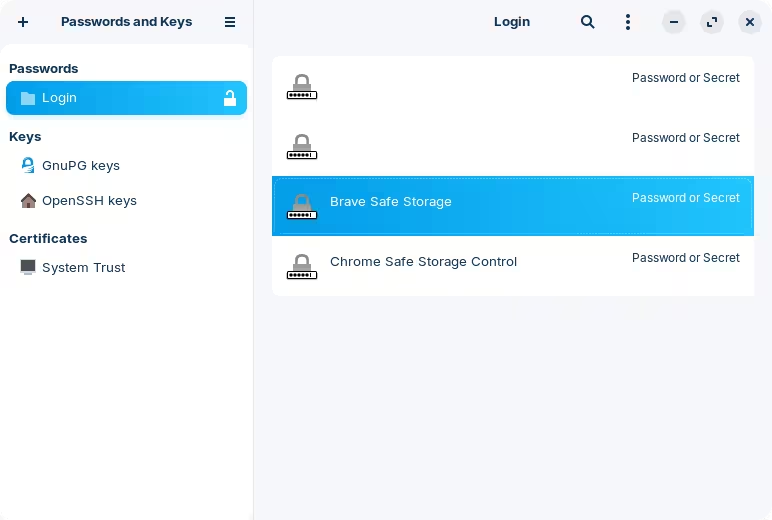
Try launching "Passwords and Keys" from the application menu. There, you will find a section for passwords that you can unlock with your own login password.
There you should have an entry for your browser. If you're using Brave, which is the default, it should be there:
Double click on that and you should be able to change the password from there. I'd recommend deleting this entry entirely and then restarting the computer to make sure changes are applied normally. The next time you launch Brave, it will ask for a password to "unlock the keyring".
On some computers it may also be tab. Try to press the key repeatedly during boot.
You can also setup grub menu so that it is always displayed at boot (I'd recommend this because you have easier access to recovery) by editing /etc/default/grub and changing the menu style
from GRUB_TIMEOUT_STYLE=hidden to GRUB_TIMEOUT_STYLE=menu
and set a timeout of 5 or 10 (seconds).
As per this thread below, you can delete the current keyring which would prompt you to create a new one with whatever password you like (I recommend using the same as the login to make it simpler).
Do not just delete those files, make a copy of them first. This is shown in the accepted answer in this thread, but feel free to ask here if you have any questions on how to do this.
Note that this will delete all passwords stored in the keyring, so I would caution you to leave this as a last resort option just to avoid any potential problems that this may cause (which I don't know if it will). It would be best to reach out to the person that used this computer before you, and ask for the password so you can change it.
There are several security protocols in place, some newer than others.
I note zenzen's warning here:
This is some pretty hard luck. I have experienced similar, where I did not use something for quite some time and when I finally did, I found it was flawed, but well past the return-by date.
The supplier went out of business during the time when you bought the computer and started using it enough to learn that there was an issue with the password.
From such things, we learn our hard lessons in life.
If this was me... I would not delete the keyrings. There is too much potential with that for it to go sideways; and a lack of certainty as to how much success you can glean from it.
Instead, your best action is to backup all of your files, create a Zorin OS LiveUSB and reinstall Zorin OS, choosing a password that you will remember.
 Note that this will delete all passwords stored in the keyring, so I would caution you to leave this as a last resort option just to avoid any potential problems that this may cause (which I don't know if it will). It would be best to reach out to the person that used this computer before you, and ask for the password so you can change it.