Hi all,
I'm looking to permanently switch away from Windows but Steam on Zorin and Zorin in general are very slow in comparison to my Windows partition. I'm not very tech savvy but usually god at following directions. Any help would be greatly apreciated!
specs:
Hardware Information:
Model: ASUSTeK COMPUTER INC. TUF Gaming FX505GT_FX505GT
If not already done: Disabled Secure Boot and Fast Boot in BIOS and Fast start-Up in Windows
Bevause You use a Nvidia Graphics Card and Your System is running in Wayland, switching to Xorg is worth a Test. To do that, go to the Login Screen. Click there on Your Profile so that the Password Field appears. When it is appeared, You should see in the bottom right Corner a Gear Icon. Click on it and choose the Option ''Zorin Desktop on Xorg'' and then log in.
Is Steam installed as Flatpak or .deb Package?
What Nvidia Driver do You use?
Also You could use the Command nvidia-smi to check if the Nvidia Card is detected and sudo prime-select nvidia to choose the Nvidia Card as primary Output Device
You could also check Your BIOS to disable the iGPU, too
What Proton Version You use could be a Factor, too depending on what Game You use
You could try it with a newer Kernel to have better Hardware Support
If you get an error because inxi is not installed, you can install it with
sudo apt install inxi
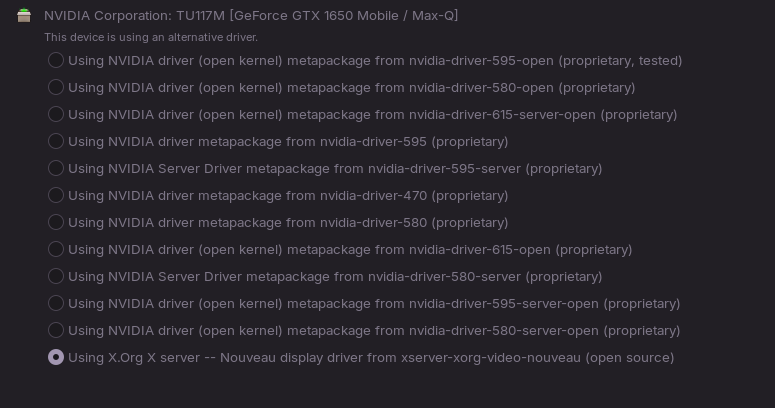
Did you take a look at the app Software & Updates > Additional drivers and tried to select a proprietary nvidia driver there? At the moment, you are running the open source driver Nouveau which is not very performant.
That might be related. Can You make a Picture of the ''Additional Drivers'' Tab in Software & Updates and post it here please?
That is Your iGPU:
That is integrated in Your CPU. Your BIOS should offer an Option to disable it. Unfortunately, there isn't a unified Way to do that. So, You have to look a bit. From what I know, You have mostly directly the Option to disable the internal Graphics or iGPU or You can choose the primary Output Devoce or have Options for Graphics where You can choose PCIe. So, You have to search a bit.
OK Milatary Grade laptop...nice shows the internal drive is an ssd. thats the drive I would use for the Zorin install as its way faster then the Hdd. Use the HDD for extra storage as zorin uses very little space for install. I use a 500Gb ssd and its more then enough size for all the stuff you might install. i use an internal drive for all my steam games to save space most likely the vid card selection will be in the monitor section of the bios if its using same bios as my asus b550-f gaming board.
is there any way of doing this while zorin is already installed? or would I have to uninstall and reinstall, I originally just let zorin chose the partitioning on its own
what i did at install is made sure the drive i wanted to install to was only drive in computer after install made sure everything worked then added the other drive in and set zorin drive to 1st boot position in bios.....
with the ssd as the only drive choose use entire drive and it will setup the partitions on that drive for zorin, so a reinstall will be nessary and the ssd drive will be way faster vs the HDD
Okay, You don't have a Nvidia Driver installed. The chosen one at the bottom is the defaut Nouveau Driver.
So, You could install one of the Nvidia Drivers. and after that, You could use a Command to use Your Nvidia Card as the primary Graphics Output. Then, You wouldn't have to search through Your BIOS.
I looked at Nvidia and Your Card should support the 595 Driver. To install it, type in the Terminal:
This has helped a lot! Im not quite at the level of my windows speed yet, but the progress has been huge! also turns out that zorin IS installed on the ssd.