Been using Zorin and its my first Linux OS to revert to after i refused to use and move to windows 11. I have a Dell 5490 16gb i5 cpu. basic office laptop for late 2010s maybe into the 2020s.
i used windows 10 until i couldnt- i refused to use the version that will last into the 2030s. and just moved to a beginner linux OS. i made the full transition.
but i have a consistent issue-- my mic never works, and when it does, im told im muffled and almost unintelligible. i made a fix a bit ago until an update, now im back at square one. im new to the terminal but i know the basic of basics. idfk what command i did in the past, but here are some links i THINK helped me in solving my issue.
reference- no, i never had issues with my mic before this, ever. and once i got it working, a zorin update hit and it seems i have to do it all over again. now i dont even remember what got it working or what terminal commands i did. ugggghhhhhh...
LINKS:
there could be other links but idk! i forgot to note what helped in this thread that got my mic working.
the only thing i can remember is trying to install the audio drive for my specific laptop model
i dont know! and im tired of telling my friends "oh i cant get my mic to work" to "it works lets vc" to immediate "oh nvm it doesnt work again" e_e
Does Your System run in Wayland or X11? You can check that with the Command echo $XDG_SESSION_TYPE via Terminal.
Did You tried Pulse Audio Volume Control? It is a Tool for set up Audi Input and Output. You can install it with sudo apt install pavucontrol via Terminal. When installed, check the Configuration and Input Tab for Audio Profiles and Options. You might need to play a bit with the Settings.
Have you tried booting a previous linux kernel?
To do that:
From grub menu screen, select "Additional Options for Zorin".
then select previous linux kernel generic version than the latest one.
Boot that and see if that gets you back to where you were before the "update".
those latitude mics are usually on sof / intel hda and get weird after pulse/pipewire profile flips.
probably worth checking pactl list short sources and in pavucontrol (Input Devices) that the internal mic isnt stuck on a monitor or muted channel. also try alsamixer -c0, hit F4 for capture, make sure mic/capture is unmuted and not at zero.
if it only got muffled after a kernel bump, the older kernel tip above is the right next step. for me that fixed a 5490-ish mic once when sof firmware was the mess.
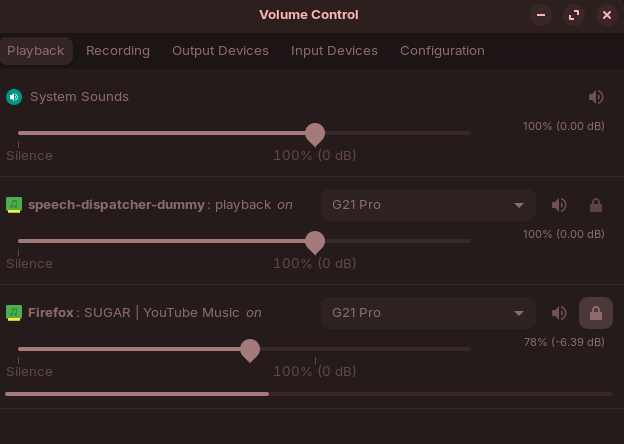
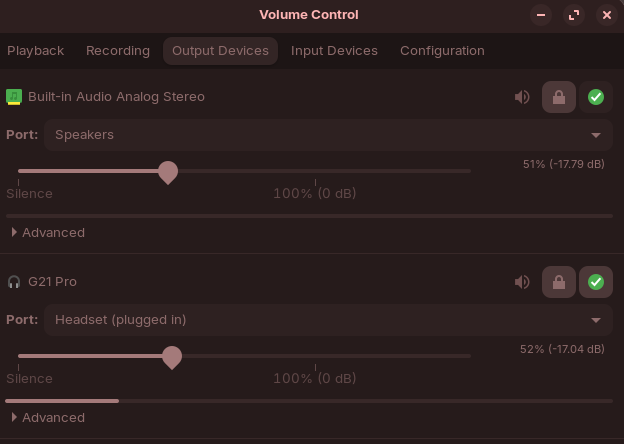
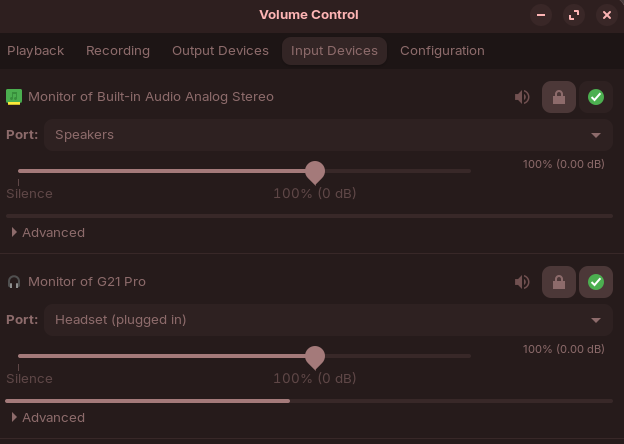
its not just muffled, but it also doesnt work at all. at the time it DOES work, its muffled (usually under various inputs listed as "default") and its usually 75% of the time just not working. i looked into pavucontrol and saw much of nothing, (image.)
as for alasmixer -c0, ive already tried that and got this:
xx@xx:~$ alasmixer -c0
Command 'alasmixer' not found, did you mean:
  command 'alsamixer' from deb alsa-utils (1.2.9-1ubuntu1)
Try: sudo apt install <deb name>
yes, ive tried pavu. no matter the research and reddit threads, i didnt seem to find a solution until the moment i found a workaround on this help forum.
to add- "g21" is just the name of the earbuds im using as of now. theyre not my usual. but even without bluetooth earbuds, i still have the same issues without bluetooth devices!
yeah looking at that pactl list, you only have .monitor sources. those are loopbacks of the outputs, not a real mic capture device. so pipewire is not seeing the internal mic as an input right now.
try:
pactl list short cards
then look for a profile that mentions Input (often analog-stereo or HiFi). switch with something like:
pactl set-card-profile <card#> analog-stereo
also the command is alsamixer not alasmixer. after the profile flip, open alsamixer -c0, hit F4 for Capture, unmute Mic/Capture.
if pactl list short cards shows no Input profile at all, it is usually sof/firmware or the card stuck on a headset-only profile. older kernel from grub Additional Options is still the cleanest rollback while you dig. paste the cards list if you want a narrower guess.