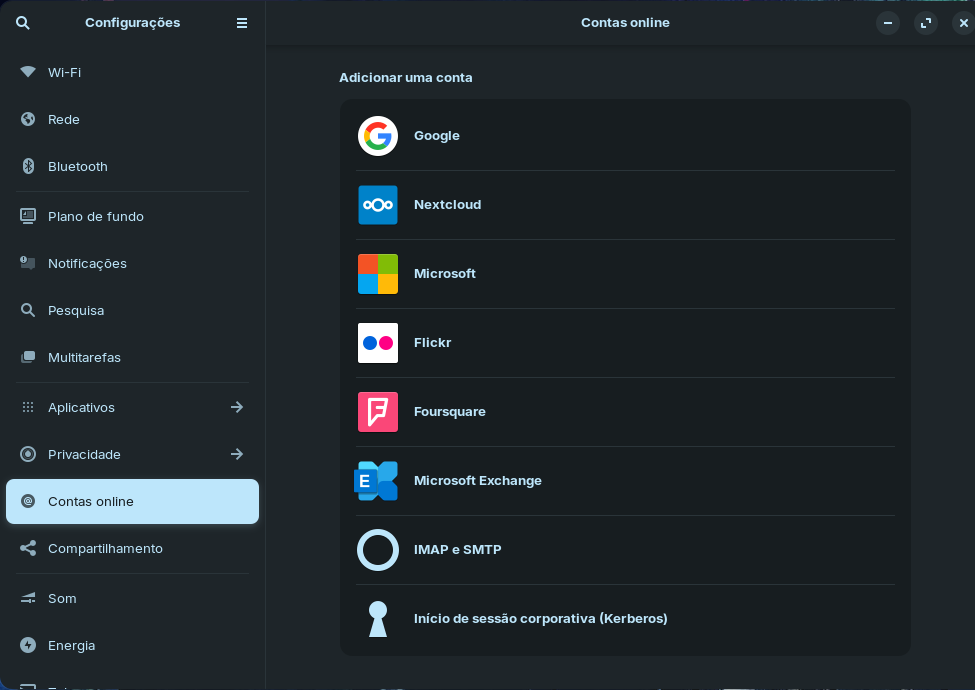
I'm currently using Zorin OS 17 and I've noticed that the "Online Accounts" section doesn't offer an option to add Microsoft 365. As a result, I can't directly integrate OneDrive through the system settings.
I've observed that both Linux Mint and Ubuntu (which Zorin OS is based on) have this option readily available in their respective Online Accounts settings, without needing any third-party software.
Currently, I'm using rclone to manage my OneDrive, which works relatively well, but it would be much more convenient to have direct integration within the system.
Could anyone please advise on how to enable Microsoft 365 integration in the Online Accounts? Or, is this feature simply not available in Zorin OS 17 (perhaps due to its Ubuntu 22 base) and I'll need to wait for Zorin OS 18 to have this functionality?
Any insights or workarounds would be greatly appreciated!
Changed the thread to general help. I believe as of Gnome version 47 they added 365 integration as an option to their Online Accounts option. As Zorin is on gnome 43, we don't have access to that yet, but the newer Ubuntu and Mint releases would (being based on 24.04 or higher, vs Zorin which is on 22.04). Hopefully with the release of Zorin 18 that functionality should be brought in as well.
I experienced this when I got Zorin as well. As @applecheeks37 has said, it's not available because of the version of Gnome that Zorin 17 is based on.
OneDrive Client for Linux has served me well. I initially missed the default inbuilt functionalilty, but the Client actually serves my specific needs better.