I don't think so because it's a bundle, When I will have some times I will take a look to make a Miller Columns like I did for dual panel, but no promises 
2 Likes
4 Likes
Wow, thank you very much, your extension works! You're really an artist! I'd love to be able to do something like that, too and creating my own extensions!
Sometimes (in the live session), when I have very long paths as e.g. /usr/share/themes/ZorinOrange-Dark/gnome-shell/assets/calendar-event.svg, I run into a problem where the last column is loaded but isn't immediately visible in the window because the window is too small, and I have to scroll to see it.
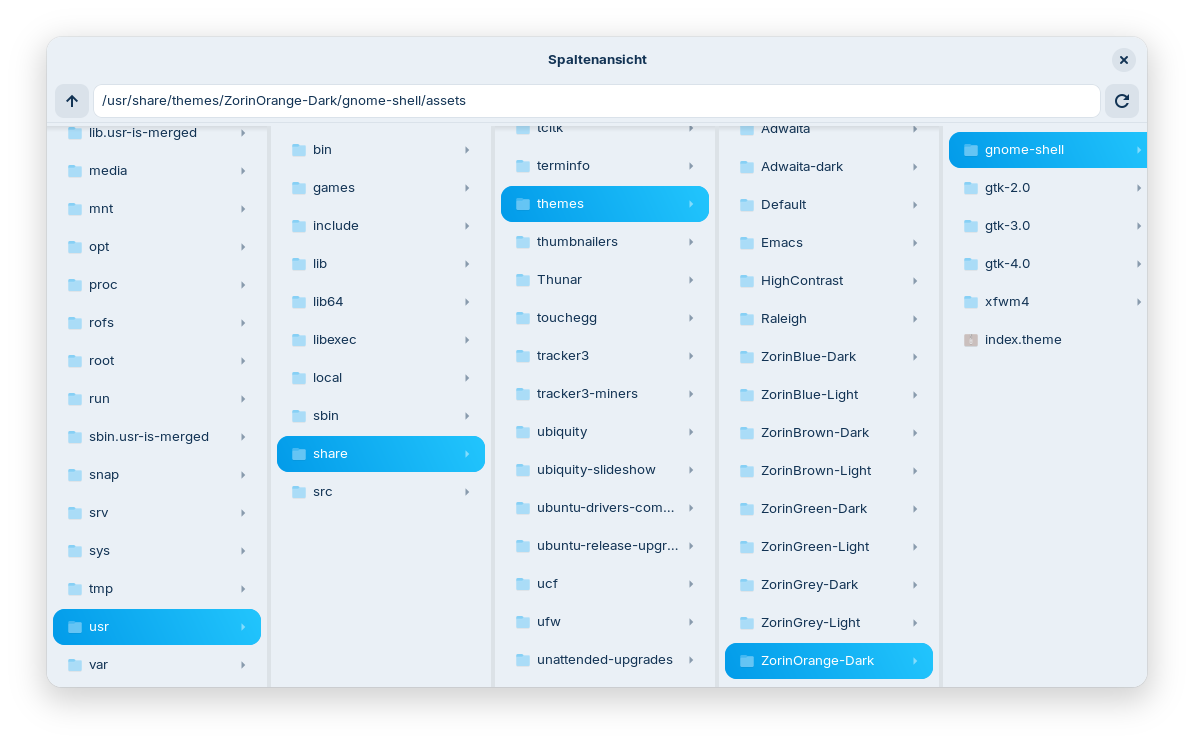
2 Likes
It doesn't jump forward? I have tested it, too and for me the next Collum comes automatically in the View. So, when I click on ''gnome-shell'', it directly opens the Folder in the next Column and I can see it + I get a Scrollbar at the Bottom because the first Column in the Row disappears behind that.
Yes, sometimes not. But good to know that it always works for you.
Your Live Session runs in X11, right?
Yes, I'm running at X11 at the moment. I'll test it on Wayland.
1 Like
Hm, it is the same there. Sometimes it works, sometimes not.
In my live session, the extension is slower in loading than the other nautilus "my computer" extension.
Maybe related to the Live Session Mode.
I see what you mean I'im going to take a look at this
1 Like
I'd really like to know why loading with the extension is much slower than in the normal Nautilus view (I've only tested it in the live session on Zorin 18 so far because on Zorin 17 the extension is not supported and I had no access to my other computer), e.g. when calling icons of /usr/share/icons. In the normal view I see the icons nearly at once, in the column view a while nothing happens, not a single icon loaded, then they appear. As said, with the other extension is it faster, but also not as fast as with the normal view in nautilus.
Does the extension or such a column view need more ressources/RAM?
I wonder how long it will be before Gnome makes minor adjustments to Gnome 50+ that will precent it from working?
I tested the installation of the "My computer" nautilus extension in a Zorin 17 live session with the installation script. The installation was shown as successful, but it didn't work at all. The "computer" widget and columns were not shown. That was the terminal output when running nautilus:
zorin@zorin:~$ nautilus
Traceback (most recent call last):
File "/home/zorin/.local/share/nautilus-python/extensions/nautilus-my-computer.py", line 14, in
from nautilus_my_computer.main import MyComputerExtension # noqa: E402,F401
File "/home/zorin/.local/share/nautilus-python/extensions/nautilus_my_computer/main.py", line 19, in
gi.require_version("Gdk", "4.0")
File "/usr/lib/python3/dist-packages/gi/init.py", line 117, in require_version
raise ValueError('Namespace %s is already loaded with version %s' %
ValueError: Namespace Gdk is already loaded with version 3.0
Traceback (most recent call last):
File "/usr/share/nautilus-python/extensions/nautilus-hide.py", line 20, in
from gettext import ngettext, locale, bindtextdomain, textdomain
ImportError: cannot import name 'locale' from 'gettext' (/usr/lib/python3.10/gettext.py)
nautilus-wipe-Message: 05:28:30.222: Initializing
Nautilus-Share-Message: 05:28:30.909: Called "net usershare info" but it failed: Failed to execute child process »net« (No such file or directory)
It sounds a bit as if the extension doesn't work because nautilus in Zorin 17 is based on gtk 3.0 and not gtk 4.0.
This is not about ressources, like I said it bypass nautilus API and nautilus doesn't like that, so some process try to "work" with a "tumor", so it become slow and sometimes nautilus crash.
Gnome Nautilus will stay like this 50+ or not, because the API is not open and what this extension do is "forbidden".
You can make many extensions you want but you can't touch the structure.
I was referring to your Nautilus extension. I thought, you have used another method so that it doesn't crash?
The columns in "my computer" were loaded faster than in your extension in my test.
No it's not because of Zorin based on GTK3, it's because of Gnome nautilus GDK (gi.require_version("Gdk", "4.0")
1 Like
I don't touch the structure but for sure it's slowest, and more slowest in live session, I tried to optimize but it's just an python extension witch call nautilus to work...
But I made that in few hours, it need more optimization
1 Like
Oops, I thought it is a typo. I had never heard of gdk before.
1 Like