00:00.0 Host bridge: Intel Corporation Xeon E3-1200 v2/3rd Gen Core processor DRAM Controller (rev 09)
00:02.0 VGA compatible controller: Intel Corporation IvyBridge GT2 [HD Graphics 4000] (rev 09)
00:14.0 USB controller: Intel Corporation 7 Series/C210 Series Chipset Family USB xHCI Host Controller (rev 04)
00:1a.0 USB controller: Intel Corporation 7 Series/C216 Chipset Family USB Enhanced Host Controller #2 (rev 04)
00:1b.0 Audio device: Intel Corporation 7 Series/C216 Chipset Family High Definition Audio Controller (rev 04)
00:1c.0 PCI bridge: Intel Corporation 7 Series/C216 Chipset Family PCI Express Root Port 1 (rev c4)
00:1c.5 PCI bridge: Intel Corporation 7 Series/C210 Series Chipset Family PCI Express Root Port 6 (rev c4)
00:1d.0 USB controller: Intel Corporation 7 Series/C216 Chipset Family USB Enhanced Host Controller #1 (rev 04)
00:1e.0 PCI bridge: Intel Corporation 82801 PCI Bridge (rev a4)
00:1f.0 ISA bridge: Intel Corporation B75 Express Chipset LPC Controller (rev 04)
00:1f.2 SATA controller: Intel Corporation 7 Series/C210 Series Chipset Family 6-port SATA Controller [AHCI mode] (rev 04)
00:1f.3 SMBus: Intel Corporation 7 Series/C216 Chipset Family SMBus Controller (rev 04)
02:00.0 Ethernet controller: Realtek Semiconductor Co., Ltd. RTL8111/8168/8211/8411 PCI Express Gigabit Ethernet Controller (rev 06)
hey idk if this is normal but also my fans are at max speed 24/7 this also happend on windows. is that normal?
Have you been monitoring your temperatures? Overheating can absolutely cause these symptoms.
sudo apt install psensor lm-sensors
i opened it now what?
What are your temperatures?
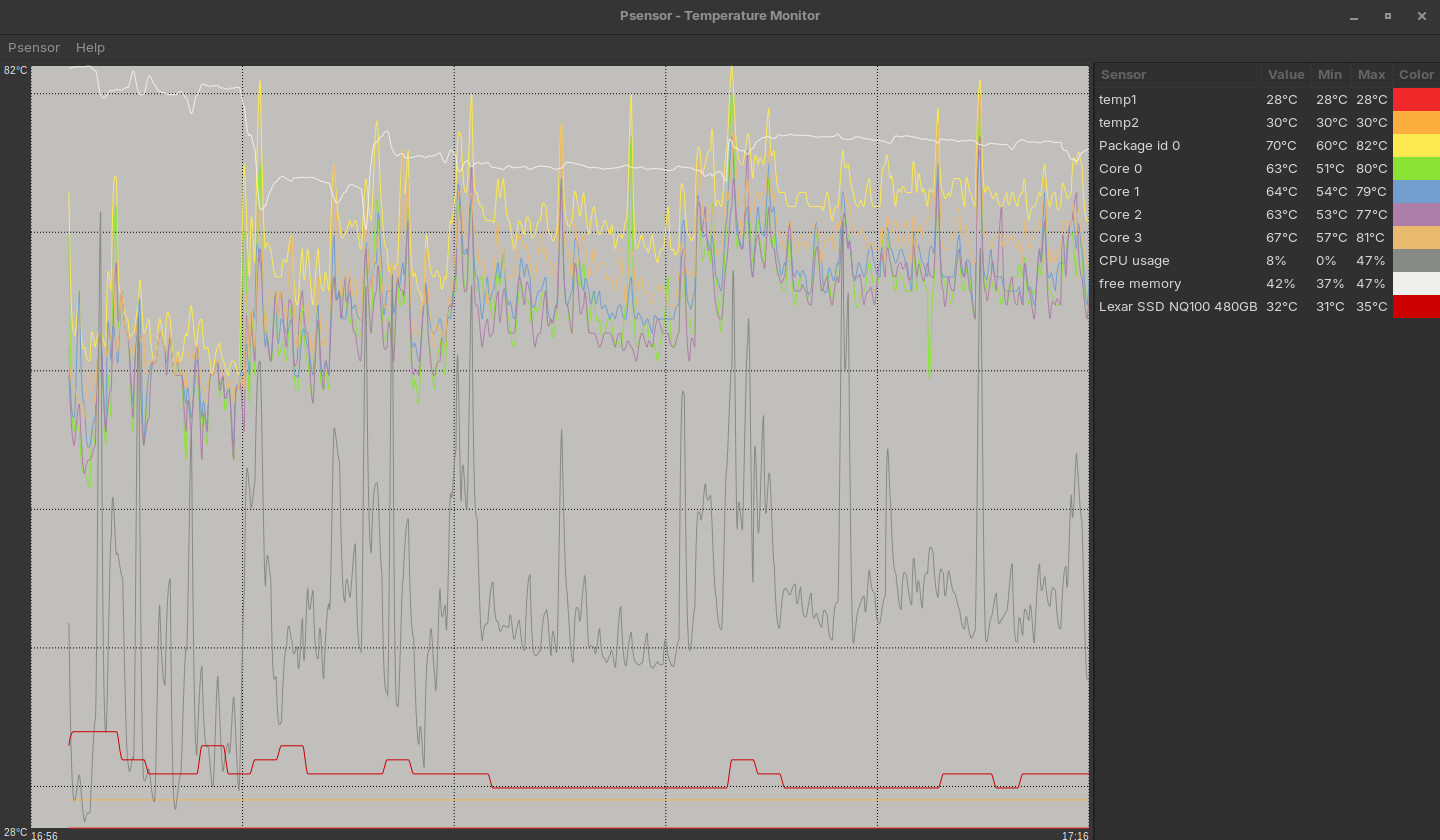
is it just me or is it going up? im not even playing any games
Yes, I am seeing temps over 80 degrees C, which I would never allow on my machine.
First step is; clean it - get compressed air or other safe cleaning materials and clear out dust from fans and vents that are trapping and insulating heat. Even small bits of dust can do a lot.
Be warned: Do not use a Powered Vaccuum cleaner - they can hyperspin fans that will generate a charge and can burn out a motherboard.
They also can generate Static electricity that can fry a motherboard.
ah ok, thanks!
i just cleaned my pc but idk if it fixed it. ima check hold on
I agree  % that package temp concerns me greatly! If the computer is not being overclocked to 4GHZ or more, it should not get that hot, running normal clock speeds, doing anything.
Agreed again! Whether using compressed air, or a vacuum, the trick to fans, is to hold the fan from turning with your finger, then shoot air or vacuum it, as long as the fan don't turn, your safe.
Which is the reason why I want to get this gem eventually...

Its expensive, but its design to not send charge static into sensitive electronics. It comes with a wrist strap, which grounds you to machine, which grounds through the building electrical structure. It also uses filter bags for collection, which insures, you don't push dust around the room in process of collection. Apparently, it can be configured as a blower as well, by hooking the hose up, on the other side, but I have no use for that.

Hello!
jaxon reed here,
Since it’s your first day on Linux, no worries this kind of full system restart usually points to a low level issue, not Minecraft itself. Heavy modpacks can crash Linux if the wrong GPU drivers are installed, especially if you’re using the default open source ones. Installing the proper proprietary drivers for your GPU (NVIDIA/AMD) is the first thing to do. Also keep an eye on RAM usage, because big modpacks can push Linux into an out of memory crash, which causes an instant reboot. Once you have the correct drivers, proper Java version, and safe memory allocation, this problem usually stops.
In fairness, newer AMDs are designed with intended max safe temps at 95C, and Intels run even hotter. The spec sheet I see for the Xeon E3-1200 has a max of 100C. (https://www.intel.com/content/dam/www/public/us/en/documents/datasheets/xeon-e3-1200v6-vol-1-datasheet.pdf, page 92)
In fairness, every machine I use and have used have spec sheets that claim that, but once over 85degrees C, they start sputtering, stalling, crashing or other.
My experience tells me that those spec sheets are half CYA and half marketing.
Not to mention the amount of melted plastic cases...
I've run stable at 95, though obviously that's a load test, not something I'd stay at (and it does start to throttle).
...I kind of feel like "plastic cases" may say something about the build quality as a whole. I don't think I've seen one outside of mini-PCs using low wattage processors.
I'm a strong believer in metal cases, both Desktop & Notebook, as metal is a natural heat dissipator. Plastic is a natural insulator, so thats a bad choice IMHO.
My notebook will only hit 80C momentarily, while overclocking to 4GHZ+ while heavy gaming, it won't sustain that load forever. This is also why I chose a machine with dual blower fan coolers with copper heat pipe exchangers, and why I also use a dual blower fan Afmat cooler.


