Hello,
I have the following problem:
Zorin OS only recognizes my monitor (Acer) one to fifteen minutes after startup. Until then, the screen remains black.
I use an HDMI connection and have found out that this could be related to INTEL software in particular. What settings do I need to change to solve the problem, or would it be better to use a DP connection?
Help in German would be nice :-)) Considering that I am not an IT professional.
Mein System:
Zorin OS 17.3
INTEL COE i7-8650U CPU 1.90GHz,1 physical processor,4 cores,8 threads.
Motherboard:J85489-207 / NUC7I7DNB (Intel Corporation)
Thank you very much for your help and your time.
TruthMelody
Willkommen im Forum!
Sie können es ja mal über den DP Anschluss versuchen und sehen ob das besser funktioniert. Wenn ja und es kein Problem gibt es über DP laufen zu lassen, können Sie es ja so benutzen.
Ein anderer Ansatz wäre: Läuft das System in Wayland oder X11? Sie können das mit dem Terminalbefehl echo $XDG_SESSION_TYPE überprüfen. Sollte das System in Wayland laufen, würde ich vorschlagen zu X11/Xorg zu wechseln. Um das zu tun, gehen Sie zum Login Screen. Clicken Sie dort auf Ihr Profil, sodass das Passwortfeld angezeigt wird. Wenn es angezeigt wird, sollten Sie ein Zahnrad-Icon in der unteren rechten Ecken sehen. Clicken Sie drauf und wählen sie die Option ''Zorin Desktop on Xorg'' and dann loggen Sie sich ein.
EDIT: Noch etwas vergessen: Sind Secure Boot und Fast Boot im BIOS abgeschalten?
Translation:
Welcome to the forum!
You could try using the DP connection and see if that works better. If so, and there are no problems running it via DP, you can use it that way.
Another approach would be: Is the system running in Wayland or X11? You can check this with the terminal command echo $XDG_SESSION_TYPE. If the system is running in Wayland, I would suggest switching to X11/Xorg. To do this, go to the login screen. Click on your profile there so that the password field is displayed. When it is displayed, you should see a gear icon in the lower right corner. Click on it and select the option “Zorin Desktop on Xorg,” then log in.
EDIT: Forgot something: Are Secure Boot and Fast Boot in BIOS disabled?
Hello, thank you for your help.
Do Secure and Fast Boot have to be turned off?
If so, then I need to find out. I forgot their settings.
What would be necessary in the BIOS settings after changing to X11/Xorg?
It avoids Issues. So, it would be good to have it disabled.
Maybe look in BIOS under Options like Boot or Security or something like that. It isn't standarized where You can find it.
Switching to Xorg, You don't make in the BIOS. That, You make on the Zorin Login Screen like described above.
If You not find Secure Boot and Fast Boot in BIOS, You could try it with switching to Xorg first. Maybe this is enough. If switching shouldn't be enough, You could take a Look in the BIOS then. You could post Pictures of Your BIOS here. So, we can see it and maybe can help to find the Options.
Hi,switching to X11/Xorg doesnt change anything.I will check the BIOS tomorrow.I'm going to buy a DP cable tomorrow. Maybe that will solve my problem.If not, I would be grateful for further assistance.
Thanks a lot
1 Like
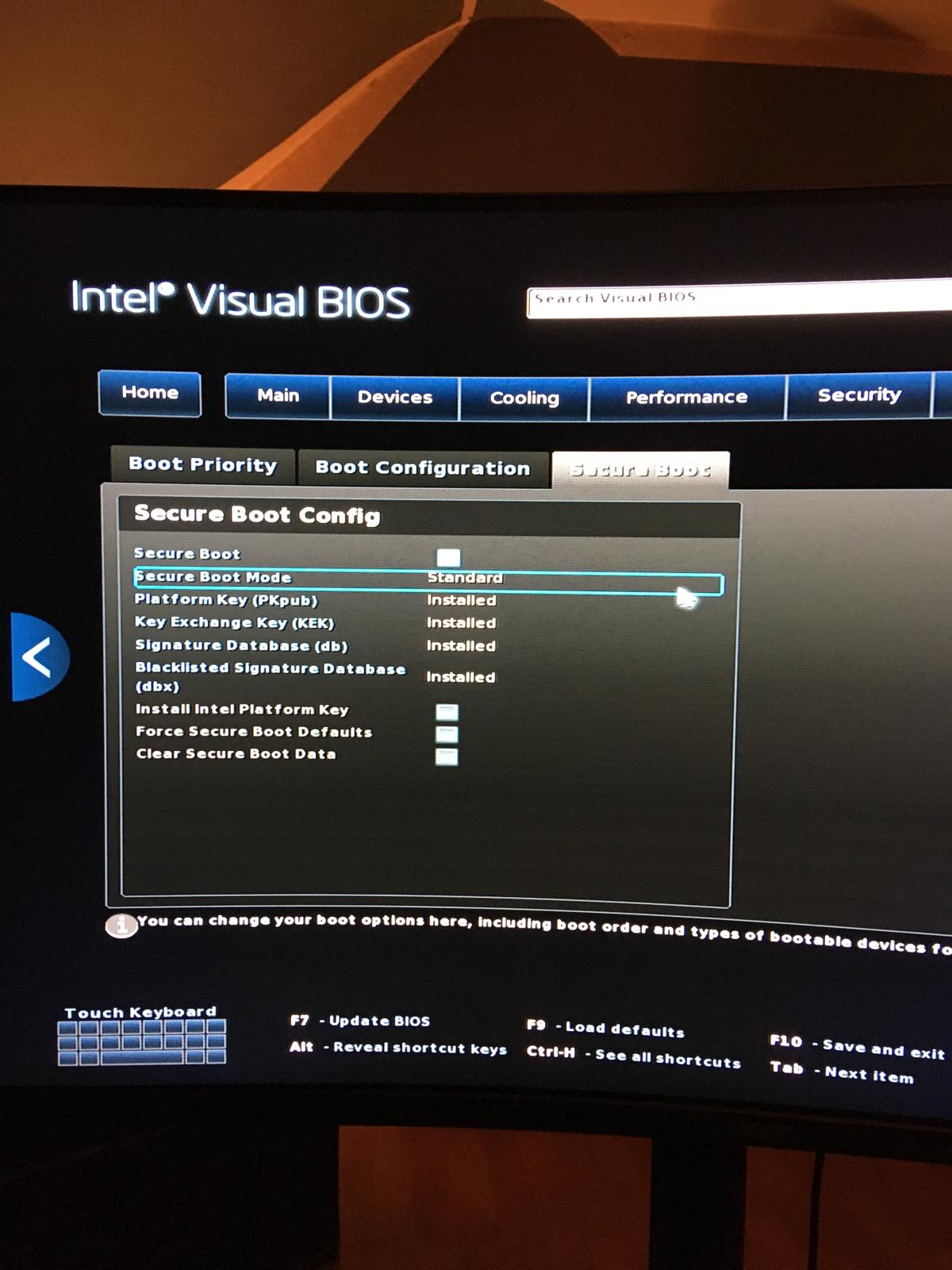

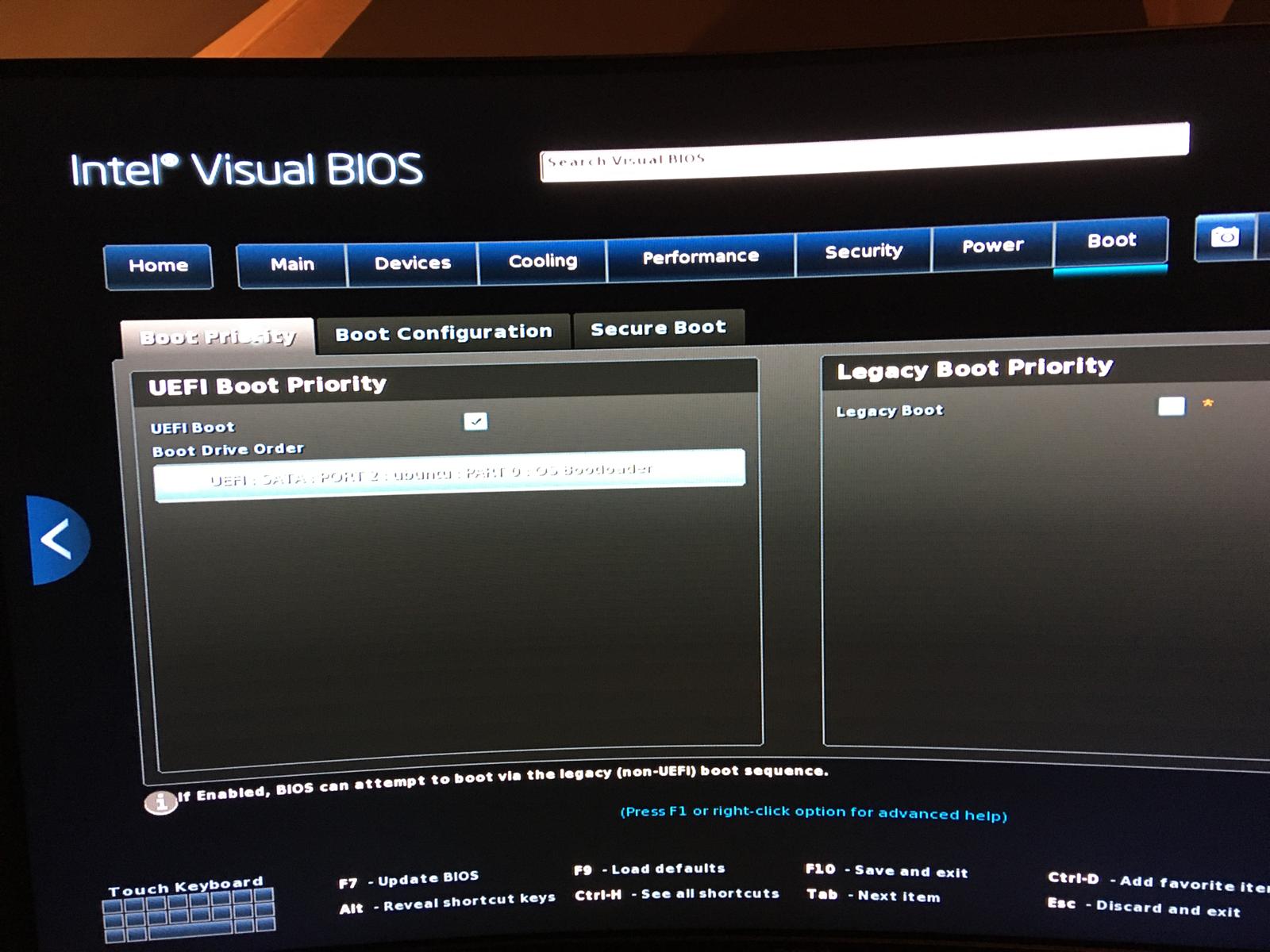
Hi Leon,these are Fotos by phone cause i didnt understand how to save screenshots.thank you for further informations!
That looks so far good. This here:
shows Secure Boot as unmarked. It could be that this is not enough. On the Option ''Secure Boot Mode'' look if You can set it from ''Standard'' to ''Other OS''.
Hi,the poor-quality photo shows UEFI Boot Priority, which also boots the OS.
I ordered an active HDMI to DP adapter online today because it wasn't available in stores. Let's see if it works.Apparently, my problem is a known issue between Intel and Linux, which I read somewhere.
Thank you Leon
You ordered an Adapter ... I have made the Experience in the Forum here that Adapters sometimes can be problematic. Hopefully with You it isn't such a Case. But let it arrive and test it.
Hi,I am open for new solutions!
Try it first. When it works, all is fine. Sometimes the Problem with these Adapters can be that a Monitor isn't recognized right and doesn't work right. So, normally, we here would suggest to ue a DP to DP Cable or HDMI to HDMI Cable.
But as I wrote: When it works, all is fine. So, try it first.
1 Like
Leon,'ll let you know. If you or anyone else on the forum has any ideas for a solution, please share them!
cu
Hi Leon, the PC/Zorin/monitor is now running smoothly. Your advice to delete Wayland and replace it with Xorg was spot on. Thank you for that!
Secondly, I assigned the correct HDMI port to the PC.
It was silly of me to think that the correct HDMI port would be detected automatically. It was detected automatically, but only after several minutes.
Sometimes the solution is so obvious.
But I'm still going to try out the active HDMI to DP adapter I ordered.
I hope I can't do anything wrong with it and I'll let you know how it went if you want.
Thank you very much for your helpful and friendly support.
1 Like
Good that it works now. Take an Eye on it a couple Days and when it is fine report back. Then we can take this as solved.
Hi Leon,
my experiences over last few days:
Sometimes the monitor is recognized quickly and sometimes not,regardless of whether I use HDMI or DP.
I attempted further research also with AI,to finally solve the problem.Here is what AI says:
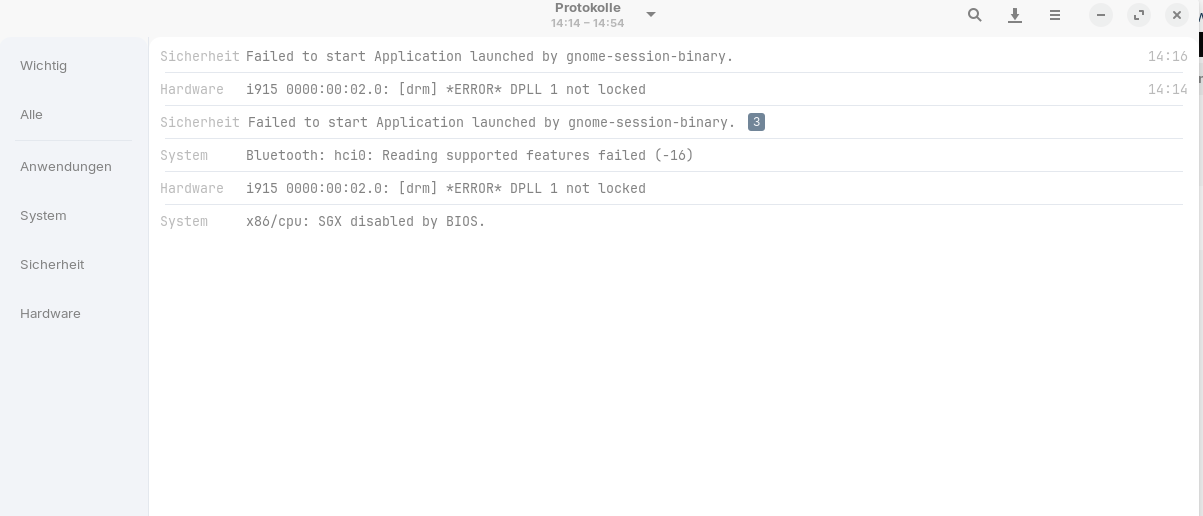
Das passt sehr gut zu Intel UHD 620 + Acer-Monitor – und erklärt auch die Meldung „DPLL 1 not locked“.
Du hast ein bekanntes Linux-Intel-HDMI-Erkennungsproblem beim Systemstart.
Ich erkläre kurz warum und dann was zuverlässig hilft.
Warum wird der Monitor spät erkannt?
Beim Booten passiert Folgendes:
- Zorin OS startet schneller als der Acer-Monitor
- Die Intel-Grafik fragt den Monitor ab (EDID-Abfrage)
- Der Monitor antwortet zu spät
- Ergebnis:
- Bildschirm bleibt kurz schwarz
- oder wird erst nach Login erkannt
- oder erst nach Ein/Aus des Monitors
- dabei erscheint oft DPLL not locked
 Das ist Timing-Problem, kein Defekt.
Acer-Monitore sind dafür leider relativ bekannt.
DIE ZUVERLÄSSIGSTEN LÖSUNGEN (nach Wirkung sortiert)

 Feste Bildwiederholrate erzwingen (sehr wichtig)
Zorin OS → Einstellungen → Anzeige
- Acer-Monitor auswählen
- 60,00 Hz fest einstellen
- NICHT „Automatisch“
- Auflösung manuell setzen (z. B. 1920×1080)
Behebt das Problem bei ~70 % der Fälle.
AI suggested the following,but Im̀ unsure whether I can/should do it this way:
 Kernel-Parameter (dauerhafte Lösung)
Wenn es immer passiert, auch nach obigem:
- Terminal öffnen
- Datei bearbeiten:
sudo nano /etc/default/grub
- Zeile:
GRUB_CMDLINE_LINUX_DEFAULT="quiet splash"
ändern zu:
GRUB_CMDLINE_LINUX_DEFAULT="quiet splash i915.enable_psr=0"
- Übernehmen:
sudo update-grub
sudo reboot
Deaktiviert ein Intel-Stromsparfeature, das genau dieses Problem verursacht.
Thank you for your patience
And which one of these helped? The Refresh Rate Thing or the Kernel Parameter?
Hi Leon, I haven't tried it via the terminal because I'm not sure that AI is the right alternative.
How would you evaluate this statement?
This fits very well with Intel UHD 620 + Acer monitor – and also explains the message “DPLL 1 not locked”.
You have a known Linux-Intel-HDMI detection problem at system startup
This disables a Power Saving Function of Intel's integrated Graphics. It could be worth a Try. If it should help, You can undo it again. Another Point that I saw related to that: Do You have Fractional Scaling in Settings>Display active?
No,it is not active.Should it be activated?