MPV not working after upgrade to Z17

I was using MPV (flatpak version) on Z16, but now that I've upgraded to Z17 it won't open (nothing happens when I click to open it). I uninstalled and re-installed but that didn't help.

Any ideas how to fix this?

PS: I need to use the flatpak version because I use it with another program.

As a quick test, does it launch if you log in on Zorin On Xorg?

Will it launch if you run from terminal

flatpak run io.mpv.Mpv

Does that list any errors?

Are you using Flatseal to allow permissions?

Nope, even on Xorg absolutely nothing happens when I click it.

No, it still wouldn't open. It did not give errors, just listed a bunch of info about MPV.

I don't know what flatseal is. I don't recall installing this. How can I check to see if its on my system?

Due to Flatpak being an extra sandbox, you can install flatseal to provide more permissions to Flatpak apps:

sudo apt install flatseal

Flatseal is a GUI application the manages Flatpak package portals.

It may be that the Flatpak package of MPV needs system permissions to operate - it would need access to see your music files, at least...

PulseAudio and Pipewire may be culprits, too.
A shame that the command returned no errors... But no errors displayed often point toward a permissions issue.

This surprises me a bit, since MPV is known to have quite a few issues on Wayland and actually is supposed to fallback to X-server (XWayland).

Here is a more low level verbose error logging run command to try:

flatpak run io.mpv.Mpv --no-config --no-video

That command wouldn't work, I ended up installing it via the software center. I tried opening MPV afterward, but it's still not working. Is there a particular setting in Flatseal that I should change?

Yes, I agree as the software center is again giving the error "GPG verification enabled, but no signatures found (use gpg-verify=false in remote config to disable)"

Not sure if the two are related or not, but permissions seem to be an issue since upgrading

Even with that command, terminal still outputs the same thing:

mpv v0.40.0 Copyright © 2000-2025 mpv/MPlayer/mplayer2 projects
libplacebo version: v7.349.0 (v7.349.0)
FFmpeg version: n7.1.1
FFmpeg library versions:
   libavcodec      61.19.101
   libavdevice     61.3.100
   libavfilter     10.4.100
   libavformat     61.7.100
   libavutil       59.39.100
   libswresample   5.3.100
   libswscale      8.3.100
Usage:   mpv [options] [url|path/]filename

Basic options:
 --start=<time>    seek to given (percent, seconds, or hh:mm:ss) position
 --no-audio        do not play sound
 --no-video        do not play video
 --fs              fullscreen playback
 --sub-file=<file> specify subtitle file to use
 --playlist=<file> specify playlist file

 --list-options    list all mpv options
 --h=<string>      print options which contain the given string in their name

It's like absolutely nothing happens in background when I try to open it.

The GUI app is used to modify permissions, so yes, you must launch Flatseal then go in and change what you need to change. I do not use any flatpak's at all, so I have never used it or Flatpak MPV to know the details - but I suspect you may see clear indicators on launching Flatseal and examining the options.

Actually... these likely are related. Yes... I know I suggested a new thread - I thought this error above had been solved, yet MPV remained.
Let's look at that error.

flatpak remote-delete flathub

flatpak remote-add --if-not-exists flathub https://flathub.org/repo/flathub.flatpakrepo

flatpak update

Using the software store, remove the flatpak MPV package. Once done...
Kill gnome software

killall gnome-software

Reinstall it:

sudo apt install --reinstall gnome-software gnome-software-plugin-flatpak gnome-software-plugin-snap

You can leave the gnome-software-plugin-snap package off (Be sure to backspace the `space between flatpak plugin and snap plugin in the command, too) if you do not use Snaps and SnapD

With all that done, reinstall MPV from software store and test...

Ok, I followed all your instructions. The error in the software center is still there. With Mpv, it still won't open however I clicked on a video file and the audio started playing and I could see the app icon in my dash, but there is nothing visual showing (there is no video on my screen). I'm thinking I may have to give up on MPV.

What is your terminal output of

flatpak remotes --show-details

and

cat /var/lib/flatpak/repo/config

Thanks Aravisian, I really do appreciate your help!

Terminal says:

Name    Title                          URL                                   Collection ID Subset Filter Priority Options … … Homepage                         Icon
flathub Flathub                        https://dl.flathub.org/repo/          -             -      -      1        system  … … https://flathub.org/             https://dl.flathub.org/repo/logo.svg
nuvola  Nuvola Apps Flatpak Repository https://dl.tiliado.eu/flatpak/nuvola/ -             -      -      1        system  … … https://tiliado.eu/nuvolaplayer/ https://tiliado.eu/static/nuvolaplayer/logo.png
zorinos Zorin OS                       https://flatpak.zorinos.com/repo/     -             -      -      1        system  … … https://zorinos.com/             https://flatpak.zorinos.com/repo/logo.svg

The output is...

[core]
repo_version=1
mode=bare-user-only
min-free-space-size=500MB
xa.pinned=runtime/com.obsproject.Studio.Plugin.DroidCam/x86_64/stable;runtime/org.gtk.Gtk3theme.ZorinBlue-Dark/x86_64/3.22;runtime/org.gtk.Gtk3theme.ZorinBlue-Light/x86_64/3.22;runtime/org.gtk.Gtk3theme.ZorinGreen-Dark/x86_64/3.22;runtime/org.gtk.Gtk3theme.ZorinGreen-Light/x86_64/3.22;runtime/org.gtk.Gtk3theme.ZorinGrey-Dark/x86_64/3.22;runtime/org.gtk.Gtk3theme.ZorinGrey-Light/x86_64/3.22;runtime/org.gtk.Gtk3theme.ZorinOrange-Dark/x86_64/3.22;runtime/org.gtk.Gtk3theme.ZorinOrange-Light/x86_64/3.22;runtime/org.gtk.Gtk3theme.ZorinPurple-Dark/x86_64/3.22;runtime/org.gtk.Gtk3theme.ZorinPurple-Light/x86_64/3.22;runtime/org.gtk.Gtk3theme.ZorinRed-Dark/x86_64/3.22;runtime/org.gtk.Gtk3theme.ZorinRed-Light/x86_64/3.22
xa.masked=io.github.seadve.Kooha

[remote "zorinos"]
url=https://flatpak.zorinos.com/repo/
xa.title=Zorin OS
gpg-verify=true
gpg-verify-summary=true
xa.comment=The repository of Flatpak applications for Zorin OS
xa.description=The repository of Flatpak applications for Zorin OS
xa.icon=https://flatpak.zorinos.com/repo/logo.svg
xa.homepage=https://zorinos.com/

[remote "nuvola"]
url=https://dl.tiliado.eu/flatpak/nuvola/
xa.title=Nuvola Apps Flatpak Repository
xa.default-branch=stable
gpg-verify=true
gpg-verify-summary=true
xa.comment=Rolling releases of sandboxed web apps
xa.description=Rolling releases of sandboxed web apps.
xa.icon=https://tiliado.eu/static/nuvolaplayer/logo.png
xa.homepage=https://tiliado.eu/nuvolaplayer/

[remote "flathub"]
url=https://dl.flathub.org/repo/
xa.title=Flathub
gpg-verify=true
gpg-verify-summary=true
xa.comment=Central repository of Flatpak applications
xa.description=Central repository of Flatpak applications
xa.icon=https://dl.flathub.org/repo/logo.svg
xa.homepage=https://flathub.org/

Hopefully the clue is in there!

I suspect Nuvola.
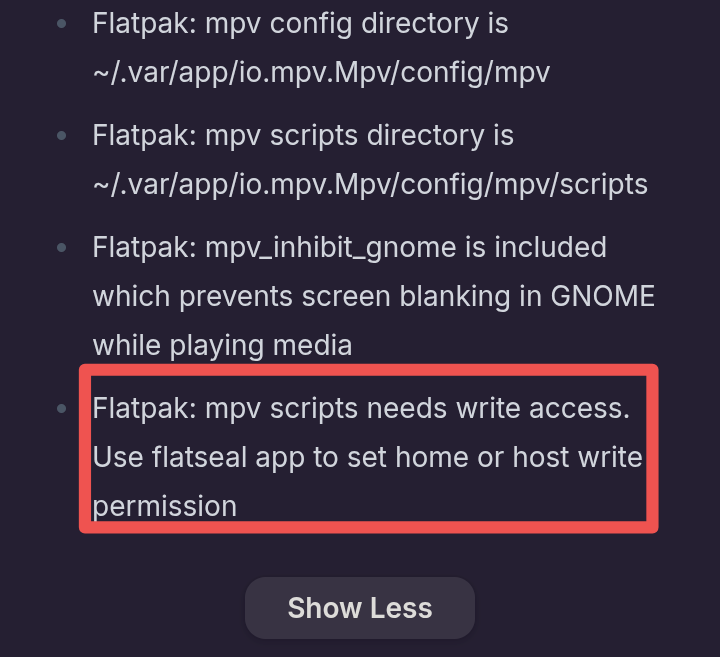
Maybe try this solution:


(This screenshot is from the description of mpv in flathub.org)

I think you made an right assumption. It's missing write permission to home and needs to be set through flatseal.


And since the OP mentioned that audio plays and icon appears in the dock but no video shows, my guess could be missing any multimedia-codecs or video drivers.

1 Like

Recently, another user had this problem when using a flatpak app. The multimedia codecs were installed on the computer, but the flatpak had no access to them and videos were not playing. After the permissions for all users/system files were set, everything worked perfectly.

Did You tried to install MPV directly from the flathub Website?

Yes, that can't work because Flatseal is a Flatpak, too. But the Installation of Flatseal did worked, yes?

this Nuvola Flatpak Repo is not added by default. Maybe this makes the Problem. You could try it with deleting it and then install MPV. And there would be the Question now if MPV will be installed from this Flatpak Repo and not from the normal flathub one.

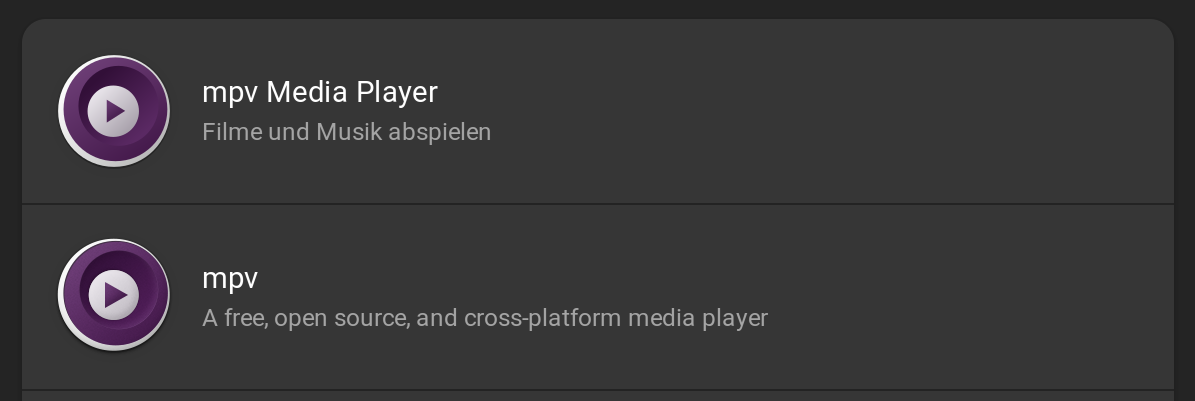
When you open Gnome Software and seach for mpv what Options do You get? I have 2:

The first one is the APT Version and the 2nd one the Flatpak Version from Flathub. When You open the Site of each, You have on the right side the ''Install'' Button and under it the Package Format and Source. Could You take a Look at it and tell us what Options do You have there?

No, those instructions don't work anymore... well, at least for me. The thing is, I never installed a Nuvola player. I can't find it in flatpak list or apt list and I can't seem to be able to remove the repository either. How do I just get rid of this thing?

I gave MPV the permissions via Flatseal - no change. As for the codecs or drivers, MPV was working perfectly prior to upgrading to Z17. Am I wrong to assume I should already have the correct drivers? I don't know how to install media codecs or how to check if I have the correct ones.

Oh really? How do I set those?

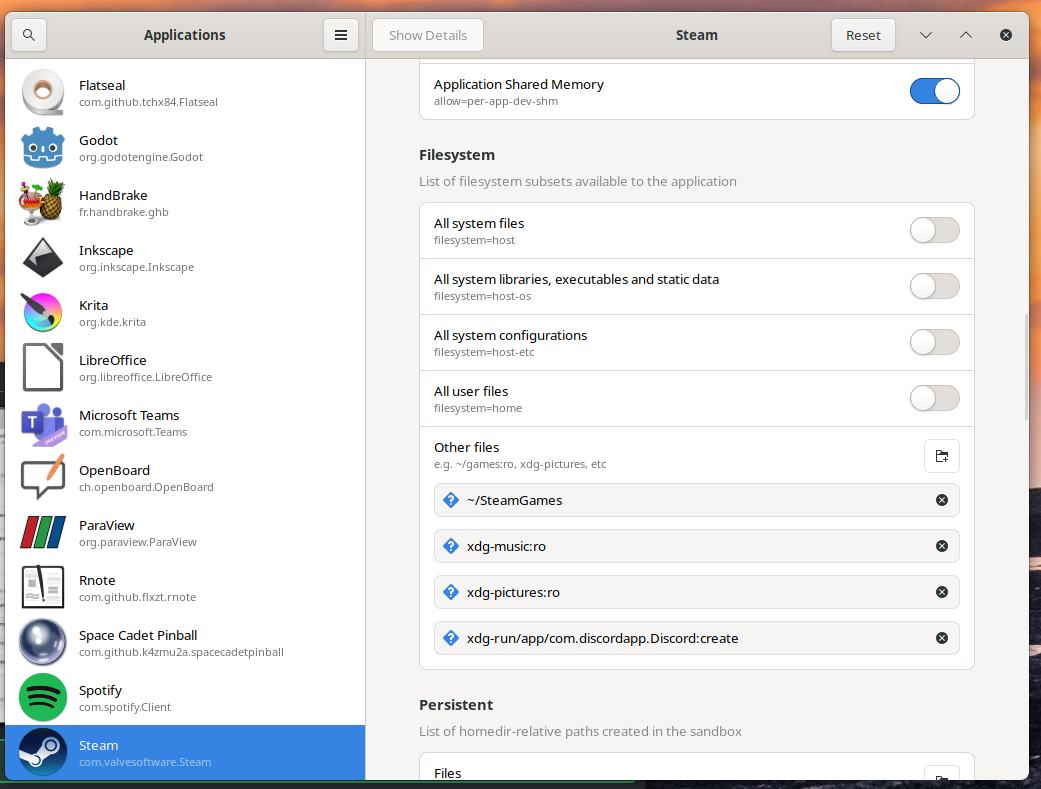
This is only a picture of the internet. But it should look similar. Click on mpv and then at filesystem toggle on "All users files" and if that isn't enough so that videos are playing, also "All system files"

You could check if videos are playing in a browser that is installed as .deb package.

Zorin uses Zorin-restricted-extras, they are the same as ubuntu-restricted-extras. If they aren't installed you can install them with

"sudo apt install ubuntu-restricted-extras"

Usually you are asked at fresh installation if you want to install multimediacodecs. Note: You have to agree the microsoft license.

Yes, it did :grin:

I honestly do not recall ever installing Nuvola. I've deleted it and now the error in the software center is gone - yay! However, after reinstalling MPV, it still isn't playing the video portion (only the sound plays).

I have the same as you - 2 options, 1 apt, 1 flatpak/snap

What you could try is, switching to Xorg and look if that helps.
Logout and at login click on your username, then a cog icon appears. There you can set "Zorin desktop on Xorg". Then login with your password.
I enabled both permissions and still nothing....

My last "fresh installation" was years ago lol. But I have just installed that multi codecs you suggested and still only the sound is playing.

Maybe there is some issue with my display/graphics driver that MPV doesn't like as I noticed some changes since this last upgrade. Is that possible?