That looks like Your System isn't in UEFI Mode. Could You type it in Terminal again and post a Screenshot of it please?
I swapped out my Zorin SSD for another one running Windows 10 to check my hardware's condition. The Microsoft system runs perfectly on my hardware. I put the Zorin SSD back in; the BIOS boot process reported no errors (!), and Zorin OS 18.1 seems to be working fine. However, the BIOS automatically switched to Legacy mode instead of UEFI. That’s surprising.
When You put in the Zorin Drive?
I physically remove them. It's one or the other, but never both together.
Yes, I understand. But I meant if the BIOS switches between UEFI and Legacy depending if You have the Windows or Zorin Drive put in. Is that correct?
Yes, that correct.
I’ve been using Zorin in "Legacy BIOS" mode for 24 hours now: I haven't experienced any freezes, any unexpected returns to the startup screen, or any crashes. For a system based on UEFI, it’s baffling.
When You are logged in in Zorin, could You open the ''Disks'' Program and check Your Drive where Zorin is installed please? You find there an Option called ''Partitioning'' when You click on Your Disk on the left and then on the right, you get an Overview. The Option is over the Partitions Table. If You not sure, post a Screenshot of it here.
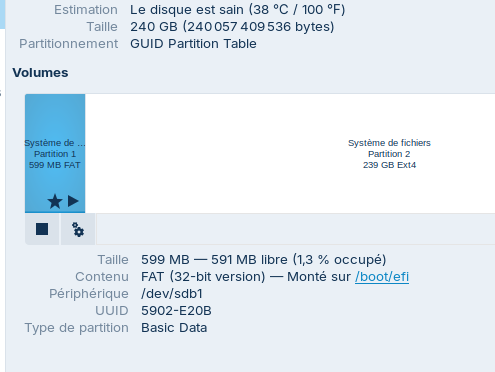
First partition : "système de partition 1 - 599MB FAT32" and second partition : "système de partition 2 - 239GB EXT4". While researching the Zorin OS installation, I found instructions to create a FAT32 partition for UEFI booting, which is what I did.
@JustZorin Is this what you were looking for?
1 Like
Could You post a Screenshot from ''Disks'' please?
Dear swar,
yes, thank you! That was what I was looking for. 
An extra very nice efibootmgr command!
1 Like
Well, on your Zorin OS Disk the EFI partition has the wrong partition type "Basic Data", but it should have partition type "EFI System".
It should be possible to correct this within a booted Zorin OS Live environment or is it better to do a new Zorin OS installation?
It is GPt, okay. But that the first Partition on ''Type de partition'' has Basic Data is not like it should be. There should be ''EFI System''. How did You set up the Partitions on the Installation?
I am wondering two things here.
-
It might be labeling it as basic data because it is formatted to FAT32 (and anything related to Windows is usually identified as 'basic data partition' - I always have a little laugh to myself when I see this - in the past Windows would be referred to as 'other OS'.

-
This is why I prefer viewing partitions in GParted rather than disks.
If the partition has no 'flags' it won't show correctly for the boot process to pick it up. And it can't be rectified (AFAIK) without a re-installation.
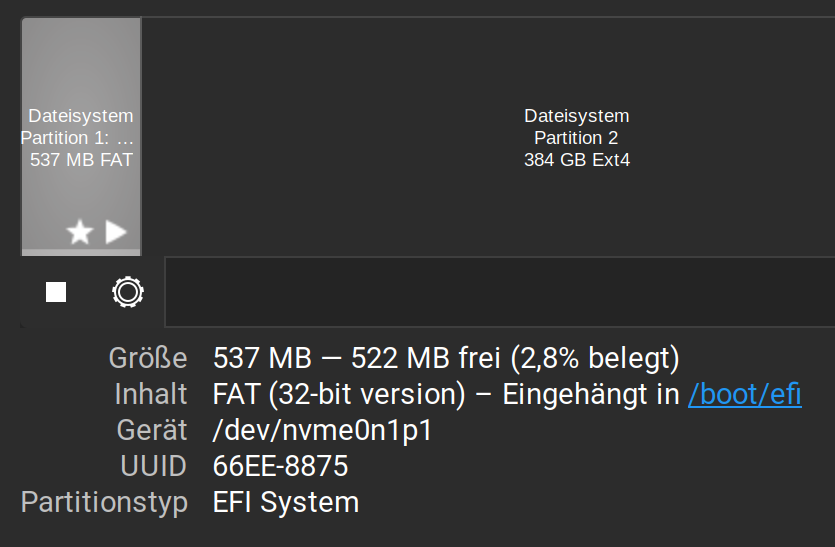
I wiped the partitions during the Zorin installation and created two new ones. This was to ensure the complete removal of the previous data, which had featured two simultaneous "BIOS boot" partitions.
Ponce-De-LeonCommunity Moderator
 elmerzorin
It is GPt, okay. But that the first Partition on ''Type de partition'' has Basic Data is not like it should be. There should be ''EFI System''. How did You set up the Partitions on the Installation?
And You didn't created the first Partition directly as EFI Partition, right? You only set the Mount Point this Partition?
I created a new ext4 partition to replace the previous ones, then created a FAT32 partition for the EFI boot. I installed Zorin, but graphics glitches appeared. I swapped in the SSD containing Windows 10, and the hardware worked fine. I put the Zorin SSD back in; the graphics glitches stopped, and it booted in Legacy mode. I’m not changing a thing!
1 Like
When it works for You, You don't have to.
2 Likes