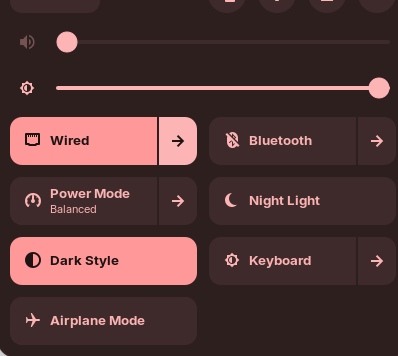
Hi and welcome.
Could you provide us with make and model of your notebook?
Additionally could you open a Terminal by entering the word Terminal in the menu search bar and then press enter.
Next, in the Terminal copy and paste the following command by clicking on the copy to clipboard icon shown at the end of the command, and in terminal, right-click and select paste. Then press return and then copy and paste the results back here.
sudo lshw -C network
Welcome to the Forum!
- Did You take a Look at the ''Additional Drivers'' Tab in Software & Updates if there is a Driver offered?
- When You open the Settings do You have a Wifi and Bluetooth Option?
- Are Secure Boot and Fast Boot in BIOS disabled?
- If Windows is still installed: Is Fast Start-Up in Windows disabled?
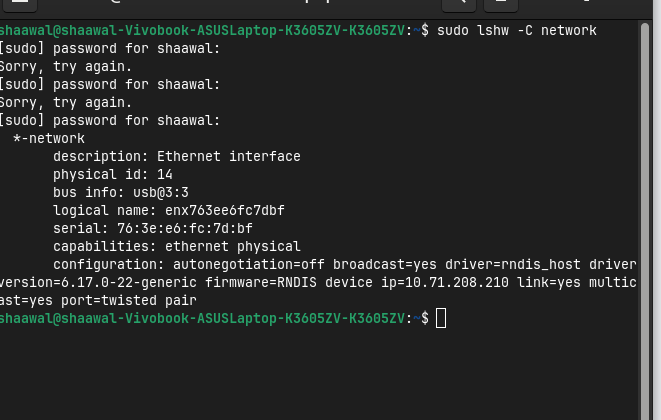
i don't have dual , there are wifi and bluetooth options in settings but when click bluetooth it just turns of instantly and wifi just doesn't work, yesterday when i opened software updater and other software apps it didn't crash but today when i open it just doesn't open.
Hi, could you actually paste the text from the terminal rather than the image/screenshot?
it doesnt let me copy from terminal
It does. Place your mouse over the first letter of the results then hold down left button and drag to the end then righthclick to select copy, open reply window, paste and send.
*-network
description: Network controller
product: MEDIATEK Corp.
vendor: MEDIATEK Corp.
physical id: 0
bus info: pci@0000:2c:00.0
version: 00
width: 64 bits
clock: 33MHz
capabilities: pciexpress msi pm bus_master cap_list
configuration: driver=wlan latency=0
resources: iomemory:620-61f irq:19 memory:622c100000-622c1fffff memory:60200000-60207fff
*-network
description: Ethernet interface
physical id: 14
bus info: usb@3:3
logical name: enx127337a8cce1
serial: 12:73:37:a8:cc:e1
capabilities: ethernet physical
configuration: autonegotiation=off broadcast=yes driver=rndis_host driverversion=6.17.0-22-generic firmware=RNDIS device ip=10.71.208.17 link=yes multicast=yes port=twisted pair
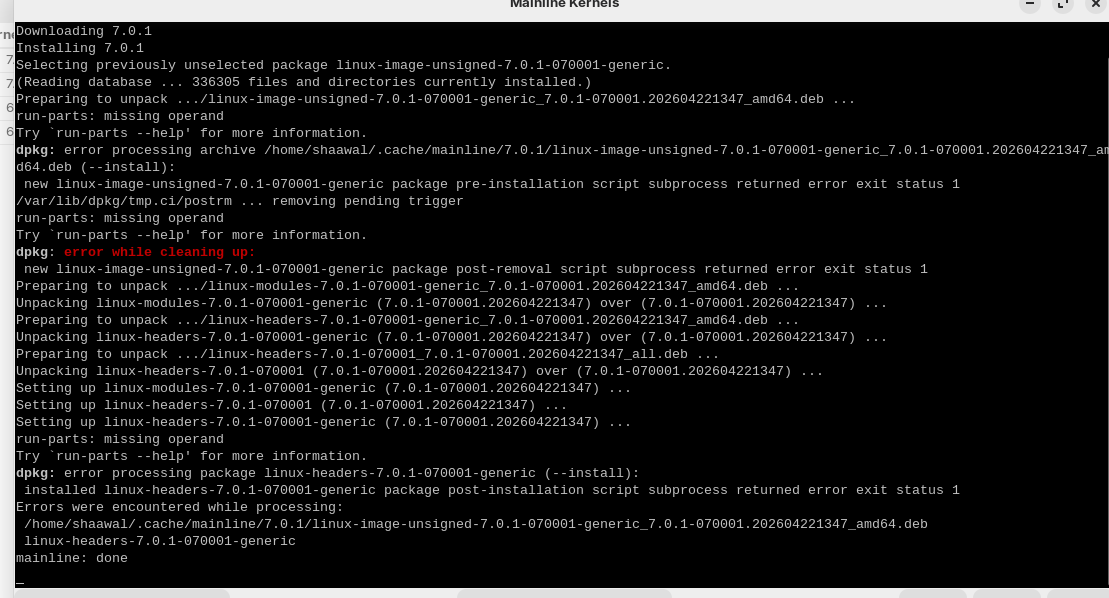
And when i downloaded new kernel from other forum posts saying to download newer kernel if wifi isnt there i tried but it said dpkg something error.
Your hardware is a USB ethernet adapter based on that model id of enx127337a8cce1. It is not wifi.
What comes back with:
lsusb
lsusb
Bus 001 Device 001: ID 1d6b:0002 Linux Foundation 2.0 root hub
Bus 002 Device 001: ID 1d6b:0003 Linux Foundation 3.0 root hub
Bus 003 Device 001: ID 1d6b:0002 Linux Foundation 2.0 root hub
Bus 003 Device 002: ID 03f0:2a41 HP, Inc HP 1000 USB Optical Mouse
Bus 003 Device 004: ID 04f3:0c90 Elan Microelectronics Corp. ELAN:ARM-M4
Bus 003 Device 005: ID 322e:2012 BillionPixels USB2.0 HD UVC WebCam
Bus 003 Device 006: ID 13d3:3579 IMC Networks Wireless_Device
Bus 003 Device 010: ID 04e8:6863 Samsung Electronics Co., Ltd Galaxy series, misc. (tethering mode)
Bus 004 Device 001: ID 1d6b:0003 Linux Foundation 3.0 root hub
" The Linux driver for the IMC Networks Wireless_Device (USB ID 13d3:3579 ) is the kernel module btusb. This device is a Bluetooth adapter, not a Wi-Fi card, and is supported by kernel versions 2.6.24 and newer .
- Driver Name :
btusb - Kernel Support : Available in all modern Linux kernels (2.6.24+)
- Function : Bluetooth connectivity only; it does not provide Wi-Fi capabilities.
- Configuration : Ensure
CONFIG_BTandCONFIG_BT_HCIBTUSBare enabled in your kernel configuration.
Users reporting Wi-Fi issues with laptops containing this device (such as ASUS VivoBook or G14 models) are often confusing this Bluetooth component with a separate, incompatible MediaTek Wi-Fi chip (e.g., ID 14c3:7902). The 13d3:3579 device itself generally works out-of-the-box on standard distributions like Ubuntu 22.04, Debian 12, and Linux Mint 21.2+, though some newer kernel versions or specific hardware configurations may occasionally report "failed" status in hardware databases. If Bluetooth is not functioning, verify the kernel version is at least 5.15 or newer and check for additional proprietary firmware packages.
AI-generated answer. Please verify critical facts."
Your other hardware device is the fingerprint reader:
" The Elan Microelectronics Corp. ELAN:ARM-M4 (ID 04f3:0c90) is not officially supported by the standard libfprint library in mainstream Linux distributions.
However, it is possible to use this device by compiling a community-developed driver . Key details include:
- Community Solution : A user successfully modified a fork of the
libfprint-elanmoc2driver (specifically by forking a fork and making minor code changes) to support this device. - Installation Challenges : After compiling the driver, users may encounter the error
Impossible to enroll: GDBus.Error:net.reactivated.Fprint.Error.NoSuchDevice. - Fix for Detection : To resolve detection issues after compilation, create the file
/etc/ld.so.conf.d/local.confwith the lines/usr/local/liband/usr/local/lib64, then runsudo ldconfigand restart the service withsudo systemctl restart fprintd.service. - Alternative Models : Other Elan models like 04f3:0c4b and 04f3:0c4c have better support, often available via the
libfprint-2-tod1-elanpackage in Ubuntu PPAs.
AI-generated answer. Please verify critical facts."
The only other device is your Samsung phone which you are using to tether for internet access, so either there is no wireless cip in your notebook or it has been damaged/fried. I would advise you buy a USB dongle like this:
the kernel versiion 2.6.24 is not in the app mainline kernels how do i download and if i download will it fix my problems?
I have updated my last post. The information states 2.6+ which means any kernel above that base one.
From what I can see you do not have wifi period, either because it does not have one or it is damaged/fried.
Just had another thought. Does the notebook have a physical switch on the side or does it use a combination of Fn plus one of the F keys that has a Wifi icon on it? Also is wifi enabled in the BIOS? If the BIOS setting is off the OS won't see it.
i switched from windows to zorin i had wireless acces and bluetooth when i downloaded zorin i coudnt find wifi
What is the make and model of your device?
how do i see 
Your notebook/laptop make and model is what I meant.