Please add the clarifying details.
Output of
uname -r
sudo lshw -C network
Please add the clarifying details.
Output of
uname -r
sudo lshw -C network
6.8.0-94-generic

 *-network UNCLAIMED
       description: Network controller
       product: BCM4364 802.11ac Wireless Network Adapter
       vendor: Broadcom Inc. and subsidiaries
       physical id: 0
       bus info: pci@0000:03:00.0
       version: 03
       width: 64 bits
       clock: 33MHz
       capabilities: pm msi pciexpress cap_list
       configuration: latency=0
       resources: memory:81400000-81407fff memory:81000000-813fffff
  *-network
       description: Ethernet interface
       product: NetXtreme BCM57766 Gigabit Ethernet PCIe
       vendor: Broadcom Inc. and subsidiaries
       physical id: 0
       bus info: pci@0000:04:00.0
       logical name: enp4s0f0
       version: 01
       serial: 38:f9:d3:0d:fa:91
       capacity: 1Gbit/s
       width: 64 bits
       clock: 33MHz
       capabilities: pm vpd msi msix pciexpress bus_master cap_list ethernet physical tp 10bt 10bt-fd 100bt 100bt-fd 1000bt 1000bt-fd autonegotiation
       configuration: autonegotiation=on broadcast=yes driver=tg3 driverversion=6.8.0-94-generic firmware=57766a-v1.15 latency=0 link=no multicast=yes port=twisted pair
       resources: irq:17 memory:b0200000-b020ffff memory:b0210000-b021ffff
  *-network
       description: Ethernet interface
       physical id: 9
       bus info: usb@1:5
       logical name: enx2ac1a0560018
       serial: 2a:c1:a0:56:00:18
       capabilities: ethernet physical
       configuration: broadcast=yes driver=ipheth driverversion=6.8.0-94-generic ip=172.20.10.2 link=yes multicast=yes
Alright, you say it installed and I can see in your output it matches the chipset.
Let's try
sudo modprobe -r wl && sudo modprobe wl
modprobe: FATAL: Module wl not found.
Output of
apt list --installed | grep bcmw
Zorin 17 is a fork of Ubuntu 24.04:
"Module wl not found in Ubuntu 22.04 typically occurs when the Broadcom wireless driver is missing or failed to load, often on laptops with Broadcom BCM43xx or similar wireless chips.
sudo apt update && sudo apt install -y bcmwl-kernel-source
After installation, reboot your system.
dmesg | grep wl
You should see output like wl: loading out-of-tree module and wlan0: Broadcom BCM43b1... .
sudo apt install linux-headers-$(uname -r)
This is required for DKMS to rebuild the module if the kernel was updated.
b43 , bcma , brcmsmac ):sudo modprobe -r b43 bcma brcmsmac
sudo modprobe wl
If the issue persists, confirm your wireless chip with:
lspci -k | grep -A 3 -i "network\|wireless"
This confirms whether the correct driver is needed and helps identify conflicts.
AI-generated answer. Please verify critical facts."
WARNING: apt does not have a stable CLI interface. Use with caution in scripts.
If that is the only output, that tells us it is Not Installed.
Please install it:
sudo apt update && sudo apt install bcmwl-kernel-source
Relay what you see in the terminal. It tells you what is going on. If it errors, relay that here.
If it completes successfully, relay that here.
"The warning "WARNING: apt does not have a stable CLI interface. Use with caution in scripts" indicates that apt is designed for interactive use and may change its output format or behavior in future versions, which can break scripts.
apt is intended as an end-user tool and may modify its command-line interface (CLI) between versions for better interactive experience.apt detects its output is not going to a terminal (e.g., piped to grep , used in a script), it issues this warning to caution against relying on its output format.apt-get instead for scriptsapt-get has a stable CLI and is designed for scripting.apt are available in apt-get , with the same underlying functionality.sudo apt-get update
sudo apt-get upgrade -y
sudo apt-get install -y package-name
apt )Apt::Cmd::Disable-Script-Warning option:echo "Apt::Cmd::Disable-Script-Warning true;" | sudo tee /etc/apt/apt.conf.d/90disablescriptwarning
apt commands.2>&1 | grep -v to remove the warning line:apt list --upgradable 2>&1 | grep -v "stable CLI interface"
apt in scripts . Use apt-get , apt-cache , or dpkg-query instead.apt command is safe for interactive use but not recommended for automation due to potential future changes in output or behavior.AI-generated answer. Please verify critical facts."
It seems to have completed, though it did end off with this and Im not sure if that conflicts with anything
depmod.....
update-initramfs: deferring update (trigger activated)
Setting up libgcc-s1:i386 (12.3.0-1ubuntu1~22.04.2) ...
Setting up libc6:i386 (2.35-0ubuntu3.13) ...
Processing triggers for libc-bin (2.35-0ubuntu3.10) ...
Processing triggers for man-db (2.10.2-1) ...
Processing triggers for initramfs-tools (0.140ubuntu13.5) ...
update-initramfs: Generating /boot/initrd.img-6.8.0-94-generic
W: Possible missing firmware /lib/firmware/amdgpu/ip_discovery.bin for module amdgpu
W: Possible missing firmware /lib/firmware/amdgpu/vega10_cap.bin for module amdgpu
W: Possible missing firmware /lib/firmware/amdgpu/sienna_cichlid_cap.bin for module amdgpu
W: Possible missing firmware /lib/firmware/amdgpu/navi12_cap.bin for module amdgpu
W: Possible missing firmware /lib/firmware/amdgpu/aldebaran_cap.bin for module amdgpu
W: Possible missing firmware /lib/firmware/amdgpu/gc_11_0_0_toc.bin for module amdgpu
W: Possible missing firmware /lib/firmware/amdgpu/sienna_cichlid_mes1.bin for module amdgpu
W: Possible missing firmware /lib/firmware/amdgpu/sienna_cichlid_mes.bin for module amdgpu
W: Possible missing firmware /lib/firmware/amdgpu/navi10_mes.bin for module amdgpu
W: Possible missing firmware /lib/firmware/amdgpu/gc_11_0_3_mes.bin for module amdgpu
W: Possible missing firmware /lib/firmware/amdgpu/smu_14_0_2.bin for module amdgpu
W: Possible missing firmware /lib/firmware/amdgpu/dcn_3_5_1_dmcub.bin for module amdgpu
apt list --installed | grep bcmw gives me
WARNING: apt does not have a stable CLI interface. Use with caution in scripts.

bcmwl-kernel-source/jammy-updates,now 6.30.223.271+bdcom-0ubuntu10~22.04.1 amd64 [installed]
Did you use apt-get when installing?
Now try
sudo modprobe -r wl && sudo modprobe wl
These can be ignored for now:
Nothing happens 
Let's look at
sudo lshw -C network
again...
  *-network UNCLAIMED
       description: Network controller
       product: BCM4364 802.11ac Wireless Network Adapter
       vendor: Broadcom Inc. and subsidiaries
       physical id: 0
       bus info: pci@0000:03:00.0
       version: 03
       width: 64 bits
       clock: 33MHz
       capabilities: pm msi pciexpress cap_list
       configuration: latency=0
       resources: memory:81400000-81407fff memory:81000000-813fffff
  *-network
       description: Ethernet interface
       product: NetXtreme BCM57766 Gigabit Ethernet PCIe
       vendor: Broadcom Inc. and subsidiaries
       physical id: 0
       bus info: pci@0000:04:00.0
       logical name: enp4s0f0
       version: 01
       serial: 38:f9:d3:0d:fa:91
       capacity: 1Gbit/s
       width: 64 bits
       clock: 33MHz
       capabilities: pm vpd msi msix pciexpress bus_master cap_list ethernet physical tp 10bt 10bt-fd 100bt 100bt-fd 1000bt 1000bt-fd autonegotiation
       configuration: autonegotiation=on broadcast=yes driver=tg3 driverversion=6.8.0-94-generic firmware=57766a-v1.15 latency=0 link=no multicast=yes port=twisted pair
       resources: irq:17 memory:b0200000-b020ffff memory:b0210000-b021ffff
  *-network
       description: Ethernet interface
       physical id: 9
       bus info: usb@1:5
       logical name: enx2ac1a0560018
       serial: 2a:c1:a0:56:00:18
       capabilities: ethernet physical
       configuration: broadcast=yes driver=ipheth driverversion=6.8.0-94-generic ip=172.20.10.2 link=yes multicast=yes
I thought you said you switched to 5.15 Kernel when you loaded Zorin OS 17.3...
Ach!! I can’t believe i missed a crucial detail  apologies.
I assume its okay to move forward with
sudo apt install linux-image-5.15.0-83-generic linux-headers-5.15.0-83-generic linux-modules-5.15.0-83-generic linux-modules-extra-5.15.0-83-generic ?
Let's start with
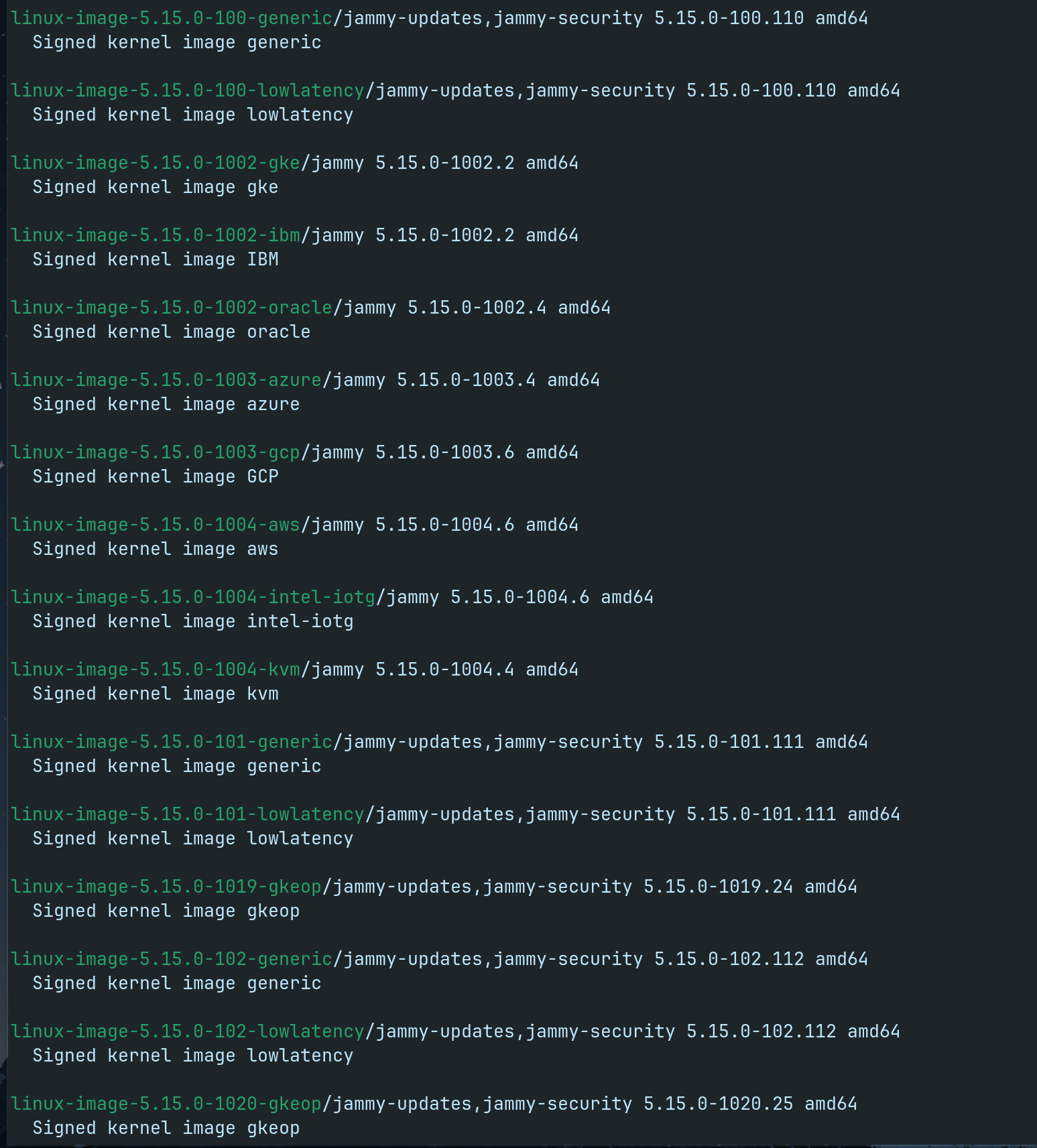
apt search linux-image-5.15
to ensure it is in the repo..
Ok, let's try
sudo apt install linux-image-5.15.0-83-generic linux-headers-5.15.0-83-generic linux-modules-5.15.0-83-generic linux-modules-extra-5.15.0-83-generic
it may be listed near the bottom of your output...