I am having a problem connecting to Wifi after just loading Zorin 18. I can connect to router via ethernet fine. I can connect using phone hotspot fine. However, wifi to my router (same one that Ethernet works fine on), does not work.
When I ping in terminal it says destination host not found. If I search in Brave it says DNS address could not be found.
Wifi icon shows it's connected. My router is an Asus RT-AX92U and I have custom DNS on it which works for every other device connected. All other devices work fine also.
If I restart NetworkManager.service then turn networking off then on then restart NetworkManager.service again, it works for a split second.
I understand; but what I am seeing in all of your output is that system-side, everything gives every indication that wifi is loaded, working and you see the wifi icon as connected, too.
Given custom configuration with the router - this definitely looks router side.
It may be that something about that configuration will work on Android or Windows OS that are more lax about protocol's and security.
Linux does tend to be more strict.
An effective test may be a clean router connection.
Maybe it is a router issue, the puzzling thing is that I have a laptop with Pop OS that connects to this router via wifi just fine. I also just finished installing and setting up Zorin OS 18 Education on another laptop and it connects to this router via wifi just fine also. So i'm still not sure why this other laptop won't connect.
The other puzzling thing is that I had installed Zorin OS 18 on it about 2 months ago but didn't finish setting it up. The wifi worked just fine after install. 4 days ago I started up the laptop to finish setup and that's when the wifi problem started.
Try to boot from older 6.14 kernel if you are using kernel 6.17 now.
At grub menu select advanced options for Zorin and then select kernel 6.14 to boot from and test the WLAN.
If the grub menu isn't displayed at boot press esc (or left shift key) continuosly during boot, then it will appear.
I think all of this is sufficient to suggest it is not the router, after-all.
But puzzling, since everything else suggests that the Wifi should be working.
If another edition of Zorin OS is working and Pop_OS is also working - that kind of clears the router, IMO.
Since you never finished setting things up... How would you feel about a fresh install of Zorin OS on the machine?
Sometimes... during install... If a configuration somewhere is corrupted, weird things (like this) can happen. A fresh install may be the easiest resolution.
Since Ethernet works but WiFi doesn't, it might be worth trying to manually set the DNS in the IPv4 settings for that WiFi connection specifically. If you switch it from 'Automatic' to something like Google DNS (8.8.8.8) or Cloudflare (1.1.1.1), it might bypass whatever the router is failing to hand over.
I reinstalled Zorin Core and here's what I found in the process. I can connect to my guest network and browse the internet successfully. I still cannot connect to my main network, it gives the same error: DNS error followed by a cannot reach the address if you leave it sitting for several minutes. I also noticed that even though I forget the connection in Zorin and delete the device in my router, it keeps reassigning the same MAC address and IP address. So this might be a router issue after all.
I will be scouring the internet for answers because I don't know how to make my router assign a different address and if that would fix this issue. I know this forum is not for networking but if anyone has ideas on how to fix this it would be much appreciated.
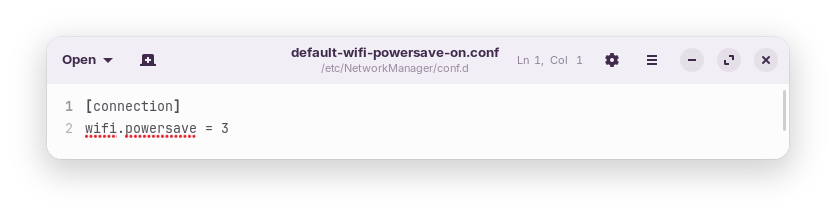
From reading this I'd like to try changing the power save option and maybe add the thing to the grub parameters.
Any suggestions on which one I should try first. Also, I need more specific instructions on how to do either of these, especially the grub parameter thing. I am not really understanding the directions I've come across so far and some of the information is from a long time ago (10+ years) and I don't know if it is still a good idea to do it that way.
Here is a quick guide on adding a Grub parameter, though you will not be adding nomodeset - substitute that with the parameter(s) you will actually be using
Then arrow key down to change the value to 2
(I thought this was tried already early in the thread...)
Once 3 is changed to 2, tap ctl+o to overwrite, then enter to save as current configuration
Tap ctl+x to eXit the editor.
@ComputerUser Do you have entered the correct command? If nothing is in the file you could try to add the content of the file to
/etc/NetworkManager/conf.d/default-wifi-powersave-on.conf
Replace the 3 with 2.
I already edited the powersave. What I'm trying to do now is edit grub to add a parameter. That's where it can't find the default grub file when I enter