Ever since I upgraded Zorin earlier this year, I've had endless problems and have spent considerable time here trying to resolve those problems. The first most noticeable problem was that my Wacom Pen became very glitchy and my apps/software would crash out regularly.
I was told that my computer was too old for the latest version of Zorin. With support from the community here, I was able to get it working again with an old kernel, but I was warned that it won't be supported for very long.
However, I still encountered the occasional problem, so bought a new computer thinking that would solve all my problems... nope. After installing Zorin, the screen would freeze on during boot-up. Again with support, I managed to get past this problem by using a different kernel.
But I was still having issues with my fairly old Wacom Pen Tablet, so I (very recently) bought an XP Pen Deco Pro LW (Gen 2).
Now I'm having all the same old problems with this pen tablet as I was with the old Wacom at the very start of this saga.
I guess I'm here today seeking an honest answer to the question: is this just the way Zorin is (terribly glitchy), or is there a way to resolve this instability once and for all?
I would try to separate “tablet driver crash” from “desktop/kernel instability” before blaming all of Zorin. XP-Pen’s Linux driver often installs a background service plus a GUI, and if the old Wacom packages are still present they can fight over input devices. I would first unplug the tablet, remove/disable any old Wacom/XP-Pen user services you installed, reboot, then install only the current XP-Pen driver and test in a clean new user account. Also check journalctl -b -p warning..err right after a freeze/crash; if you see GPU/kernel errors there, the tablet is probably only triggering a wider graphics/kernel problem rather than being the root cause.
Unfortunately, after attempting to follow quietbadger27's suggestions, I tried to delete the Wacom drivers and now my machine won't boot
Luckily I have my old machine so I'm using that to speak with you now. I'm trying to access important files on my [now broken] machine via the USB Zorin live boot, but I can't seem to find anything. If I can find then copy them, I'll then probably just reinstall Zorin - unless you have any recommendations?
When in Live Mode, open Nautilus (the File Manager) and then on the left Side click on ''Other Places''. Then You should see at the right Side on 2nd Position the Drive of Your Machine. Click that and navigate to ''home''.
There would be the Question what leads to that Situation and if @quietbadger27's Instructions have influenced and that and if they did, what exactly. A lot of Variables ... so, it is not so easy to say.
So, when You haved saved Your Data, maybe a Reinstall could be a good Opportunity to begin with a fresh Start. It might not be the optimal Thing, yes.
I have managed to rescue my data. So I think I'll go down the route of reinstall. Is this a simple matter of installing from the USB again?
EDIT: I've reinstalled Zorin, but I'm back to another older problem I encountered when I bought this machine and installed Zorin a few weeks ago. It refuses to boot up. Apparently the computer hardware is too modern for the current kernel, so we installed a yet-to-be released kernel (if I remember correctly).
Okay, so I'm back to where I was when I started this topic with my computer operational again. I used the advice from previous help I received to overcome the kernel/new hardware problem.
I have also installed the .deb driver instead of the .tar for my XP pen tablet, but the glitching is still there. For example, the cursor disappears and occasionally becomes unresponsive. It's particularly noticeable when I have my web browser open.
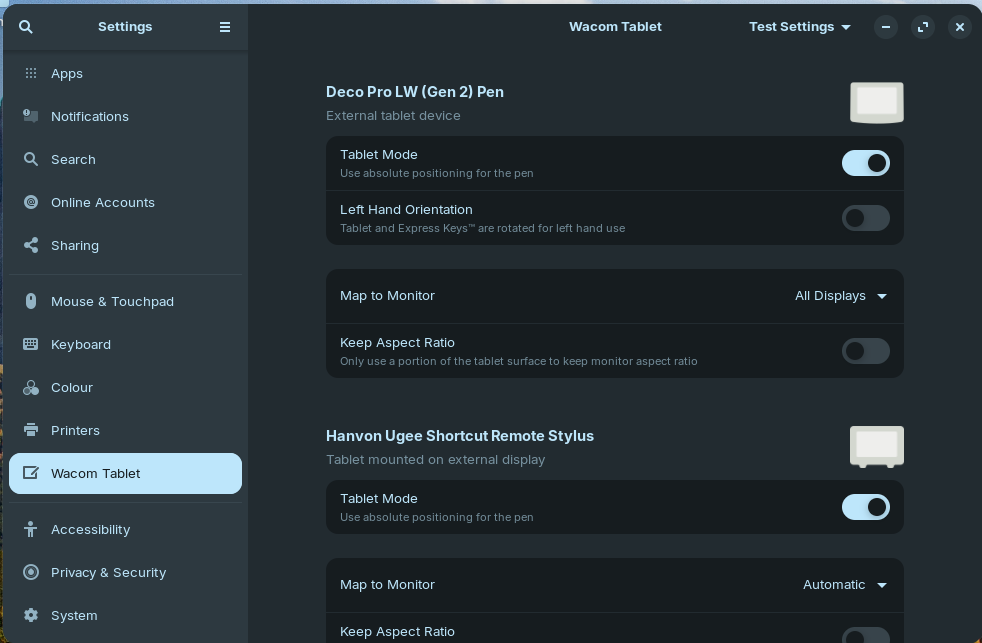
In the Zorin settings menu, it still has 'Wacom Tablet' as the name of the tablet options on the left side of the window - should I assume this is only a menu title and not indicative of Wacom being the primary device?
It's the way Zorin is, and is why I stopped using it. The developers didn't bother fixing the bugs. Suggest you switch to a different distribution. Good luck.
No, I've found that it happens with all menus and windows outside of the apps I've been trying to use. I have also noticed glitching of menu icons (such as the minimise/full-screen and close buttons on every window). Parts of the imagery distorts when I move the cursor over them. See image below for example:
What a relief to see someone say this - I was starting to go mad!
Since the upgrade at the beginning of the year, I haven't been able to progress with my self-employment venture due to the massive difficulties faced with Zorin.
I've spent ~£3,000 trying to overcome this, the understanding being that my previous computer was too old for the latest Zorin (even though it is marketed as an OS that revives old computers).
Brand new computer + brand new tablet = exactly the same problems.
For me it looks like an additional Menu Option, yes. Did You chekced how it because when You disable the Toggle on ''Tablet Mode''? And in the top right, You have ''Test Settings''. When you click on it, what other Options are there?
Does this mean, You have installed a newer Kernel? If yes: Which one?