Great that it fixed for you, it couldn't be Odysseus, because it doesn't touch the network, it just communicate with
I didn't think it was Odysseus but wanted to check as I knew there had been lots of updates. Thanks and again I love using Odysseus.
2 Likes
Update 1.8.1
- Copies and moves: a nearly full drive can no longer leave a truncated file whose original is then deleted; safer Replace on FAT/NTFS keys, Undo of a partly failed move, simultaneous copies of folders with the same name (1.8.0)
- Archives: “Delete originals” never removes files that are not in the archive (exclusions, Freshen, archive saved inside the folder); an archive containing a file of its own name is no longer overwritten; names are matched exactly; symbolic links are stored as links; all volumes of split RAR/ZIP archives are removed; temporary files are cleaned up (1.8.0)
- Startup no longer fails on a damaged bookmarks or settings file; “Remove from bookmarks” no longer adds a duplicate for folders with parentheses or “&” (1.8.0)
- File names with “&”, “<” or invalid UTF-8 are displayed everywhere (trash, properties, notifications, archive window) (1.8.0)
- Column view: going back to the list shows the folder opened in the columns (1.8.0)
- Closed windows and tabs no longer keep working in the background (1.8.0)
- AZERTY keyboards: Ctrl+1 / 2 / 3 switch between list, grid and column views, Ctrl+0 resets the zoom (the number row gives “& é " à” without Shift, and nothing happened)
4 Likes
Update 1.8.2
- Visible columns: Nautilus's column chooser (switches, drag to reorder, Move Up / Down) with “Apply to Current Folder Only”, stored in the same folder metadata as Nautilus; column order is kept, also when a header is dragged
- Removing a USB drive: a desktop notification like Nautilus (“Writing data… Don't unplug until finished”, then “can be safely unplugged”) instead of an easily missed message in the window
- English and German: mounting a drive no longer shows “Move up” / “Nach oben”
3 Likes
Update 1.8.3
- Copies: a file still being written (an active log, a browser profile) or a system file from /proc is copied again instead of being refused as an incomplete copy
- A folder seen through two paths (bind mount): moving it into its own subfolder or merging it onto itself is refused cleanly instead of copying endlessly or deleting it
- Closed windows no longer come back to life when an operation started from them finishes; Properties left open after their window was closed use another open window
- Ctrl+1 / 2 / 3 / 0 are recognised by the physical key: they work on AZERTY keyboards without side effects on other layouts
- Archive window and column chooser titles show “&” correctly; small fixes for tar archives made with “.” and for dragging out of archives
4 Likes
Update 1.8.4
- A network share that stops answering (NAS switched off, Wi-Fi lost) no longer freezes the window: free space, sidebar, bookmarks, clicks and folder checks never wait for it, and its folders show an error instead
- Local folders stay fast while a share is stuck: network reads and background work (thumbnails, folder colours, item counts) no longer hold up the local disks
2 Likes
Update 1.8.5
- Ejecting a network share that stopped answering works right away: no more waiting for the network timeout before anything happens, and a share that no longer answers is unmounted without asking again and again
- The “Volume is busy” question shown while unmounting uses Odysseus’ own dialog, with full button labels that follow the theme
1 Like
Update 1.8.6
- New “Open Odysseus on” setting (Preferences, General): home folder as in Nautilus, the last location (both panels and the active one in dual-panel mode), or a chosen folder — used when Odysseus is opened without a given folder, from the dock or the applications menu
- A last location that is gone (unplugged key, deleted folder, unmounted or silent share) falls back to the home folder, without waiting or mounting anything at startup
1 Like
Update 1.8.9
- A tab dragged to another window now follows it: tab title, path bar and new tabs belong to the window that received it (1.8.7)
- Deleting items inside a tar archive made with “.” really deletes them; any item 7-Zip leaves behind is now reported instead of a silent success (1.8.7)
- Copies to a USB key, an external disk or a network share follow the real speed of the device: no more progress bar stuck at 96 %, Cancel works at once, and “done” means the data is really on the device (1.8.8)
- Copies to a phone (including in recovery mode), a camera or an iPhone are sent directly like Nautilus does: no more “Input/output error” at the end, and faster (1.8.8)
- Preferences: the “Open Odysseus on” choice no longer leaves a blank space before its arrow
1 Like
Update 1.9.0
- New playlists: right-click tracks or music folders → Playlist → create an .m3u (natural order, relative paths, titles and durations), then add tracks from other folders or from search results to build a medley
- Adding to a playlist keeps its existing lines and skips tracks already in it; playlists are never overwritten
3 Likes
Update 1.9.1
- No more “ghost” of the “Merge” / “Replace” question left over the file list at the end of a copy (seen with transparent themes on X11)
- The conflict question names the folder instead of its full path, like Nautilus
1 Like
Update 1.9.2
- Google Drive and OneDrive (GNOME online accounts): real names (“My Drive”, “Shared with me”) instead of identifiers, and folders open (they kept loading forever); copy, drag, rename and delete go through GIO, like Nautilus @applecheeks37
4 Likes
What a great work Nourpon, thank you !!
I'll try it as soon as possible in virt-manager.
Will Odysseus explored deeper than Nautilus ?!
Actually, these last years, i find Nemo very good, espacially memory of icons sizes independently from folders, and the split view of the panel.
Merci pour ton travail !
1 Like
Thank you 
Thank you for your tireless work!
1 Like
Thank you for your kinds words !
Hi Nourpon,
I have encountered something...
Right-click pdf file -> email
Thunderbird opens with a new email open, but no attachment.
Is it just me?
Thank you!
Another one - sorry!
I'm browsing files on my NAS (which uses SMB).
I double-click a docx file expecting it to open in Textmaker, instead it opened in LibreOffice (which Zorin must have installed in an update, as I am sure I removed it after original install).
Textmaker is definitely the default file handler, as you can see here when I tried 'Open with'. This DID open in Textmaker correctly.
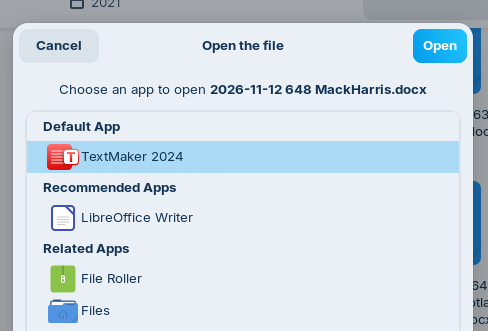
Double-click to open a docx opens corectly into Textmaker from the local file system.
Also, working with the NAS seems much slower and laggier (and twice crashed Odyseus, compared to Files). I am using a particularly slow WiFi at the moment, usually I prefer to be plugged in on Ethernet.
2 Likes
Thanks for the reports, you found 2 real bugs!
-
With Thunderbird installed as a snap or Flatpak, the attachment was lost on the way (xdg-email doesn’t recognise it); Odysseus now starts Thunderbird itself with the files attached.
-
On the NAS, Odysseus asked for an app that can open smb:// addresses, which ruled out TextMaker; it now does like Nautilus. Both fixes will be in the next version.
About the slowness and crashes: could you start odysseus from a terminal and send me what it prints when it crashes?
2 Likes
Thank you.
Of course, since then I haven't yet got a crash while working in the NAS, but here's some observations.
Its very slow to read the directory listing. I'm in traditional (non columns) view. Drilling my way down - 6 folders deep.
Nautilus displays the directory listing in seconds, Odysseus seems to be taking at least a minute, or longer.
I double click to open a file - that works.
I return to Odysseus, and its unresponsive. Right-clicking the same file, or another, seems to do nothing. Or an extremely long wait.
In fact, returning to that window just now, its frozen, I can't click onto anything else.
Clicking the window close button does nothing. But nothing output in the terminal. I terminated from system monitor.
1 Like