Hello! I am having problems with Sonic Pi booting up on my laptop running Ubuntu… Linux. I have had no problems with it running on Windows and the Raspberry Pi. I have not tried shutting down my computer and rebooting it. Below are the technical details of my problem:
=======
Sonic Pi Boot Error Report
==================
System Information
----------------
* Sonic Pi version: 3.2.2
* OS: Ubuntu 25.10
GUI Log
-------
**`/home/(username)/.sonic-pi/log/gui.log`**
```
[GUI] - Welcome to the Sonic Pi GUI
[GUI] - ===========================
[GUI] -
[GUI] - {f8135a8f-0125-487b-9e9a-cc8c940b66f5}
[GUI] - Discovering port numbers...
[GUI] - Port entry server-listen-to-gui : 51235 : 51235
[GUI] - Port entry gui-send-to-server : 51235 : 51235
[GUI] - Port entry gui-listen-to-server : 51236 : 51236
[GUI] - Port entry server-send-to-gui : 51236 : 51236
[GUI] - Port entry scsynth : 51237 : 51237
[GUI] - Port entry scsynth-send : 51237 : 51237
[GUI] - Port entry osc-midi-out : 51238 : 51238
[GUI] - Port entry osc-midi-in : 51239 : 51239
[GUI] - Port entry server-osc-cues : 4560 : 4560
[GUI] - Port entry erlang-router : 51240 : 51240
[GUI] - Port entry websocket : 51241 : 51241
[GUI] - Detecting port numbers...
[GUI] - GUI listen to server port 51236
[GUI] - port: 51236 [OK]
[GUI] - Server listen to gui port 51235
[GUI] - port: 51235 [OK]
[GUI] - Server incoming OSC cues port 4560
[GUI] - port: 4560 [OK]
[GUI] - Scsynth port 51237
[GUI] - port: 51237 [OK]
[GUI] - Server send to GUI port 51236
[GUI] - port: 51236 [OK]
[GUI] - GUI send to server port 51235
[GUI] - port: 51235 [OK]
[GUI] - Scsynth send port 51237
[GUI] - port: 51237 [OK]
[GUI] - Erlang router port 51240
[GUI] - port: 51240 [OK]
[GUI] - OSC MIDI out port 51238
[GUI] - port: 51238 [OK]
[GUI] - OSC MIDI in port 51239
[GUI] - port: 51239 [OK]
[GUI] - Websocket port 51241
[GUI] - port: 51241 [OK]
[GUI] - All ports OK
[GUI] - launching Sonic Pi Runtime Server:
[GUI] - Ruby server pid registered: 97832
[GUI] - hiding main window
[GUI] - initialising toolbar icons
[GUI] - setting up window structure
[GUI] - restoring scope states
[GUI] - creating status bar
[GUI] - creating info panel
[GUI] - creating shortcuts
[GUI] - creating tool bar
[GUI] - initialising documentation window
[GUI] - wait for sync
[GUI] - waiting for Sonic Pi Server to boot...
Server on port 51236...
[GUI] - waiting for Sonic Pi Server to boot...
[GUI] - UDP OSC Server ready and listening
................................
[GUI] - Sonic Pi Server failed to start with this error message:
> Server Exception:
Boot - Unable to connect to SuperCollider
["/usr/lib/sonic-pi/app/server/ruby/lib/sonicpi/scsynthexternal.rb:267:in `boot_and_wait'", "/usr/lib/sonic-pi/app/server/ruby/lib/sonicpi/scsynthexternal.rb:443:in `boot_server_linux'", "/usr/lib/sonic-pi/app/server/ruby/lib/sonicpi/scsynthexternal.rb:151:in `boot'", "/usr/lib/sonic-pi/app/server/ruby/lib/sonicpi/scsynthexternal.rb:37:in `initialize'", "/usr/lib/sonic-pi/app/server/ruby/lib/sonicpi/server.rb:78:in `new'", "/usr/lib/sonic-pi/app/server/ruby/lib/sonicpi/server.rb:78:in `initialize'", "/usr/lib/sonic-pi/app/server/ruby/lib/sonicpi/studio.rb:192:in `new'", "/usr/lib/sonic-pi/app/server/ruby/lib/sonicpi/studio.rb:192:in `init_scsynth'", "/usr/lib/sonic-pi/app/server/ruby/lib/sonicpi/studio.rb:57:in `initialize'", "/usr/lib/sonic-pi/app/server/ruby/lib/sonicpi/lang/sound.rb:89:in `new'", "/usr/lib/sonic-pi/app/server/ruby/lib/sonicpi/lang/sound.rb:89:in `block (2 levels) in included'", "/usr/lib/sonic-pi/app/server/ruby/lib/sonicpi/lang/ixi.rb:72:in `block (2 levels) in included'", "/usr/lib/sonic-pi/app/server/ruby/bin/sonic-pi-server.rb:302:in `new'", "/usr/lib/sonic-pi/app/server/ruby/bin/sonic-pi-server.rb:302:in `<main>'"]
[GUI] - UDP OSC Server no longer listening
............................
[GUI] - Critical error! Could not boot Sonic Pi Server.
[GUI] - stopping UDP OSC Server...
[GUI] - Critical Error. Unable to connect to server..
```
Server Errors
-------------
**`/home/joey/.sonic-pi/log/server-errors.log`**
```
jack_get_descriptor : dll
jack_get_descriptor returns null for 'jack_internal_metro.so'
jack_get_descriptor : dll
jack_get_descriptor returns null for 'jack_inprocess.so'
Cannot create RT messagebuffer thread: Operation not permitted (1)
Retrying messagebuffer thread without RT scheduling
Messagebuffer not realtime; consider enabling RT scheduling for user
no message buffer overruns
Cannot create RT messagebuffer thread: Operation not permitted (1)
Retrying messagebuffer thread without RT scheduling
Messagebuffer not realtime; consider enabling RT scheduling for user
no message buffer overruns
jack_get_descriptor : dll
jack_get_descriptor returns null for 'jack_intime.so'
Cannot create RT messagebuffer thread: Operation not permitted (1)
Retrying messagebuffer thread without RT scheduling
Messagebuffer not realtime; consider enabling RT scheduling for user
no message buffer overruns
Cannot lock down 39190460 byte memory area (Cannot allocate memory)
Cannot use real-time scheduling (RR/10) (1: Operation not permitted)
AcquireSelfRealTime error
Cannot lock down 39190460 byte memory area (Cannot allocate memory)
Cannot use real-time scheduling (RR/5) (1: Operation not permitted)
JackClient::AcquireSelfRealTime error
jack_port_get_buffer called with an incorrect port 0
jack_port_get_buffer called with an incorrect port 0
jack_port_get_buffer called with an incorrect port 0
jack_port_get_buffer called with an incorrect port 0
jack_port_get_buffer called with an incorrect port 0
JackEngine::XRun: client = SuperCollider was not finished, state = Running
JackAudioDriver::ProcessGraphAsyncMaster: Process error
JackEngine::XRun: client = SuperCollider was not finished, state = Triggered
JackAudioDriver::ProcessGraphAsyncMaster: Process error
JackEngine::XRun: client = SuperCollider was not finished, state = Triggered
JackAudioDriver::ProcessGraphAsyncMaster: Process error
JackEngine::XRun: client = SuperCollider was not finished, state = Triggered
JackAudioDriver::ProcessGraphAsyncMaster: Process error
JackEngine::XRun: client = SuperCollider was not finished, state = Triggered
JackAudioDriver::ProcessGraphAsyncMaster: Process error
JackEngine::XRun: client = SuperCollider was not finished, state = Triggered
JackAudioDriver::ProcessGraphAsyncMaster: Process error
JackEngine::XRun: client = SuperCollider was not finished, state = Triggered
JackAudioDriver::ProcessGraphAsyncMaster: Process error
JackEngine::XRun: client = SuperCollider was not finished, state = Triggered
JackAudioDriver::ProcessGraphAsyncMaster: Process error
JackEngine::XRun: client = SuperCollider was not finished, state = Triggered
JackAudioDriver::ProcessGraphAsyncMaster: Process error
JackEngine::XRun: client = SuperCollider was not finished, state = Triggered
JackAudioDriver::ProcessGraphAsyncMaster: Process error
JackEngine::XRun: client = SuperCollider was not finished, state = Triggered
JackAudioDriver::ProcessGraphAsyncMaster: Process error
JackEngine::XRun: client = SuperCollider was not finished, state = Triggered
JackAudioDriver::ProcessGraphAsyncMaster: Process error
JackEngine::XRun: client = SuperCollider was not finished, state = Triggered
JackAudioDriver::ProcessGraphAsyncMaster: Process error
JackEngine::XRun: client = SuperCollider was not finished, state = Triggered
JackAudioDriver::ProcessGraphAsyncMaster: Process error
JackEngine::XRun: client = SuperCollider was not finished, state = Triggered
JackAudioDriver::ProcessGraphAsyncMaster: Process error
JackEngine::XRun: client = SuperCollider was not finished, state = Triggered
JackAudioDriver::ProcessGraphAsyncMaster: Process error
JackEngine::XRun: client = SuperCollider was not finished, state = Triggered
JackAudioDriver::ProcessGraphAsyncMaster: Process error
JackEngine::XRun: client = SuperCollider was not finished, state = Triggered
JackAudioDriver::ProcessGraphAsyncMaster: Process error
JackEngine::XRun: client = SuperCollider was not finished, state = Triggered
JackAudioDriver::ProcessGraphAsyncMaster: Process error
JackEngine::XRun: client = SuperCollider was not finished, state = Triggered
JackAudioDriver::ProcessGraphAsyncMaster: Process error
JackEngine::XRun: client = SuperCollider was not finished, state = Triggered
JackAudioDriver::ProcessGraphAsyncMaster: Process error
JackEngine::XRun: client = SuperCollider was not finished, state = Triggered
JackAudioDriver::ProcessGraphAsyncMaster: Process error
JackEngine::XRun: client = SuperCollider was not finished, state = Triggered
JackAudioDriver::ProcessGraphAsyncMaster: Process error
JackEngine::XRun: client = SuperCollider was not finished, state = Triggered
JackAudioDriver::ProcessGraphAsyncMaster: Process error
JackEngine::XRun: client = SuperCollider was not finished, state = Triggered
JackAudioDriver::ProcessGraphAsyncMaster: Process error
JackEngine::XRun: client = SuperCollider was not finished, state = Triggered
JackAudioDriver::ProcessGraphAsyncMaster: Process error
JackEngine::XRun: client = SuperCollider was not finished, state = Triggered
JackAudioDriver::ProcessGraphAsyncMaster: Process error
JackEngine::XRun: client = SuperCollider was not finished, state = Triggered
JackAudioDriver::ProcessGraphAsyncMaster: Process error
JackEngine::XRun: client = SuperCollider was not finished, state = Triggered
JackAudioDriver::ProcessGraphAsyncMaster: Process error
JackEngine::XRun: client = SuperCollider was not finished, state = Triggered
JackAudioDriver::ProcessGraphAsyncMaster: Process error
JackEngine::XRun: client = SuperCollider was not finished, state = Triggered
JackAudioDriver::ProcessGraphAsyncMaster: Process error
JackClientSocket::Read time out
ClientNotify fails name = SuperCollider notification = 18 val1 = 0 val2 = 0
JackEngine::XRun: client = SuperCollider was not finished, state = Triggered
JackAudioDriver::ProcessGraphAsyncMaster: Process error
JackEngine::XRun: client = SuperCollider was not finished, state = Triggered
JackAudioDriver::ProcessGraphAsyncMaster: Process error
JackEngine::XRun: client = SuperCollider was not finished, state = Triggered
JackAudioDriver::ProcessGraphAsyncMaster: Process error
JackEngine::XRun: client = SuperCollider was not finished, state = Triggered
JackAudioDriver::ProcessGraphAsyncMaster: Process error
JackEngine::XRun: client = SuperCollider was not finished, state = Triggered
JackAudioDriver::ProcessGraphAsyncMaster: Process error
JackEngine::XRun: client = SuperCollider was not finished, state = Triggered
JackAudioDriver::ProcessGraphAsyncMaster: Process error
JackEngine::XRun: client = SuperCollider was not finished, state = Triggered
JackAudioDriver::ProcessGraphAsyncMaster: Process error
JackEngine::XRun: client = SuperCollider was not finished, state = Triggered
JackAudioDriver::ProcessGraphAsyncMaster: Process error
JackEngine::XRun: client = SuperCollider was not finished, state = Triggered
JackAudioDriver::ProcessGraphAsyncMaster: Process error
JackEngine::XRun: client = SuperCollider was not finished, state = Triggered
JackAudioDriver::ProcessGraphAsyncMaster: Process error
JackEngine::XRun: client = SuperCollider was not finished, state = Triggered
JackAudioDriver::ProcessGraphAsyncMaster: Process error
JackEngine::XRun: client = SuperCollider was not finished, state = Triggered
JackAudioDriver::ProcessGraphAsyncMaster: Process error
JackEngine::XRun: client = SuperCollider was not finished, state = Triggered
JackAudioDriver::ProcessGraphAsyncMaster: Process error
JackEngine::XRun: client = SuperCollider was not finished, state = Triggered
JackAudioDriver::ProcessGraphAsyncMaster: Process error
JackEngine::XRun: client = SuperCollider was not finished, state = Triggered
JackAudioDriver::ProcessGraphAsyncMaster: Process error
JackEngine::XRun: client = SuperCollider was not finished, state = Triggered
JackAudioDriver::ProcessGraphAsyncMaster: Process error
JackEngine::XRun: client = SuperCollider was not finished, state = Triggered
JackAudioDriver::ProcessGraphAsyncMaster: Process error
JackEngine::XRun: client = SuperCollider was not finished, state = Triggered
JackAudioDriver::ProcessGraphAsyncMaster: Process error
JackEngine::XRun: client = SuperCollider was not finished, state = Triggered
JackAudioDriver::ProcessGraphAsyncMaster: Process error
JackEngine::XRun: client = SuperCollider was not finished, state = Triggered
JackAudioDriver::ProcessGraphAsyncMaster: Process error
JackEngine::XRun: client = SuperCollider was not finished, state = Triggered
JackAudioDriver::ProcessGraphAsyncMaster: Process error
JackEngine::XRun: client = SuperCollider was not finished, state = Triggered
JackAudioDriver::ProcessGraphAsyncMaster: Process error
JackEngine::XRun: client = SuperCollider was not finished, state = Triggered
JackAudioDriver::ProcessGraphAsyncMaster: Process error
JackEngine::XRun: client = SuperCollider was not finished, state = Triggered
JackAudioDriver::ProcessGraphAsyncMaster: Process error
JackEngine::XRun: client = SuperCollider was not finished, state = Triggered
JackAudioDriver::ProcessGraphAsyncMaster: Process error
JackEngine::XRun: client = SuperCollider was not finished, state = Triggered
JackAudioDriver::ProcessGraphAsyncMaster: Process error
JackEngine::XRun: client = SuperCollider was not finished, state = Triggered
JackAudioDriver::ProcessGraphAsyncMaster: Process error
JackEngine::XRun: client = SuperCollider was not finished, state = Triggered
JackAudioDriver::ProcessGraphAsyncMaster: Process error
JackEngine::XRun: client = SuperCollider was not finished, state = Triggered
JackAudioDriver::ProcessGraphAsyncMaster: Process error
JackEngine::XRun: client = SuperCollider was not finished, state = Triggered
JackAudioDriver::ProcessGraphAsyncMaster: Process error
JackEngine::XRun: client = SuperCollider was not finished, state = Triggered
JackAudioDriver::ProcessGraphAsyncMaster: Process error
JackClientSocket::Read time out
ClientNotify fails name = SuperCollider notification = 18 val1 = 1 val2 = 0
JackEngine::XRun: client = SuperCollider was not finished, state = Triggered
JackAudioDriver::ProcessGraphAsyncMaster: Process error
JackEngine::XRun: client = SuperCollider was not finished, state = Triggered
JackAudioDriver::ProcessGraphAsyncMaster: Process error
JackEngine::XRun: client = SuperCollider was not finished, state = Triggered
JackAudioDriver::ProcessGraphAsyncMaster: Process error
JackEngine::XRun: client = SuperCollider was not finished, state = Triggered
JackAudioDriver::ProcessGraphAsyncMaster: Process error
JackEngine::XRun: client = SuperCollider was not finished, state = Triggered
JackAudioDriver::ProcessGraphAsyncMaster: Process error
JackEngine::XRun: client = SuperCollider was not finished, state = Triggered
JackAudioDriver::ProcessGraphAsyncMaster: Process error
JackEngine::XRun: client = SuperCollider was not finished, state = Triggered
JackAudioDriver::ProcessGraphAsyncMaster: Process error
JackEngine::XRun: client = SuperCollider was not finished, state = Triggered
JackAudioDriver::ProcessGraphAsyncMaster: Process error
JackEngine::XRun: client = SuperCollider was not finished, state = Triggered
JackAudioDriver::ProcessGraphAsyncMaster: Process error
JackEngine::XRun: client = SuperCollider was not finished, state = Triggered
JackAudioDriver::ProcessGraphAsyncMaster: Process error
JackEngine::XRun: client = SuperCollider was not finished, state = Triggered
JackAudioDriver::ProcessGraphAsyncMaster: Process error
JackEngine::XRun: client = SuperCollider was not finished, state = Triggered
JackAudioDriver::ProcessGraphAsyncMaster: Process error
JackEngine::XRun: client = SuperCollider was not finished, state = Triggered
JackAudioDriver::ProcessGraphAsyncMaster: Process error
JackEngine::XRun: client = SuperCollider was not finished, state = Triggered
JackAudioDriver::ProcessGraphAsyncMaster: Process error
JackEngine::XRun: client = SuperCollider was not finished, state = Triggered
JackAudioDriver::ProcessGraphAsyncMaster: Process error
JackEngine::XRun: client = SuperCollider was not finished, state = Triggered
JackAudioDriver::ProcessGraphAsyncMaster: Process error
JackEngine::XRun: client = SuperCollider was not finished, state = Triggered
JackAudioDriver::ProcessGraphAsyncMaster: Process error
JackEngine::XRun: client = SuperCollider was not finished, state = Triggered
JackAudioDriver::ProcessGraphAsyncMaster: Process error
JackEngine::XRun: client = SuperCollider was not finished, state = Triggered
JackAudioDriver::ProcessGraphAsyncMaster: Process error
JackEngine::XRun: client = SuperCollider was not finished, state = Triggered
JackAudioDriver::ProcessGraphAsyncMaster: Process error
JackEngine::XRun: client = SuperCollider was not finished, state = Triggered
JackAudioDriver::ProcessGraphAsyncMaster: Process error
JackEngine::XRun: client = SuperCollider was not finished, state = Triggered
JackAudioDriver::ProcessGraphAsyncMaster: Process error
JackEngine::XRun: client = SuperCollider was not finished, state = Triggered
JackAudioDriver::ProcessGraphAsyncMaster: Process error
JackEngine::XRun: client = SuperCollider was not finished, state = Triggered
JackAudioDriver::ProcessGraphAsyncMaster: Process error
JackEngine::XRun: client = SuperCollider was not finished, state = Triggered
JackAudioDriver::ProcessGraphAsyncMaster: Process error
JackEngine::XRun: client = SuperCollider was not finished, state = Triggered
JackAudioDriver::ProcessGraphAsyncMaster: Process error
JackEngine::XRun: client = SuperCollider was not finished, state = Triggered
JackAudioDriver::ProcessGraphAsyncMaster: Process error
JackEngine::XRun: client = SuperCollider was not finished, state = Triggered
JackAudioDriver::ProcessGraphAsyncMaster: Process error
JackEngine::XRun: client = SuperCollider was not finished, state = Triggered
JackAudioDriver::ProcessGraphAsyncMaster: Process error
JackEngine::XRun: client = SuperCollider was not finished, state = Triggered
JackAudioDriver::ProcessGraphAsyncMaster: Process error
JackEngine::XRun: client = SuperCollider was not finished, state = Triggered
JackAudioDriver::ProcessGraphAsyncMaster: Process error
JackEngine::XRun: client = SuperCollider was not finished, state = Triggered
JackAudioDriver::ProcessGraphAsyncMaster: Process error
JackEngine::XRun: client = SuperCollider was not finished, state = Triggered
JackAudioDriver::ProcessGraphAsyncMaster: Process error
JackEngine::XRun: client = SuperCollider was not finished, state = Triggered
JackAudioDriver::ProcessGraphAsyncMaster: Process error
JackEngine::XRun: client = SuperCollider was not finished, state = Triggered
JackAudioDriver::ProcessGraphAsyncMaster: Process error
JackEngine::XRun: client = SuperCollider was not finished, state = Triggered
JackAudioDriver::ProcessGraphAsyncMaster: Process error
JackEngine::XRun: client = SuperCollider was not finished, state = Triggered
JackAudioDriver::ProcessGraphAsyncMaster: Process error
JackEngine::XRun: client = SuperCollider was not finished, state = Triggered
JackAudioDriver::ProcessGraphAsyncMaster: Process error
JackEngine::XRun: client = SuperCollider was not finished, state = Triggered
JackAudioDriver::ProcessGraphAsyncMaster: Process error
JackEngine::XRun: client = SuperCollider was not finished, state = Triggered
JackAudioDriver::ProcessGraphAsyncMaster: Process error
JackEngine::XRun: client = SuperCollider was not finished, state = Triggered
JackAudioDriver::ProcessGraphAsyncMaster: Process error
JackEngine::XRun: client = SuperCollider was not finished, state = Triggered
JackAudioDriver::ProcessGraphAsyncMaster: Process error
JackEngine::XRun: client = SuperCollider was not finished, state = Triggered
JackAudioDriver::ProcessGraphAsyncMaster: Process error
JackEngine::XRun: client = SuperCollider was not finished, state = Triggered
JackAudioDriver::ProcessGraphAsyncMaster: Process error
JackEngine::XRun: client = SuperCollider was not finished, state = Triggered
JackAudioDriver::ProcessGraphAsyncMaster: Process error
JackEngine::XRun: client = SuperCollider was not finished, state = Triggered
JackAudioDriver::ProcessGraphAsyncMaster: Process error
JackEngine::XRun: client = SuperCollider was not finished, state = Triggered
JackAudioDriver::ProcessGraphAsyncMaster: Process error
JackEngine::XRun: client = SuperCollider was not finished, state = Triggered
JackAudioDriver::ProcessGraphAsyncMaster: Process error
JackEngine::XRun: client = SuperCollider was not finished, state = Triggered
JackAudioDriver::ProcessGraphAsyncMaster: Process error
JackEngine::XRun: client = SuperCollider was not finished, state = Triggered
JackAudioDriver::ProcessGraphAsyncMaster: Process error
JackEngine::XRun: client = SuperCollider was not finished, state = Triggered
JackAudioDriver::ProcessGraphAsyncMaster: Process error
JackEngine::XRun: client = SuperCollider was not finished, state = Triggered
JackAudioDriver::ProcessGraphAsyncMaster: Process error
JackEngine::XRun: client = SuperCollider was not finished, state = Triggered
JackAudioDriver::ProcessGraphAsyncMaster: Process error
JackEngine::XRun: client = SuperCollider was not finished, state = Triggered
JackAudioDriver::ProcessGraphAsyncMaster: Process error
JackEngine::XRun: client = SuperCollider was not finished, state = Triggered
JackAudioDriver::ProcessGraphAsyncMaster: Process error
JackEngine::XRun: client = SuperCollider was not finished, state = Triggered
JackAudioDriver::ProcessGraphAsyncMaster: Process error
JackEngine::XRun: client = SuperCollider was not finished, state = Triggered
JackAudioDriver::ProcessGraphAsyncMaster: Process error
JackEngine::XRun: client = SuperCollider was not finished, state = Triggered
JackAudioDriver::ProcessGraphAsyncMaster: Process error
JackEngine::XRun: client = SuperCollider was not finished, state = Triggered
JackAudioDriver::ProcessGraphAsyncMaster: Process error
JackEngine::XRun: client = SuperCollider was not finished, state = Triggered
JackAudioDriver::ProcessGraphAsyncMaster: Process error
JackEngine::XRun: client = SuperCollider was not finished, state = Triggered
JackAudioDriver::ProcessGraphAsyncMaster: Process error
JackEngine::XRun: client = SuperCollider was not finished, state = Triggered
JackAudioDriver::ProcessGraphAsyncMaster: Process error
JackEngine::XRun: client = SuperCollider was not finished, state = Triggered
JackAudioDriver::ProcessGraphAsyncMaster: Process error
JackEngine::XRun: client = SuperCollider was not finished, state = Triggered
JackAudioDriver::ProcessGraphAsyncMaster: Process error
JackEngine::XRun: client = SuperCollider was not finished, state = Triggered
JackAudioDriver::ProcessGraphAsyncMaster: Process error
JackEngine::XRun: client = SuperCollider was not finished, state = Triggered
JackAudioDriver::ProcessGraphAsyncMaster: Process error
JackEngine::XRun: client = SuperCollider was not finished, state = Triggered
JackAudioDriver::ProcessGraphAsyncMaster: Process error
JackEngine::XRun: client = SuperCollider was not finished, state = Triggered
JackAudioDriver::ProcessGraphAsyncMaster: Process error
Cannot write socket fd = 19 err = Connection reset by peer
CheckRes error
Could not write notification
ClientNotify fails name = SuperCollider notification = 3 val1 = 0 val2 = 0
Cannot write socket fd = 19 err = Broken pipe
CheckRes error
Could not write notification
ClientNotify fails name = SuperCollider notification = 3 val1 = 0 val2 = 0
Cannot write socket fd = 19 err = Broken pipe
CheckRes error
Could not write notification
ClientNotify fails name = SuperCollider notification = 3 val1 = 0 val2 = 0
Cannot write socket fd = 19 err = Broken pipe
CheckRes error
Could not write notification
ClientNotify fails name = SuperCollider notification = 3 val1 = 0 val2 = 0
Cannot write socket fd = 19 err = Broken pipe
CheckRes error
Could not write notification
ClientNotify fails name = SuperCollider notification = 3 val1 = 0 val2 = 0
Unknown error...
terminate called after throwing an instance of 'Jack::JackTemporaryException'
what():
```
Server Output
-------------
**`/home/(username)/.sonic-pi/log/server-output.log`**
```
Sonic Pi server booting...
This is version 3.2.0 running on Ruby 3.3.8.
The time is 2026-01-08 13:31:54 -0600
Using primary protocol: udp
Detecting port numbers...
Listen port: 51235
- OK
Scsynth port: 51237
- OK
Scsynth send port: 51237
- OK
OSC cues port: 4560
- OK
Erlang port: 51240
- OK
OSC MIDI out port: 51238
- OK
OSC MIDI in port: 51239
- OK
Websocket port: 51241
- OK
Opening UDP Server to listen to GUI on port: 51235
Starting Server Runtime
Booting server...
Booting Sonic Pi
----------------
Booting on Linux
Jackd not running on system. Starting...
jackdmp 1.9.22
Copyright 2001-2005 Paul Davis and others.
Copyright 2004-2016 Grame.
Copyright 2016-2023 Filipe Coelho.
jackdmp comes with ABSOLUTELY NO WARRANTY
This is free software, and you are welcome to redistribute it
under certain conditions; see the file COPYING for details
JACK server starting in realtime mode with priority 10
self-connect-mode is "Don't restrict self connect requests"
audio_reservation_init
Acquire audio card Audio0
creating alsa driver ... hw:0|hw:0|2048|3|44100|0|0|nomon|swmeter|-|32bit
configuring for 44100Hz, period = 2048 frames (46.4 ms), buffer = 3 periods
ALSA: final selected sample format for capture: 24bit little-endian
ALSA: use 3 periods for capture
ALSA: final selected sample format for playback: 32bit integer little-endian
ALSA: use 3 periods for playback
Started [97855] [-] jackd -R -T -p 32 -d alsa -n 3 -p 2048 -r 44100 [-] /tmp/sonic-pi-pids/97855
Boot - Starting the SuperCollider server...
Boot - scsynth -u 51237 -m 131072 -a 1024 -D 0 -R 0 -l 1 -i 16 -o 16 -b 4096 -B 127.0.0.1
Started [97871] [-] scsynth -u 51237 -m 131072 -a 1024 -D 0 -R 0 -l 1 -i 16 -o 16 -b 4096 -B 127.0.0.1 [-] /tmp/sonic-pi-pids/97871
Boot - SuperCollider booted successfully.
Boot - Connecting to the SuperCollider server...
Boot - Sending /status to server: 127.0.0.1:51237
Boot - Sending /status to server: 127.0.0.1:51237
Boot - Sending /status to server: 127.0.0.1:51237
Boot - Sending /status to server: 127.0.0.1:51237
Boot - Sending /status to server: 127.0.0.1:51237
Boot - Sending /status to server: 127.0.0.1:51237
Boot - Sending /status to server: 127.0.0.1:51237
Boot - Sending /status to server: 127.0.0.1:51237
Boot - Sending /status to server: 127.0.0.1:51237
Boot - Sending /status to server: 127.0.0.1:51237
Boot - Sending /status to server: 127.0.0.1:51237
Boot - Sending /status to server: 127.0.0.1:51237
Boot - Sending /status to server: 127.0.0.1:51237
Boot - Sending /status to server: 127.0.0.1:51237
Boot - Sending /status to server: 127.0.0.1:51237
Boot - Unable to connect to SuperCollider
Failed to start server: Boot - Unable to connect to SuperCollider
/usr/lib/sonic-pi/app/server/ruby/lib/sonicpi/scsynthexternal.rb:267:in `boot_and_wait'
/usr/lib/sonic-pi/app/server/ruby/lib/sonicpi/scsynthexternal.rb:443:in `boot_server_linux'
/usr/lib/sonic-pi/app/server/ruby/lib/sonicpi/scsynthexternal.rb:151:in `boot'
/usr/lib/sonic-pi/app/server/ruby/lib/sonicpi/scsynthexternal.rb:37:in `initialize'
/usr/lib/sonic-pi/app/server/ruby/lib/sonicpi/server.rb:78:in `new'
/usr/lib/sonic-pi/app/server/ruby/lib/sonicpi/server.rb:78:in `initialize'
/usr/lib/sonic-pi/app/server/ruby/lib/sonicpi/studio.rb:192:in `new'
/usr/lib/sonic-pi/app/server/ruby/lib/sonicpi/studio.rb:192:in `init_scsynth'
/usr/lib/sonic-pi/app/server/ruby/lib/sonicpi/studio.rb:57:in `initialize'
/usr/lib/sonic-pi/app/server/ruby/lib/sonicpi/lang/sound.rb:89:in `new'
/usr/lib/sonic-pi/app/server/ruby/lib/sonicpi/lang/sound.rb:89:in `block (2 levels) in included'
/usr/lib/sonic-pi/app/server/ruby/lib/sonicpi/lang/ixi.rb:72:in `block (2 levels) in included'
/usr/lib/sonic-pi/app/server/ruby/bin/sonic-pi-server.rb:302:in `new'
/usr/lib/sonic-pi/app/server/ruby/bin/sonic-pi-server.rb:302:in `<main>'
```
Scsynth Output
--------------
**`/home/(username)/.sonic-pi/log/scsynth.log`**
```
# Starting SuperCollider 2026-01-08 13:31:55
Found 0 LADSPA plugins
JackDriver: client name is 'SuperCollider'
SC_AudioDriver: sample rate = 48000.000000, driver's block size = 2048
SuperCollider 3 server ready.
```
Process Log
--------------
**`/home/joey/.sonic-pi/log/processes.log`**
```
Clearing pids: ["97282", "97267", "97237"]
Clearing [97282]
-- command scsynth -u 51237 -m 131072 -a 1024 -D 0 -R 0 -l 1 -i 16 -o 16 -b 4096 -B 127.0.0.1
-- removing /tmp/sonic-pi-pids/97282
-- unable to get ProcTable info for: 97282
-- process: 97282 not running
Clearing [97267]
-- command jackd -R -T -p 32 -d alsa -n 3 -p 2048 -r 44100
-- removing /tmp/sonic-pi-pids/97267
-- unable to get ProcTable info for: 97267
-- process: 97267 not running
Clearing [97237]
-- command /usr/bin/ruby -E utf-8 /usr/lib/sonic-pi/app/server/ruby/bin/sonic-pi-server.rb -u 51235 51236 51237 51237 4560 51240 51238 51239 51241
-- removing /tmp/sonic-pi-pids/97237
-- unable to get ProcTable info for: 97237
-- process: 97237 not running
Finished clearing pids
Started [97832] [-] /usr/bin/ruby -E utf-8 /usr/lib/sonic-pi/app/server/ruby/bin/sonic-pi-server.rb -u 51235 51236 51237 51237 4560 51240 51238 51239 51241 [-] /tmp/sonic-pi-pids/97832
Started [97855] [-] jackd -R -T -p 32 -d alsa -n 3 -p 2048 -r 44100 [-] /tmp/sonic-pi-pids/97855
Started [97871] [-] scsynth -u 51237 -m 131072 -a 1024 -D 0 -R 0 -l 1 -i 16 -o 16 -b 4096 -B 127.0.0.1 [-] /tmp/sonic-pi-pids/97871
```
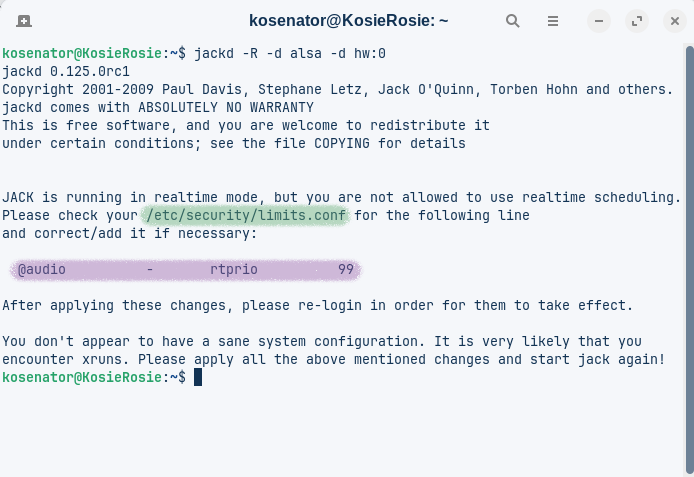
 Thank you. I forgot one of my regular navigation methods when I was still on Windows. I used both methods, now I need to find a way to turn the file open to writing.
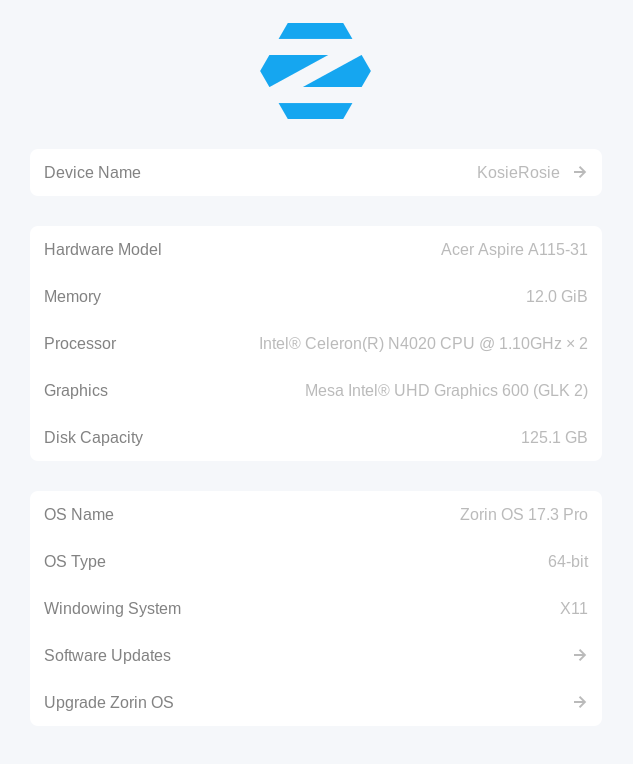
 Zorin 17 has pulseaudio, Zorin 18 pipewire.