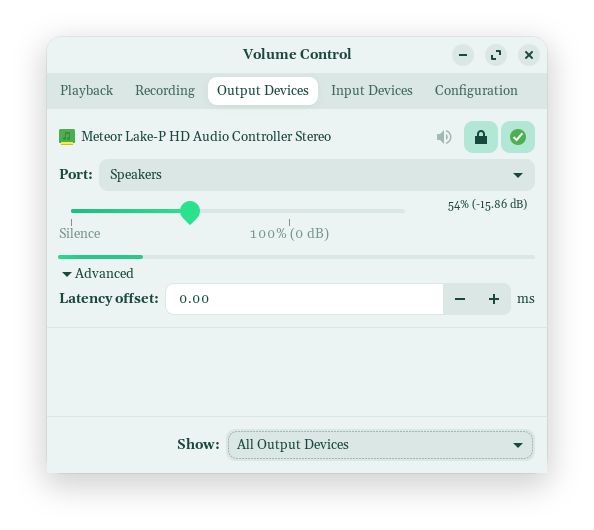
Good afternoon. I'm new here, and new-ish to Zorin having dipped my toes into Mint, Fedora, Ubuntu. I dual boot my laptop - above with Windows 11. I have sound via Windows. I do not have sound via Zonrin 17.3 OS Core, via the laptop speakers, but I have sound via a blue-tooth speaker and my headphones.
My laptop is new, with a Intel® Core™ Ultra 7 155U × 14 processor. I believe that my laptop is too new to have the correct drivers for sound via the speakers (or that the updated drivers don't exist), but I'd appreciate some confirmation from those more in the know than little old me.
Ah new laptop. Me thinks your sound issues may possibly be due to the linux kernel (6.8..) offered by Z17.3, not yet supporting your new hardware.
Did you have sound via speakers when you tried Mint, Fedora or Ubuntu? (they may have later linux kernels)
Do you know what soundcard/s your laptop has?
Note: Z18 is currently in beta testing and may be worth a try. Zorin are pretty good at alpha testing, so beta release should not be that buggy.
Another workround would be to install a later kernel. There are instructions on the forum that can help you with that task if interested. But first tell us about your soundcard/s.
Do You have Sound on the other Distro's taht You have named or isn't there Sound, too?
You could try it with installing PulseAudio Volume Control. It is a Program to set up Audio Input and Output. You can install it with sudo apt install pavucontrol
Because You are Dual-Booting: Are Secure Boot and Fast Boot in BIOS and Fast Start-Up in Windows disabled?
Does Your System run in Wayland or X11? You can check this in Settings>About. When it runs in Wayland, You could try it with switching to X11/Xorg. To do that, go to the Login Screen, not the Lock Screen. Simply reboot for that. On the Login Screen click on Your Profile so that the Password Field appears. when it is appeared, You should see in the bottom right Corner a Gear Icon. Click on it and choose the Option ''Zorin Desktop on Xorg'' and then log in.
I'm beginning to wonder if I should go back to Windows full-time. I'm dual booting at the moment, but if I'm going to have no sound without plugging in an external speaker or a blue-tooth one I might give up.
I was even thinking about upgrading to the Pro version of 18.0, but now . . . what's the point?
Exactly! While I am happy for the OP, that they were saved by the mighty ChatGPT, knowing the steps they took to correct the issue, will help others out there facing the same problem, and that, is the most helpful SOP.