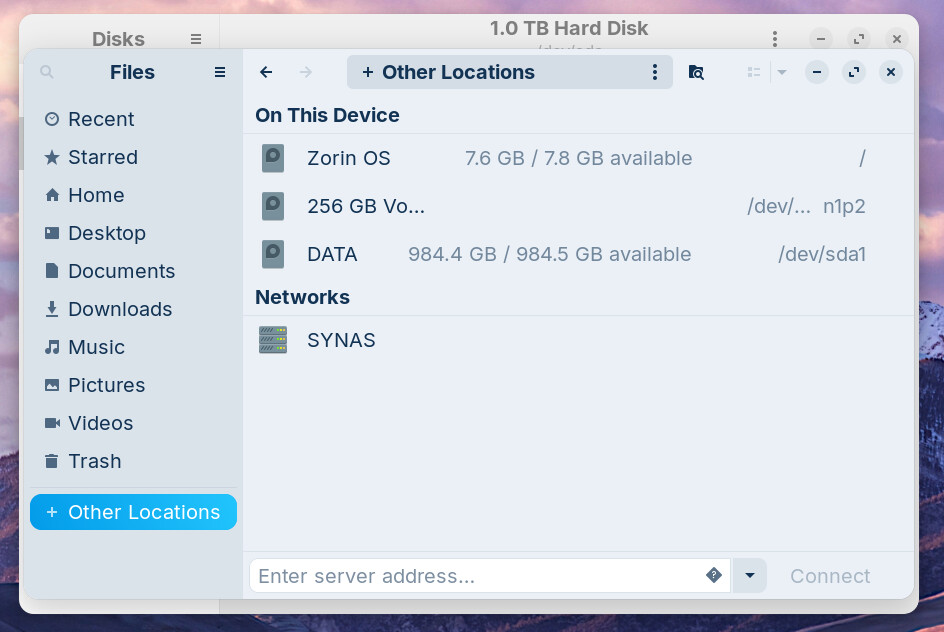
I have used the system tools update to Zorin 18.1 on a HP laptop. It was not successful and gave a white image with inserted msg of "Oh no, something went wrong. Please see your system administrator".
I have managed the re-install grub menu and have tried fsck via Rescuezilla, but it still gives the same message.
I will go get and post system properties for the HP.
zorin@zorin:~$ sudo fsck -f /dev/nvme0n1p2
fsck from util-linux 2.39.3
e2fsck 1.47.0 (5-Feb-2023)
Superblock last mount time is in the future.
(by less than a day, probably due to the hardware clock being incorrectly set)
Superblock last write time is in the future.
(by less than a day, probably due to the hardware clock being incorrectly set)
Pass 1: Checking inodes, blocks, and sizes
Pass 2: Checking directory structure
Pass 3: Checking directory connectivity
Pass 4: Checking reference counts
Pass 5: Checking group summary information
/dev/nvme0n1p2: 516053/15597568 files (0.3% non-contiguous), 10927431/62383360 blocks
zorin@zorin:~$
So, You wanted to Upgrade from Zorin 17 to 18, yes? And You used the Zorin OS Upgrader for that, yes? Were there any Error during the Upgrade Process or did it run fine? Are Secure Boot and Fast Boot in BIOS disabled? If Windows is still installed: Is Fast Start-Up in Windows disabled?
Laptop was already Zorin and no windows dual boot. I didn't disable fast boot so my bad there, though I would only need to do that on original windows machine.
The error message "Oh no, something went wrong. Please see your system admin" (or very similar) is a generic GNOME Shell crash or upgrade failure screen in Zorin OS. It commonly appears after a failed or interrupted upgrade, especially during major point releases like moving from Zorin 18 to 18.1 (released mid-April 2026).
With the Upgrader Tool, yes. But I'm now a bit irritated. Maybe I understood You wrong. You were on Zorin 18 and You wanted simply get the 18.1 Point Release, yes? This should simply come over the normal Updates. So, there is no special Way You need to go.
It may have been Zorin 17.1 Core. I remember looking at the bottom Dash which was squared, not rounded. I was looking after an old lady friend in a high stress environment, and was in-between hospital visits.
Creo que he dado con el problema de este chico el quere pasar de Zorin 17 a zorin 18.1 Perfecto primero debes reducir el espacio donde ponde DATA digamos ofrecele 900 Gb y el de zorin aumentar un poco lo que sacaste de DATA darselo a zorin ya que cuando se hace esa trancicion necesita cierta capacidad para hacerlo yo por suerte he dedicado 1 Tb externo con solo Reninciar mi PC y presionar varias veces F11 Dual Boot y carga zorin desde ahi y me va fenomental asi asi no interactua con windows 11 pro asi que amigo Luciano o como te llames ampliale la capacidad veo que tienes 7.8Gb total dale al menos 20 Gb todo sistema necesita un margen es decir que tenga algo de 30Gb totales y deberia ir sin problemas .. creo yo..
I can't really relate to this, as this is not a dual boot machine. There doesn't seem to be any shortage of data space indicated? I have an issue with the BIOS screen being really dull to read, plus the recovery screen being dull plus too tiny to read without me using a magnifying glass. If someone knows how to make the screen brighter in BIOS and recovery mode text also bigger, then I am open to suggestions?