Non-stop flickering of taskbar / windows' title bars

Several times a day, a rather annoying occurrence seems to .. occur? Taskbar goes bonkers, and rapidly (5-10 times a second) tries to hide/show itself again. Quite an eye sore, to be completely honest.

Somewhat related seems to be the issue of the title bars for certain windows - especially the ones concerning the apps I'm developing myself. When maximized, some times the title bar of it disappears completely. Some times it goes into endless flickering, similar to what the taskbar issue. When not maximized, at times the window seems to have no idea whether it's supposed to stay in the back- vs foreground: as evident by the titlebar itself flicking into grayish/unfocused mode and back, with the exact same frequency.

The workaround for the taskbar, for now, is to try to interact with it in some way. Doesn't always help, but trying to open/close different windows more often than not helps. For windows, un/maximizing and moving it around works fine.

I can't quite seem to get to the bottom of what in the world would be responsible for this sort of behaviour, though. Is it an issue with GNOME itself? The extension responsible for the taskbar alone? A mix of the two, something else entirely?

Welcome to the Forum!

  • Are Secure Boot and Fast Boot in BIOS disabled?
  • If Windows is still installed: Is Fast Start-Up in Windows disabled?
  • What Graphics Card do You have? If Nvidia: What Driver is in use?
  • Does Your System run in Wayland or X11? You can check that with the Terminal Command echo $XDG_SESSION_TYPE
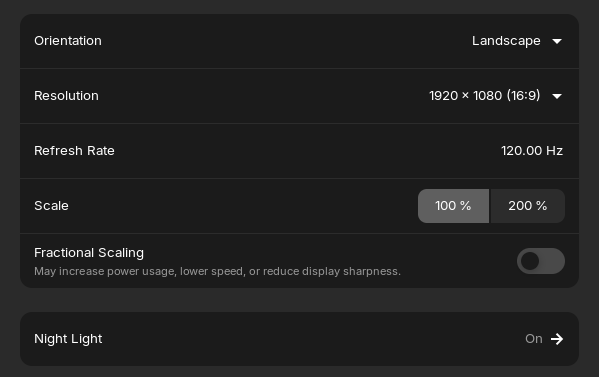
  • How are Resolution and Refresh Rate set up?
  • Is Fractional Scaling active?
  • Do You have any Third-Party Gnome Extensions installed?
  • Do You run in Kernel 6.17 or 6.14? You can check that with uname -r

Thanks for the warm welcome.

They are.

Not any longer.

from `nvidia-smi`
+-----------------------------------------------------------------------------------------+
| NVIDIA-SMI 580.126.09             Driver Version: 580.126.09     CUDA Version: 13.0     |
+-----------------------------------------+------------------------+----------------------+
| GPU  Name                 Persistence-M | Bus-Id          Disp.A | Volatile Uncorr. ECC |
| Fan  Temp   Perf          Pwr:Usage/Cap |           Memory-Usage | GPU-Util  Compute M. |
|                                         |                        |               MIG M. |
|=========================================+========================+======================|
|   0  NVIDIA GeForce GTX 1050 Ti     Off |   00000000:01:00.0 Off |                  N/A |
| N/A   42C    P8            N/A  / 5001W |       5MiB /   4096MiB |      0%      Default |
|                                         |                        |                  N/A |
+-----------------------------------------+------------------------+----------------------+

+-----------------------------------------------------------------------------------------+
| Processes:                                                                              |
|  GPU   GI   CI              PID   Type   Process name                        GPU Memory |
|        ID   ID                                                               Usage      |
|=========================================================================================|
|    0   N/A  N/A            1940      G   /usr/lib/xorg/Xorg                        4MiB |
+-----------------------------------------------------------------------------------------+

I'm on X11, heard it has better support for NVidia drivers.

All is pretty, I think - didn't change a single thing since installation:

Nope, only what comes out of the box with the default Core image.

Kernel version: 6.17.0-14-generic

Okay, because we had here some Issues with this Kernel, I would suggest to try it with booting in the older 6.14 Kernel. To do that, choose on the GRUB Menu ''Advanced Optiones'' and there take the one with the 6.14 Kernel. Then check if it behaves right.