Whenever I turn on my laptop
It seems like it can’t connect to WiFi at all but when I restart it
It works
Here’s the video of issue I’m having
Hi and welcome.
When I visit your link it says video uploading.
Please open a terminal and copy and paste the following command by clicking on the clipboard icon to the right of the command, then in terminal, right-click and paste:
sudo lspci | grep -i wireless
and post back the results.
Weird I was sure it was working
Hmm lemme send another then
Welcome to the Forum!
- Are Secure Boot and Fast Boot in BIOS disabled?
- If Windows is installed: Is Fast Start-Up in Windows disabled?
- Does You System run in Wayland or X11? You can check that with the Terminal Command
echo $XDG_SESSION_TYPEand when it should run in Wayland, I would suggest to try it with switching to X11/Xorg. To do that, go to the Login Screen. Click on Your Profile so that the Password Field appears. When it is appeared, You should see a Gear Icon in the bottom right Corner. Click on it and choose ''Zorin Desktop on Xorg'' and then log in. - Could You post the Output of
sudo lshw -C networkandrfkill listplease?
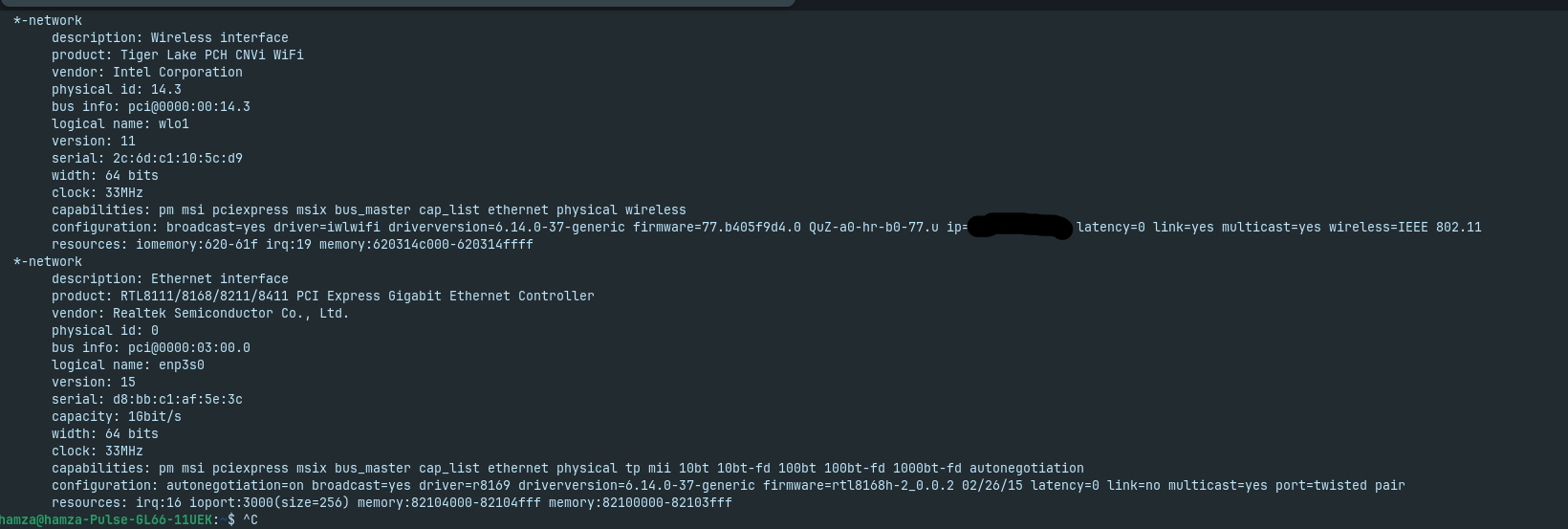
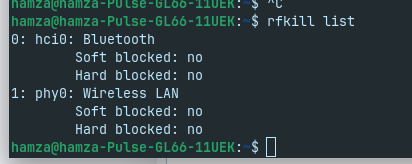
Okay and what is with:
You mean these?
Also not sure what those sessions are
I’m new to zorin instead of making posts back to back is it possible to message you? As I have more issues other than this
Also as for the video is it me or isn’t this some kind of lag when switching to dark/light mode
I would see it; it switches from light to dark entirely. Maybe not in the most visual aesthetic Way but it looks normal for me.
Then You can open for this a new Thread here when You have more Issues. that is no Problem. And when it is public, it can be seen by more People and then can offer Help and Advice.
What I now have seen from Your Pictures:
- Your System runs in X11. So, that is okay. Wayland and X11/Xorg are Display Protocols. Wayland is a newer Standard but can have/cause some Issues. X11/Xorg is older but a bit more reliable. Short answer.
- Secure Boot and Fast Boot in BIOS are disabled. that is fine, to
- But Fast Start-Up in Windows is enabled:
(the first Option)
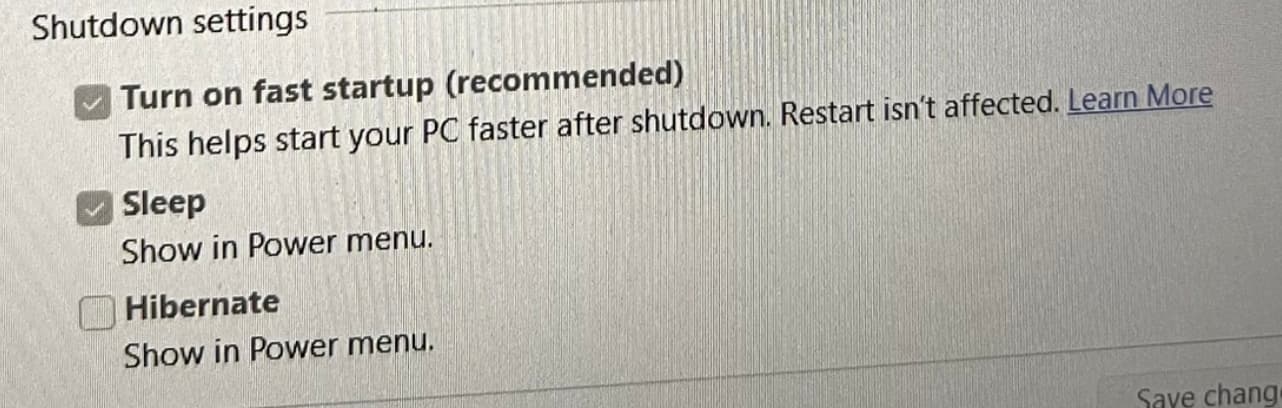
To disable it, click above on:

Then the Option will be changeable.
will do
So I tried aaaaaand
As you can see I still have the same darn issue
do i maybe instead just reinstall zorin and maybe you'd assist me with it
or if i can find someone to help
You could try it with a fresh Install when You want do that.
- Secure Boot and Fast Boot are already disabled. So, that is fine.
- Fast Start-Up in Windows is also disabled now. So, fine too.
- You could check if You BIOS is in UEFI or Legacy Mode.
- Because You have Windows, I can recommend to use Rufus for creating the Bootstick. Here You have the Option ''Parition Sheme''. Choose there GPT for Your UEFI BIOS.
- Then start the Bootstick. I would suggest to take the first Option (Try or install Zorin) without the Graphics Drivers. If You should have an Nvidia Card, You can install the Driver for it later.
- For Steam, I would suggest to take the Version from Steam directly:
Steam, The Ultimate Online Game Platform
the issue isnt because of steam
and also i need someone to be there with me as i'm new to all this i just dont want to break my computer is all 
Your device (tiger Lake Intel) shows that the driver is loaded and attached.
Broadcast is "yes."
So, does your computer have a physical switch, on the keyboard, etc, that sets Airplane mode or Switches Wifi off at the switch?
These are pretty common for quickly cutting off access on notebook computers, due to access on shared networks.
If that switch or key has accidentally been bumped... You might not be aware of it blocking your Wifi.
When I turn on the switch for airplane mode, the Wi-Fi on my computer stays off permanently, but here the Wi-Fi works after a reboot.
I wonder if it might help to disable energy-saving features for the WLAN card
or to run
sudo modprobe -r iwlwifi &&
sudo modprobe iwlwifi
If the command doesn't work try to run
sudo modprobe -r iwlwifi
before you go into suspend, and after suspend
sudo modprobe iwlwifi
If it doesn't solve the problem, try it with
sudo modprobe -r iwlmvm iwlwifi
sudo modprobe iwlmvm iwlwifi
or
sudo modprobe -r iwlmld iwlwifi
sudo modprobe iwlmld iwlwifi
If the commands work, you can create a script which runs the commands automatically after suspend.
In archlinux forum I found a script maybe it could help.
#!/bin/sh

case "$1" in
  pre)
    rfkill block wifi
    modprobe -r iwlwifi
    ;;
  post)
    modprobe iwlwifi
    rfkill unblock wifi
    ;;
esac
(I removed iwlmld from the script, but you can add iwlmld or iwlmvm in both commands - pre and post - additionally to iwlwifi if you need them). It should also work without the rfkill lines.
I'm not sure if you need to add sudo to the commands in the script because I'm not very familar with scripts.
This topic was automatically closed 90 days after the last reply. New replies are no longer allowed.