I switched from Windows to Zorin OS just a few weeks ago. I’m actually really happy with it and have been able to fix most of my issues. Then I had to join a Zoom meeting. That worked fine, but I couldn’t share my screen—or rather, when sharing my screen all I could see was a black screen with my mouse cursor. A quick search told me that I needed to switch dektop—Wayland wasn’t working, but Xorg was. Since I was in a hurry, I didn’t look into the difference between Wayland and Xorg and, to be true, I still do not understand...
Zoom worked right away, and everything was fine.
Then I shut down my PC, and the next day I wanted to join another Zoom meeting, so I booted up the PC.
The main monitor wasn’t recognized anymore (HDMI); only the smaller one via VGA/DVI worked.
I don’t have a network connection, so I can’t even check under “Network” to see if the PC is capable of connecting at all.
No speakers were found. After a few reboots, the large screen worked briefly, but only at a very low resolution.
It looks like Windows Safe Mode, but I can't get out of it.
I tried to fix the problem using AI.
Commands like nmcli device showed that I can only find "lo" and "lxcbr0," so no network card.
Another command showed me that I had switched back to Wayland, but neither Xorg nor Wayland are working any better.
My data and applications are still installed, so I don't want to completely reinstall my system. Besides, I don't understand how changing my desktop could make such a big difference.
Does anyone have any idea how I managed to mess up my system like this, and what I need to do to fix it?
You are on the right track; It cannot. It is not possible that switching to Xorg can cause these issues.
So, from this we must conclude that there is another cause.
No NIC, no audio, GPU stack minimal - this looks more like Secure Boot being enabled in BIOS or a Kernel failure. You can disable Secure Boot in your EFI Settings.
What seems most likely: A software Upgrade (Probably including 6.17 kernel) occurred, but you did not see the effects until you rebooted in order to login on Xorg.
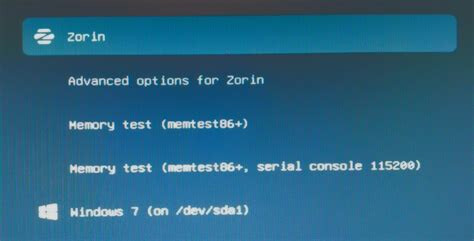
From the Grub Menu - can you select the Zorin on 6.14 kernel option and try booting from it?
If that is still no good - can you list your system specs/hardware?
Good morning guys, thank you for your fast answers and warm welcome.
Secure Boot was actually enabled. To disable it in the ASUS UEFI BIOS, I had to delete my keys.
Secure Boot and Fast Boot are now disabled. However, this hasn't changed anything in this case.
@zabadabadoo, the display looks exactly the same as before, including shortcuts and the wallpaper. (Of course, this is different from Windows.)
@Ponce-De-Leon, to be honest, I'm not sure exactly what I downloaded. I think it was https://zoom.us/download?os=linux and I chose Ubuntu and 64-bit.
The installation and first run worked. How can I post my hardware specifications here? I don't have internet access on the computer in question.
I switched to Xorg by logging out, clicking the gear icon in the bottom-right corner, and then logging back in.
When I do that now, I have the option to choose between Zorin Desktop and Zorin Desktop (Xorg).
@aravisian, the Secure Boot issue seemed like the most likely cause to me, but that wasn't the problem after all.
How can I select “Zorin on 6.14”?
I only saw that I could select my hard drive as “Force...” or “Ubuntu (Force)” as the first boot option. But that didn't change anything.
Also, back to you—how can I post the specs? I'm on a different computer—what do I need to do and take a picture of?
Here’s something else I remembered that happened in the meantime.
I installed a new switch; I used to have an HDMI and USB switch/hub (laptop and computer on the same screen and keyboard). Now this new one switch handles that. I briefly removed the M.2 drive to install a cooling case and then screwed it back in.
I also removed the switch at one point and connected the peripherals directly, but that didn’t change anything either.
How do I find this “grub” menu?
I think I know what you mean—it should be something like “Boot from USB,” “Install Zorin,” or “Zorin Advanced Options,” right?
But I can access the BIOS, and after that, Zorin boots directly to the login screen, where I don't see a “grub” menu.
Strangely enough, my second monitor isn't being recognized.
So I connected it as the only monitor, but it still wasn't recognized.
So only my monitor is recognized via DVI/VGA, not via HDMI.
The NVIDIA 580 drivers are installed and selected. Before this issue occurred, both monitors were working. On the laptop, the monitor works via HDMI.
I did update and upgrade within old kernel. After the restart, I choose kernel 17 (I think bevore the update 16 was newest) and now everythings looks great again.
Second display works, resolution is fine, ethernet works...
Part of the trouble here is Wayland being pushed before it is ready and that it is well known that it is not ready.
Waydroid, as the name shows, was always built by its developers to only work on Wayland.
Kernel problems, are the bane of my existence, on Linux with older computers. A family member has my old computer from 2012, running POP OS, and the only game he can run on it, is now Half Life 2, the computer will no longer launch any other games, and the computer will only boot off of 1 kernel, out of 20 kernels installed by POP OS. The machine or OS is a literal nightmare.
My machine is fairing much better, cause its newer, and I'm running an older version of Zorin OS, I have a newer GPU, and am having no serious kernel problems, and I'm running in Xorg. I'm happy that you found a resolution in the end, that is excellent!
Tried to boot System today and.... Nothing!
System doesn't boot.
I see "Start zorin" and "Start zorin with advanced options", but it doesn't matter what i choose, Display is Black after it, and Display "Power LED" blinks, like "nothing connected".
Very cool OS, second time I can not use my Desktop