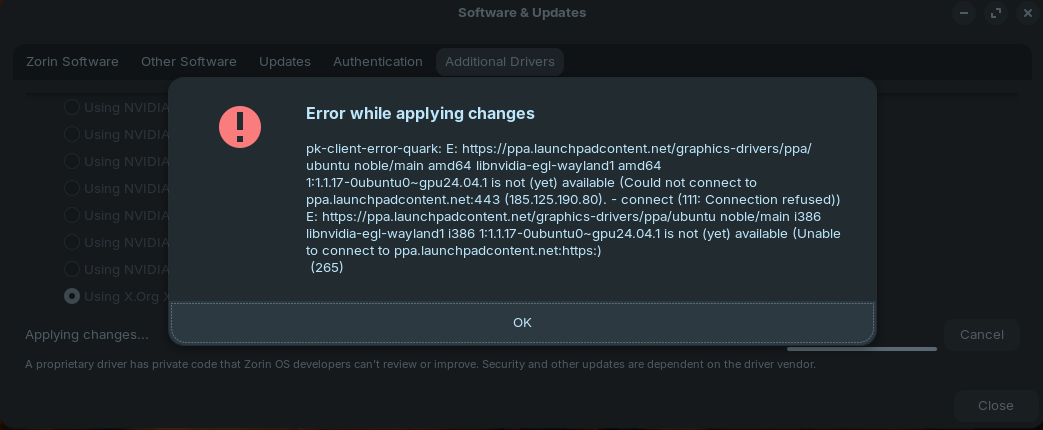
So it doesn't work, yesterday I tried when the system installed the broken beta driver 595, to change it to 590, but the kernel prioritizes 595, and for some reason it installed no more there were still options 570 and lower.
there was no 590 or 580 which are the most stable today.
with a 5080 video card he clearly doesn't use the pc as a server, especially when talking about games.
You install the 590 driver and you get 595. This is 100% because I personally checked it yesterday.
`vkedaxvip@vkedaxvip-MS-7B51:~$ sudo apt install --reinstall nvidia-driver-590 nvidia-dkms-590 nvidia-utils-590
Зчитування переліків пакунків... Виконано
Побудова дерева залежностей... Виконано
Зчитування інформації про стан... Виконано
Буде встановлено такі додаткові пакунки:
libnvidia-cfg1-595 libnvidia-common-595 libnvidia-compute-595 libnvidia-decode-595 libnvidia-encode-595 libnvidia-extra-595 libnvidia-fbc1-595 libnvidia-gl-595 nvidia-compute-utils-595
nvidia-dkms-595 nvidia-driver-595 nvidia-firmware-595-595.58.03 nvidia-kernel-common-595 nvidia-kernel-source-595 nvidia-utils-595 xserver-xorg-video-nvidia-595
Рекомендовані пакунки:
libnvidia-compute-595:i386 libnvidia-decode-595:i386 libnvidia-encode-595:i386 libnvidia-fbc1-595:i386 libnvidia-gl-595:i386
НОВІ пакунки, які будуть встановлені:
libnvidia-cfg1-595 libnvidia-common-595 libnvidia-compute-595 libnvidia-decode-595 libnvidia-encode-595 libnvidia-extra-595 libnvidia-fbc1-595 libnvidia-gl-595 nvidia-compute-utils-595
nvidia-dkms-590 nvidia-dkms-595 nvidia-driver-590 nvidia-driver-595 nvidia-firmware-595-595.58.03 nvidia-kernel-common-595 nvidia-kernel-source-595 nvidia-utils-590 nvidia-utils-595
xserver-xorg-video-nvidia-595
оновлено 0, встановлено 19 нових, 0 відмічено для видалення і 1 не оновлено.
Необхідно завантажити 386 MB архівів.
Після цієї операції об'єм зайнятого дискового простору зросте на 1 055 MB.
Бажаєте продовжити? [Y=ТАК/n=ні] Y
Отр:1 Index of /ubuntu/ noble-updates/multiverse amd64 nvidia-firmware-595-595.58.03 amd64 595.58.03-0ubuntu0.24.04.1 [74,9 MB]
Отр:2 Index of /ubuntu/ noble-updates/multiverse amd64 nvidia-kernel-common-595 amd64 595.58.03-0ubuntu0.24.04.1 [824 kB]
Отр:3 Index of /ubuntu/ noble-updates/multiverse amd64 libnvidia-cfg1-595 amd64 595.58.03-0ubuntu0.24.04.1 [158 kB]
Отр:4 Index of /ubuntu/ noble-updates/multiverse amd64 libnvidia-common-595 amd64 595.58.03-0ubuntu0.24.04.1 [18,1 kB]
Отр:5 Index of /ubuntu/ noble-updates/multiverse amd64 libnvidia-compute-595 amd64 595.58.03-0ubuntu0.24.04.1 [86,0 MB]
Отр:6 Index of /ubuntu/ noble-updates/multiverse amd64 libnvidia-decode-595 amd64 595.58.03-0ubuntu0.24.04.1 [3 070 kB]
Отр:7 Index of /ubuntu/ noble-updates/multiverse amd64 libnvidia-encode-595 amd64 595.58.03-0ubuntu0.24.04.1 [119 kB]
Отр:8 Index of /ubuntu/ noble-updates/multiverse amd64 libnvidia-extra-595 amd64 595.58.03-0ubuntu0.24.04.1 [77,2 kB]
Отр:9 Index of /ubuntu/ noble-updates/multiverse amd64 libnvidia-fbc1-595 amd64 595.58.03-0ubuntu0.24.04.1 [94,0 kB]
Отр:10 Index of /ubuntu/ noble-updates/multiverse amd64 libnvidia-gl-595 amd64 595.58.03-0ubuntu0.24.04.1 [139 MB]
Отр:11 Index of /ubuntu/ noble-updates/multiverse amd64 nvidia-compute-utils-595 amd64 595.58.03-0ubuntu0.24.04.1 [135 kB]
Отр:12 Index of /ubuntu/ noble-updates/multiverse amd64 nvidia-kernel-source-595 amd64 595.58.03-0ubuntu0.24.04.1 [79,6 MB]
Отр:13 Index of /ubuntu/ noble-updates/multiverse amd64 nvidia-dkms-595 amd64 595.58.03-0ubuntu0.24.04.1 [37,0 kB]
Отр:14 Index of /ubuntu/ noble-updates/restricted amd64 nvidia-dkms-590 amd64 590.48.01-0ubuntu0.24.04.5 [12,1 kB]
Отр:15 Index of /ubuntu/ noble-updates/multiverse amd64 nvidia-utils-595 amd64 595.58.03-0ubuntu0.24.04.1 [609 kB]
Отр:16 Index of /ubuntu/ noble-updates/multiverse amd64 xserver-xorg-video-nvidia-595 amd64 595.58.03-0ubuntu0.24.04.1 [1 207 kB]
Отр:17 Index of /ubuntu/ noble-updates/multiverse amd64 nvidia-driver-595 amd64 595.58.03-0ubuntu0.24.04.1 [507 kB]
Отр:18 Index of /ubuntu/ noble-updates/restricted amd64 nvidia-driver-590 amd64 590.48.01-0ubuntu0.24.04.5 [12,1 kB]
Отр:19 Index of /ubuntu/ noble-updates/restricted amd64 nvidia-utils-590 amd64 590.48.01-0ubuntu0.24.04.5 [12,1 kB]
Отримано 386 MB за 19сB (20,4 MB/s)
Вибір раніше не обраного пакунку nvidia-firmware-595-595.58.03.
(Читання бази даних ... на дану мить встановлено 363525 файлів та каталогів.)
Приготування до розпакування .../00-nvidia-firmware-595-595.58.03_595.58.03-0ubuntu0.24.04.1_amd64.deb ...
Розпакування nvidia-firmware-595-595.58.03 (595.58.03-0ubuntu0.24.04.1)...
Вибір раніше не обраного пакунку nvidia-kernel-common-595.
Приготування до розпакування .../01-nvidia-kernel-common-595_595.58.03-0ubuntu0.24.04.1_amd64.deb ...
Розпакування nvidia-kernel-common-595 (595.58.03-0ubuntu0.24.04.1)...
Вибір раніше не обраного пакунку libnvidia-cfg1-595:amd64.
Приготування до розпакування .../02-libnvidia-cfg1-595_595.58.03-0ubuntu0.24.04.1_amd64.deb ...
Розпакування libnvidia-cfg1-595:amd64 (595.58.03-0ubuntu0.24.04.1)...
Вибір раніше не обраного пакунку libnvidia-common-595.
Приготування до розпакування .../03-libnvidia-common-595_595.58.03-0ubuntu0.24.04.1_amd64.deb ...
Розпакування libnvidia-common-595 (595.58.03-0ubuntu0.24.04.1)...
Вибір раніше не обраного пакунку libnvidia-compute-595:amd64.
Приготування до розпакування .../04-libnvidia-compute-595_595.58.03-0ubuntu0.24.04.1_amd64.deb ...
Розпакування libnvidia-compute-595:amd64 (595.58.03-0ubuntu0.24.04.1)...
Вибір раніше не обраного пакунку libnvidia-decode-595:amd64.
Приготування до розпакування .../05-libnvidia-decode-595_595.58.03-0ubuntu0.24.04.1_amd64.deb ...
Розпакування libnvidia-decode-595:amd64 (595.58.03-0ubuntu0.24.04.1)...
Вибір раніше не обраного пакунку libnvidia-encode-595:amd64.
Приготування до розпакування .../06-libnvidia-encode-595_595.58.03-0ubuntu0.24.04.1_amd64.deb ...
Розпакування libnvidia-encode-595:amd64 (595.58.03-0ubuntu0.24.04.1)...
Вибір раніше не обраного пакунку libnvidia-extra-595:amd64.
Приготування до розпакування .../07-libnvidia-extra-595_595.58.03-0ubuntu0.24.04.1_amd64.deb ...
Розпакування libnvidia-extra-595:amd64 (595.58.03-0ubuntu0.24.04.1)...
Вибір раніше не обраного пакунку libnvidia-fbc1-595:amd64.
Приготування до розпакування .../08-libnvidia-fbc1-595_595.58.03-0ubuntu0.24.04.1_amd64.deb ...
Розпакування libnvidia-fbc1-595:amd64 (595.58.03-0ubuntu0.24.04.1)...
Вибір раніше не обраного пакунку libnvidia-gl-595:amd64.
Приготування до розпакування .../09-libnvidia-gl-595_595.58.03-0ubuntu0.24.04.1_amd64.deb ...
dpkg-query: шаблону libnvidia-gl-550 не відповідає жодний пакунок
Розпакування libnvidia-gl-595:amd64 (595.58.03-0ubuntu0.24.04.1)...
Вибір раніше не обраного пакунку nvidia-compute-utils-595.
Приготування до розпакування .../10-nvidia-compute-utils-595_595.58.03-0ubuntu0.24.04.1_amd64.deb ...
Розпакування nvidia-compute-utils-595 (595.58.03-0ubuntu0.24.04.1)...
Вибір раніше не обраного пакунку nvidia-kernel-source-595.
Приготування до розпакування .../11-nvidia-kernel-source-595_595.58.03-0ubuntu0.24.04.1_amd64.deb ...
Розпакування nvidia-kernel-source-595 (595.58.03-0ubuntu0.24.04.1)...
Вибір раніше не обраного пакунку nvidia-dkms-595.
Приготування до розпакування .../12-nvidia-dkms-595_595.58.03-0ubuntu0.24.04.1_amd64.deb ...
Розпакування nvidia-dkms-595 (595.58.03-0ubuntu0.24.04.1)...
Вибір раніше не обраного пакунку nvidia-dkms-590.
Приготування до розпакування .../13-nvidia-dkms-590_590.48.01-0ubuntu0.24.04.5_amd64.deb ...
Розпакування nvidia-dkms-590 (590.48.01-0ubuntu0.24.04.5)...
Вибір раніше не обраного пакунку nvidia-utils-595.
Приготування до розпакування .../14-nvidia-utils-595_595.58.03-0ubuntu0.24.04.1_amd64.deb ...
Розпакування nvidia-utils-595 (595.58.03-0ubuntu0.24.04.1)...
Вибір раніше не обраного пакунку xserver-xorg-video-nvidia-595.
Приготування до розпакування .../15-xserver-xorg-video-nvidia-595_595.58.03-0ubuntu0.24.04.1_amd64.deb ...
Розпакування xserver-xorg-video-nvidia-595 (595.58.03-0ubuntu0.24.04.1)...
Вибір раніше не обраного пакунку nvidia-driver-595.
Приготування до розпакування .../16-nvidia-driver-595_595.58.03-0ubuntu0.24.04.1_amd64.deb ...
Розпакування nvidia-driver-595 (595.58.03-0ubuntu0.24.04.1)...
Вибір раніше не обраного пакунку nvidia-driver-590.
Приготування до розпакування .../17-nvidia-driver-590_590.48.01-0ubuntu0.24.04.5_amd64.deb ...
Розпакування nvidia-driver-590 (590.48.01-0ubuntu0.24.04.5)...
Вибір раніше не обраного пакунку nvidia-utils-590.
Приготування до розпакування .../18-nvidia-utils-590_590.48.01-0ubuntu0.24.04.5_amd64.deb ...
Розпакування nvidia-utils-590 (590.48.01-0ubuntu0.24.04.5)...
Налаштовування nvidia-kernel-source-595 (595.58.03-0ubuntu0.24.04.1) ...
Налаштовування nvidia-firmware-595-595.58.03 (595.58.03-0ubuntu0.24.04.1) ...
Налаштовування nvidia-kernel-common-595 (595.58.03-0ubuntu0.24.04.1) ...
update-initramfs: deferring update (trigger activated)
Created symlink /etc/systemd/system/systemd-hibernate.service.wants/nvidia-hibernate.service → /usr/lib/systemd/system/nvidia-hibernate.service.
Created symlink /etc/systemd/system/systemd-suspend.service.wants/nvidia-resume.service → /usr/lib/systemd/system/nvidia-resume.service.
Created symlink /etc/systemd/system/systemd-hibernate.service.wants/nvidia-resume.service → /usr/lib/systemd/system/nvidia-resume.service.
Created symlink /etc/systemd/system/systemd-suspend-then-hibernate.service.wants/nvidia-resume.service → /usr/lib/systemd/system/nvidia-resume.service.
Created symlink /etc/systemd/system/systemd-suspend.service.wants/nvidia-suspend.service → /usr/lib/systemd/system/nvidia-suspend.service.
Налаштовування libnvidia-extra-595:amd64 (595.58.03-0ubuntu0.24.04.1) ...
Налаштовування libnvidia-cfg1-595:amd64 (595.58.03-0ubuntu0.24.04.1) ...
Налаштовування xserver-xorg-video-nvidia-595 (595.58.03-0ubuntu0.24.04.1) ...
Налаштовування libnvidia-common-595 (595.58.03-0ubuntu0.24.04.1) ...
Налаштовування nvidia-dkms-595 (595.58.03-0ubuntu0.24.04.1) ...
update-initramfs: deferring update (trigger activated)
INFO:Enable nvidia
DEBUG:Parsing /usr/share/ubuntu-drivers-common/quirks/lenovo_thinkpad
DEBUG:Parsing /usr/share/ubuntu-drivers-common/quirks/dell_latitude
DEBUG:Parsing /usr/share/ubuntu-drivers-common/quirks/put_your_quirks_here
Loading new nvidia-595.58.03 DKMS files...
Building for 6.17.0-23-generic
Building for architecture x86_64
Building initial module for 6.17.0-23-generic
Done.
nvidia.ko.zst:
Running module version sanity check.
-
Original module
- No original module exists within this kernel
-
Installation
- Installing to /lib/modules/6.17.0-23-generic/updates/dkms/
nvidia-modeset.ko.zst:
Running module version sanity check.
-
Original module
- No original module exists within this kernel
-
Installation
- Installing to /lib/modules/6.17.0-23-generic/updates/dkms/
nvidia-drm.ko.zst:
Running module version sanity check.
-
Original module
- No original module exists within this kernel
-
Installation
- Installing to /lib/modules/6.17.0-23-generic/updates/dkms/
nvidia-uvm.ko.zst:
Running module version sanity check.
-
Original module
- No original module exists within this kernel
-
Installation
- Installing to /lib/modules/6.17.0-23-generic/updates/dkms/
nvidia-peermem.ko.zst:
Running module version sanity check.
-
Original module
- No original module exists within this kernel
-
Installation
- Installing to /lib/modules/6.17.0-23-generic/updates/dkms/
depmod...
Налаштовування libnvidia-fbc1-595:amd64 (595.58.03-0ubuntu0.24.04.1) ...
Налаштовування libnvidia-compute-595:amd64 (595.58.03-0ubuntu0.24.04.1) ...
Налаштовування nvidia-dkms-590 (590.48.01-0ubuntu0.24.04.5) ...
Налаштовування libnvidia-gl-595:amd64 (595.58.03-0ubuntu0.24.04.1) ...
Налаштовування nvidia-utils-595 (595.58.03-0ubuntu0.24.04.1) ...
Налаштовування nvidia-compute-utils-595 (595.58.03-0ubuntu0.24.04.1) ...
info: Немає доступу до вказаного вами домашнього каталогу /nonexistent: No such file or directory
info: Вибір UID з проміжку з 100 до 999...
info: Вибір GID з проміжку з 100 до 999...
info: Додається системний користувач "nvidia-persistenced" (UID 122)...
info: Додається нова група "nvidia-persistenced" (GID 126)...
info: Додається новий користувач "nvidia-persistenced" (UID 122) з групою "nvidia-persistenced"...
info: Не створено `/nonexistent'.
Налаштовування libnvidia-decode-595:amd64 (595.58.03-0ubuntu0.24.04.1) ...
Налаштовування libnvidia-encode-595:amd64 (595.58.03-0ubuntu0.24.04.1) ...
Налаштовування nvidia-utils-590 (590.48.01-0ubuntu0.24.04.5) ...
Налаштовування nvidia-driver-595 (595.58.03-0ubuntu0.24.04.1) ...
Налаштовування nvidia-driver-590 (590.48.01-0ubuntu0.24.04.5) ...
Обробка тригерів initramfs-tools (0.142ubuntu25.8)...
update-initramfs: Generating /boot/initrd.img-6.17.0-23-generic
Обробка тригерів libc-bin (2.39-0ubuntu8.7)...
Обробка тригерів man-db (2.12.0-4build2)...
vkedaxvip@vkedaxvip-MS-7B51:~$ sudo update-initramfs -u
update-initramfs: Generating /boot/initrd.img-6.17.0-23-generic
vkedaxvip@vkedaxvip-MS-7B51:~$ `