...and...
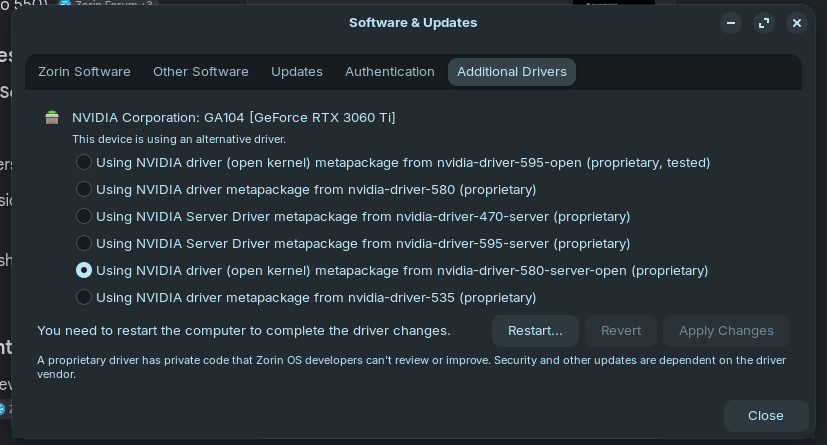
Yes! It worked! All back to normal now.  Thanks everyone!
Switching to XORG and updating the Graphics drivers appears to have worked in my case - Ubuntu Canonical must have been fixed.
...and...
Yes! It worked! All back to normal now. Thanks everyone!
Switching to XORG and updating the Graphics drivers appears to have worked in my case - Ubuntu Canonical must have been fixed.
No, they aren't. When one of them would be installed, You would have stand at the End [installed]
I have been using this system for quite a long time, since October 2025, but as practice has shown, Zorin was updated from 18 to 18.1 and some packages began to be displayed without keys, even when they are present, the system looks for them in another place, I figured it out well and here is how I fixed it, package signatures.
sudo apt update
= N: Signer missing from record...
Find the path to the key:
dpkg -L zorin-os-keyring
found out that it lies here: /etc/apt/trusted.gpg.d/zorin-os.gpg
Create a folder for new keys:
sudo mkdir -p /etc/apt/keyrings
Copy the key to a new location:
sudo cp /etc/apt/trusted.gpg.d/zorin-os.gpg /etc/apt/keyrings/zorin-os-archive-keyring.gpg
Open the configuration file:
sudo nano /etc/apt/sources.list.d/zorin.sources
You need to add a signature line, in each block:
Signed-By: /etc/apt/keyrings/zorin-os-archive-keyring.gpg
example:
Types: deb
URIs: Index of /stable/ Index of /patches/ >
Suites: noble
Components: main
Signed-By: /etc/apt/keyrings/zorin-os-archive-keyring.gpg
Types: deb
URIs: Index of /drivers/
Suites: noble
Components: main restricted
Signed-By: /etc/apt/keyrings/zorin-os-archive-keyring.gpg
Ctrl+O, Enter, Ctrl+X
Update package list:
sudo apt update
Check for available updates:
apt list --upgradable
The system has switched to a new configuration format — .sources (DEB822 format) instead of the old .list.
I was simply amazed by these unsigned packages, decided to sign them and handed them the official keys.
I had it like this..
N: Missing signer in sources.list(5) entry for 'Index of /stable/'
N: Missing signer in sources.list(5) entry for 'Index of /patches/'
N: Missing signer in sources.list(5) entry for 'Index of /apps/'
N: Missing signer in sources.list(5) entry for 'Index of /drivers/'
apt package manager. When it sees that a repository (such as drivers or stable) does not have a trusted key, it blocks installations and updates from that source for security reasons.
Security: Packages from the patches and stable repositories contain fixes for vulnerabilities. Without them, your system becomes open to threats.
I don't know why the developers didn't fix this, but this is also a nuance that I think everyone who installed 18 and the system switched to 18.1 noticed.
It shouldn't be neccessary to do that because this is the Default. Also when You do Stuff like that, You can implement the Signing in the .sources File instead of linking to the Key.
This method is better:
Code Cleanliness: The zorin.sources file remains short and clear. If you put the key itself in there, the file would stretch to 50+ lines of incomprehensible text for the average user. Officiality: You use the key directly from the official zorin-os-keyring package. If Zorin developers update this package, the file in /etc/apt/trusted.gpg.d/ will be updated automatically, and a copy in keyrings will always be at hand. Convenience: It is much easier for the average user to copy the file than to deal with converting keys to text format and inserting them into the config.
PS: As for keys and updates, this method will suit all users, and the keys are safe and will come from an official source and will be updated automatically.
here is a simple command and the new keys will be pulled into the desired folder))
keys do not change so often but it happens - as practice has shown.
sudo cp /etc/apt/trusted.gpg.d/zorin-os.gpg /etc/apt/keyrings/zorin-os-archive-keyring.gpg
please tell me in the system as I noticed earlier the standard 1024processes from the old days is still used.
example on a clean system:
ulimit -n
ulimit -Sn
ulimit -Hn
cat /proc/sys/fs/nr_open
There is a limitation in the system and a ceiling when Steam+Proton+Game may require more than the standard ceiling, say 1048576 files per 1 process.
the number of processes in the system will be 1024, then OMKill will occur!
especially when people play the game for a couple of hours.
I raised these limits for myself.
vkedaxvip@vkedaxvip-MS-7B51:~$ ulimit -n
65536
vkedaxvip@vkedaxvip-MS-7B51:~$ ulimit -Sn
65536
vkedaxvip@vkedaxvip-MS-7B51:~$ ulimit -Hn
65536
vkedaxvip@vkedaxvip-MS-7B51:~$ cat /proc/sys/fs/nr_open
2097152
vkedaxvip@vkedaxvip-MS-7B51:~$
sudo nano /etc/security/limits.conf
Scroll to the very bottom of the file and before the line # End of file add the following lines (instead of vkedaxvip, enter your username, if it is different).
 # End of file
vkedaxvip soft nofile 65536
vkedaxvip hard nofile 2097152

Important nuance for Systemd
Modern distributions (Ubuntu, Mint, Debian) often ignore limits.conf for graphical sessions. To make the limits work correctly for games, you need to make one more edit:
sudo nano /etc/systemd/user.conf
Find the line #DefaultLimitNOFILE= (remove the # at the beginning) and change it to:
DefaultLimitNOFILE=65536:2097152

Do the same in the file: sudo nano /etc/systemd/system.conf

we go on:
sudo nano /etc/pam.d/common-session

almost at the very end add..
session required        pam_limits.so
# end of pam-auth-update config

changing kernel priorities.
sudo nano /etc/sysctl.conf

at the very end add:
fs.file-max = 2097152
fs.nr_open = 2097152
I'M SPEAKIN' RIGHT NOW. IF YOU DON'T UNDERSTAND, DON'T DO ANYTHING!!!!!
I AM NOT RESPONSIBLE FOR YOUR ACTIONS. THIS IS FOR EXPERIENCED USERS ONLY!
sudo crontab -e
sudo crontab -e

# Очищення логів щонеділі
# 0 0 * * 0 journalctl --vacuum-size=500M
0 0 * * 0 /usr/bin/journalctl --vacuum-size=500M
#
# Очищення сміття від оновлень
# 0 12 * * 1 apt-get autoclean && apt-get autoremove -y
0 12 * * 1 /usr/bin/apt-get autoclean && /usr/bin/apt-get autoremove -y
#
# === ОБСЛУГОВУВАННЯ ФАЙЛОВИХ СИСТЕМ ===
# Оптимізація ВСІХ SSD (fstrim знайде всі ext4 розділи автоматично, щонеділі о 01:30)
# 30 1 * * 0 fstrim -va
30 1 * * 0 /usr/sbin/fstrim -va
#
# Швидка перевірка здоров'я дисків (щонеділі о 20:00)
# 0 20 * * 0 /usr/sbin/smartctl -a /dev/sda | grep -i "result"
# 0 20 * * 0 /usr/sbin/smartctl -a /dev/sdb | grep -i "result"
# 0 20 * * 0 /usr/sbin/smartctl -a /dev/sdc | grep -i "result"
#
# === ПЕРЕВІРКА ЗДОРОВ'Я SSD (sda, sdc, sde, sdf) ===
# Швидкий статус: PASSED/FAILED щонеділі о 20:00
0 20 * * 0 /usr/sbin/smartctl -H /dev/sda
0 20 * * 0 /usr/sbin/smartctl -H /dev/sdc
0 20 * * 0 /usr/sbin/smartctl -H /dev/sde
0 20 * * 0 /usr/sbin/smartctl -H /dev/sdf
#
# === ПЕРЕВІРКА ЗДОРОВ'Я HDD (sdb, sdd) ===
# Детальний звіт у файли (для HDD це важливо через бед-сектори)
0 20 * * 0 /usr/sbin/smartctl -A /dev/sdb > /home/vkedaxvip/Documents/HDD_2TB_report.txt
0 20 * * 0 /usr/sbin/smartctl -A /dev/sdd > /home/vkedaxvip/Documents/HDD_1TB_report.txt
#
# Швидке виправлення NTFS (HDD) раз на місяць
0 3 1 * * /usr/bin/ntfsfix -d /dev/sdb2
0 3 1 * * /usr/bin/ntfsfix -d /dev/sdd1
# Очищення оперативної 30-60-240хвилин
# */30 * * * * sync; echo 3 > /proc/sys/vm/drop_caches
# 0 * * * * sync; echo 3 > /proc/sys/vm/drop_caches
# 0 */4 * * * sync; echo 3 > /proc/sys/vm/drop_caches
#
# Оновлення Діскорд
@reboot sleep 30 && wget "https://discord.com/api/download?platform=linux&format=deb" -O /tmp/discord.deb && apt install /tmp/discord.deb -y
# @reboot sleep 30 && /usr/bin/wget "https://discord.com/api/download?platform=linux&format=deb" -O /tmp/discord.deb && /usr/bin/apt install /tmp/discord.deb -y && rm /tmp/discord.deb
I'M SPEAKIN' RIGHT NOW. IF YOU DON'T UNDERSTAND, DON'T DO ANYTHING!!!!!
I AM NOT RESPONSIBLE FOR YOUR ACTIONS. THIS IS FOR EXPERIENCED USERS ONLY!
sudo nano /etc/sysctl.conf
sudo nano /etc/sysctl.conf


# --- ПАМ'ЯТЬ ТА ВІРТУАЛІЗАЦІЯ (ДЛЯ STEAM,PROTON та інших) ---
# Вимкнення обмежень Split Lock (збільшує FPS у деяких іграх Steam)
# @reboot sysctl -w kernel.split_lock_mitigations=0
# Вимкнення обмежень Split Lock (Fix "запинань" у Proton)
kernel.split_lock_mitigate=0
# Дозволяє іграм (UE4/UE5) створювати величезну кількість областей пам'яті (Fix вильотів)
vm.max_map_count=2147483647
# Пріоритет використання Swap (90 = активне стиснення даних у zram для звільнення RAM)
vm.swappiness=90
# Вимикає агресивну дефрагментацію пам'яті у фоні (зменшує статери/фризи в іграх)
vm.compaction_proactiveness=0
# Дозволяє процесам швидше отримувати доступ до заблокованих сторінок пам'яті
vm.page_lock_unfairness=1
# Забороняє систему намагатися звільнити пам'ять за межами поточного вузла
vm.zone_reclaim_mode=0
# Змушує систему довше зберігати кеш інок та файлових структур у RAM (VFS — Virtual File System)
vm.vfs_cache_pressure = 50

# --- ФАЙЛОВА СИСТЕМА ТА ЛІМІТИ ---
# Максимальна кількість файлів, які система може відкрити (для Proton)
fs.file-max = 2097152
fs.nr_open = 2097152
# --- ОПТИМІЗАЦІЯ ЗАПИСУ НА ДИСК ---
# Починати запис даних на диск раніше (зменшує ризик фризів при фонових записах)
vm.dirty_background_ratio = 5
# Максимальний відсоток пам'яті під "брудні" дані перед примусовим записом
vm.dirty_ratio = 10

# --- МЕРЕЖА ТА ОНЛАЙН (НИЗЬКИЙ ПІНГ ТА ДОСТУП) ---
# Алгоритм керування чергами пакетів для зменшення затримок
net.core.default_qdisc = fq_codel
# Вмикає режим низької затримки для TCP-з'єднань
net.ipv4.tcp_low_latency = 1
# Дозволяє іграм використовувати порт 443 (без root-прав)
# net.ipv4.ip_unprivileged_port_start = 443
# --- ДОДАТКОВА МЕРЕЖЕВА СТАБІЛЬНІСТЬ ---
# Збільшує максимальну чергу вхідних пакетів (корисно для онлайн-ігор)
net.core.netdev_max_backlog = 5000
# Пришвидшує встановлення повторних TCP-з'єднань (швидший запуск лаунчерів та вебу)
net.ipv4.tcp_fastopen = 3
RAM is a computer that works 24/7 during the day, so it's strong and some games work around the clock.
vkedaxvip@vkedaxvip-MS-7B51:~$ free -h
               загалом      використ.   вільна    спільна буфери/кеш   дост.
Пам.:           31Gi       9,5Gi       5,2Gi       676Mi        17Gi        21Gi
Своп.:          23Gi       1,5Gi        22Gi
vkedaxvip@vkedaxvip-MS-7B51:~$ zramctl
NAME       ALGORITHM DISKSIZE   DATA  COMPR  TOTAL STREAMS MOUNTPOINT
/dev/zram0 lzo-rle      15,6G 919,4M 326,9M 348,3M         [SWAP]
vkedaxvip@vkedaxvip-MS-7B51:~$
Either disable secure boot or make sure the Secure Boot Keys are enrolled in the MOK. Here is a way to test if they are:
scott@scott-Falcon-Talon:~$ sudo mokutil --test-key /var/lib/shim-signed/mok/MOK.der
[sudo] password for scott:
/var/lib/shim-signed/mok/MOK.der is already enrolled
it sees updates for 595 and considers them as for my 590 driver.
although when updating it screams that I have 590, I can't put 595 on top of it, which is still in beta and completely unstable.
so in the end I get the answer that I have broken packages.
The packages are not actually broken, there is actually a problem on the servers: the package for the 590 driver mistakenly refers to the 595.
vkedaxvip@vkedaxvip-MS-7B51:~$ sudo apt update
В кеші:1 http://ua.archive.ubuntu.com/ubuntu noble InRelease
В кеші:2 http://security.ubuntu.com/ubuntu noble-security InRelease
В кеші:3 https://ppa.launchpadcontent.net/kisak/kisak-mesa/ubuntu noble InRelease
В кеші:4 https://ppa.launchpadcontent.net/zorinos/apps/ubuntu noble InRelease
В кеші:5 https://ppa.launchpadcontent.net/zorinos/drivers/ubuntu noble InRelease
В кеші:6 https://ppa.launchpadcontent.net/zorinos/patches/ubuntu noble InRelease
В кеші:7 https://ppa.launchpadcontent.net/zorinos/stable/ubuntu noble InRelease
В кеші:8 https://packages.zorinos.com/stable noble InRelease
В кеші:9 https://packages.zorinos.com/patches noble InRelease
В кеші:10 https://packages.zorinos.com/apps noble InRelease
В кеші:11 https://packages.zorinos.com/drivers noble InRelease
Зчитування переліків пакунків... Виконано
Побудова дерева залежностей... Виконано
Зчитування інформації про стан... Виконано
1 пакунок може бути оновлений. Для перегляду виконайте 'apt list --upgradable'.
vkedaxvip@vkedaxvip-MS-7B51:~$ sudo apt upgrade
Зчитування переліків пакунків... Виконано
Побудова дерева залежностей... Виконано
Зчитування інформації про стан... Виконано
Обчислення оновлень... Виконано
Пакунки, які залишені в незмінному стані:
  linux-modules-nvidia-590-generic-hwe-24.04
оновлено 0, встановлено 0 нових, 0 відмічено для видалення і 1 не оновлено.
vkedaxvip@vkedaxvip-MS-7B51:~$ apt list --upgradable
Лістинґ... Виконано
linux-modules-nvidia-590-generic-hwe-24.04/noble-security 6.17.0-23.23~24.04.1+1 amd64 [оновлюється з: 6.17.0-22.22~24.04.1]
N: Є 1 додаткова версія. Для її показу використовуйте ключ '-a'.
vkedaxvip@vkedaxvip-MS-7B51:~$ apt list --upgradable - a
Лістинґ... Виконано
vkedaxvip@vkedaxvip-MS-7B51:~$ sudo apt install linux-modules-nvidia-590-generic-hwe-24.04
Зчитування переліків пакунків... Виконано
Побудова дерева залежностей... Виконано
Зчитування інформації про стан... Виконано
Деякі пакунки неможливо встановити. Можливо, Ви просите неможливого,
або ж використовуєте нестабільний дистрибутив, і запитані Вами пакунки
ще не створені або були вилучені з Incoming.
Наступна інформація можливо допоможе Вам виправити ситуацію:

Пакунки, що мають незадоволені залежності:
 linux-modules-nvidia-595-generic-hwe-24.04 : Залежності (Depends): linux-modules-nvidia-595-6.17.0-23-generic (= 6.17.0-23.23~24.04.1+1) але він не буде встановлений
                                              Залежності (Depends): nvidia-kernel-common-595 (>= 595.58.03) але він не може бути встановлений
E: Неможливо усунути проблеми, ви маєте поламані зафіксовані пакунки.
vkedaxvip@vkedaxvip-MS-7B51:~$ sudo apt --fix-broken install
Зчитування переліків пакунків... Виконано
Побудова дерева залежностей... Виконано
Зчитування інформації про стан... Виконано
оновлено 0, встановлено 0 нових, 0 відмічено для видалення і 1 не оновлено.
vkedaxvip@vkedaxvip-MS-7B51:~$ sudo apt install linux-modules-nvidia-590-generic-hwe-24.04
Зчитування переліків пакунків... Виконано
Побудова дерева залежностей... Виконано
Зчитування інформації про стан... Виконано
Деякі пакунки неможливо встановити. Можливо, Ви просите неможливого,
або ж використовуєте нестабільний дистрибутив, і запитані Вами пакунки
ще не створені або були вилучені з Incoming.
Наступна інформація можливо допоможе Вам виправити ситуацію:

Пакунки, що мають незадоволені залежності:
 linux-modules-nvidia-595-generic-hwe-24.04 : Залежності (Depends): linux-modules-nvidia-595-6.17.0-23-generic (= 6.17.0-23.23~24.04.1+1) але він не буде встановлений
                                              Залежності (Depends): nvidia-kernel-common-595 (>= 595.58.03) але він не може бути встановлений
E: Неможливо усунути проблеми, ви маєте поламані зафіксовані пакунки.
vkedaxvip@vkedaxvip-MS-7B51:~$ sudo apt clean
sudo apt update
В кеші:1 http://ua.archive.ubuntu.com/ubuntu noble InRelease
В кеші:2 http://security.ubuntu.com/ubuntu noble-security InRelease
В кеші:3 https://ppa.launchpadcontent.net/kisak/kisak-mesa/ubuntu noble InRelease
В кеші:4 https://ppa.launchpadcontent.net/zorinos/apps/ubuntu noble InRelease
В кеші:5 https://ppa.launchpadcontent.net/zorinos/drivers/ubuntu noble InRelease
В кеші:6 https://ppa.launchpadcontent.net/zorinos/patches/ubuntu noble InRelease
В кеші:7 https://ppa.launchpadcontent.net/zorinos/stable/ubuntu noble InRelease
В кеші:8 https://packages.zorinos.com/stable noble InRelease
В кеші:9 https://packages.zorinos.com/patches noble InRelease
В кеші:10 https://packages.zorinos.com/apps noble InRelease
В кеші:11 https://packages.zorinos.com/drivers noble InRelease
Зчитування переліків пакунків... Виконано
Побудова дерева залежностей... Виконано
Зчитування інформації про стан... Виконано
1 пакунок може бути оновлений. Для перегляду виконайте 'apt list --upgradable'.
vkedaxvip@vkedaxvip-MS-7B51:~$ apt list --upgradable
Лістинґ... Виконано
linux-modules-nvidia-590-generic-hwe-24.04/noble-security 6.17.0-23.23~24.04.1+1 amd64 [оновлюється з: 6.17.0-22.22~24.04.1]
N: Є 1 додаткова версія. Для її показу використовуйте ключ '-a'.
vkedaxvip@vkedaxvip-MS-7B51:~$ sudo apt install nvidia-common
Зчитування переліків пакунків... Виконано
Побудова дерева залежностей... Виконано
Зчитування інформації про стан... Виконано
НОВІ пакунки, які будуть встановлені:
  nvidia-common
оновлено 0, встановлено 1 нових, 0 відмічено для видалення і 1 не оновлено.
Необхідно завантажити 1 430 B архівів.
Після цієї операції об'єм зайнятого дискового простору зросте на 16,4 kB.
Отр:1 http://ua.archive.ubuntu.com/ubuntu noble/universe amd64 nvidia-common amd64 1:0.9.7.6ubuntu3 [1 430 B]
Отримано 1 430 B за 0сB (15,8 kB/s)
Вибір раніше не обраного пакунку nvidia-common.
(Читання бази даних ... на дану мить встановлено 363855 файлів та каталогів.)
Приготування до розпакування .../nvidia-common_1%3a0.9.7.6ubuntu3_amd64.deb ...
Розпакування nvidia-common (1:0.9.7.6ubuntu3)...
Налаштовування nvidia-common (1:0.9.7.6ubuntu3) ...
vkedaxvip@vkedaxvip-MS-7B51:~$ apt list --upgradable -a
Лістинґ... Виконано
linux-modules-nvidia-590-generic-hwe-24.04/noble-security 6.17.0-23.23~24.04.1+1 amd64 [оновлюється з: 6.17.0-22.22~24.04.1]
linux-modules-nvidia-590-generic-hwe-24.04/now 6.17.0-22.22~24.04.1 amd64 [Встановлено, з можливістю розширення до: 6.17.0-23.23~24.04.1+1]

vkedaxvip@vkedaxvip-MS-7B51:~$ sudo apt-get install linux-modules-nvidia-590-generic-hwe-24.04
Зчитування переліків пакунків... Виконано
Побудова дерева залежностей... Виконано
Зчитування інформації про стан... Виконано
Деякі пакунки неможливо встановити. Можливо, Ви просите неможливого,
або ж використовуєте нестабільний дистрибутив, і запитані Вами пакунки
ще не створені або були вилучені з Incoming.
Наступна інформація можливо допоможе Вам виправити ситуацію:

Пакунки, що мають незадоволені залежності:
 linux-modules-nvidia-595-generic-hwe-24.04 : Залежності (Depends): linux-modules-nvidia-595-6.17.0-23-generic (= 6.17.0-23.23~24.04.1+1) але він не буде встановлений
                                              Залежності (Depends): nvidia-kernel-common-595 (>= 595.58.03) але він не може бути встановлений
E: Неможливо усунути проблеми, ви маєте поламані зафіксовані пакунки.
vkedaxvip@vkedaxvip-MS-7B51:~$
what is this for?
how should the system see keys with disabled security boot for nvidia video cards?
the keys will be active only when they have active security boot, or the system can pull them from services and compare them during the update.
although as the person above said it is ignored, these logs just started to bother me and then it is a security hole if it is ignored.
the system updates packages but there is no guarantee that they will not be compromised that's what keys are needed for.
if I turn on security boot, everything will be fine with the keys but my 4060Ti 16GB will turn into a cork, the kernel will not be able to pull up the nvidia driver it is not reliable, it will not be very cool to play games when everything will work chaotically.
the kernel will not be able to communicate with the nvidia driver normally and everyone knows this!
I don't have any problems now in principle, I just gave people instructions on how to fix the keyhole so that the received packages are not compromised and the Nvidia video cards feel normal.
Yeah I spotted that too - and at first I thought 'Ah it hasn't worked' - although when I went onto Steam, everything started to work normally again - good graphics, good performance.
I've a feeling that this is one of the nuances of Zorin - in that it has installed the drivers, but it doesn't say it's installed the drivers.
For example, on my laptop when I log in, I can't use the caps lock key - it won't work - yet once I've logged in, it does work. Whilst this isn't a big issue because I've gotten used to it now - there are lots of examples where Zorin have random behaviours, although the system still functions.
I have Zorin on my Laptop and my PC and I've found that the experience is very different between the two. I got the base model Star Fighter with an intel graphics card, and I get an error message when I load up Unreal Engine saying - and I quote:
The installed version of the Intel graphics driver has known issues. Please install the recommended driver version. (Link to Intel follows this - then it says...)
Installed: 25.2.8
Recommended: 24.2.8 or latest driver available
I've a feeling the above possibly refers to it needing a downgrade rather than an upgrade? Although it might have more to do with it not being able to use Vulkan Shaders on an Intel graphics card.
Personally I enjoy the randomness - it makes computer usage more random and fun - although that lack of standardisation might not suit all tastes.
Well it says:
So, a Downgrade is an Option or use the latest Version. Or is 25.2.8 the current Version?
That would make logical sense. If I get the time over a weekend I might be able to see if this works.
Having given it a bit of time since I last updated the system, today I ran:
sudo apt update && sudo apt upgrade
Which triggered (yes there were warnings and I forgot about this issue with the graphics drivers and just mashed 'yes') the drivers to be uninstalled, and I had similar issues to last time.
No problem, I came onto here, and dug out and ran:
sudo apt install nvidia-driver-595 nvidia-dkms-595
Although this time the result of:
apt list nvidia-driver-595 nvidia-dkms-959
was:
apt list nvidia-driver-580 nvidia-driver-595
Listing... Done
/noble-updates,noble-security 580.159.03-0ubuntu0.24.04.1 amd64
/noble-updates,noble-security,now 595.71.05-0ubuntu0.24.04.1 amd64 [installed]
Which explains why my system is still a bit iffy - it looks like 595 is installed and I need to regress my system again to version 580.
Red Dead and other games keep loading and don't start, although at least both monitors are working properly unlike last time. I've a feeling downgrading to 580 will fix it, as it did last time.
OR:
As the problem presents itself differently from last time - I'm wondering if the issue is that 595 is working - which is evident - and the issue is more of a software issue with Steam?
--> I'm thinking downgrading back to 580 for the time being as it is more likely that 595 is still being patched for Zorin - or for more and more devices using Zorin OS to be able to run on 595 properly.
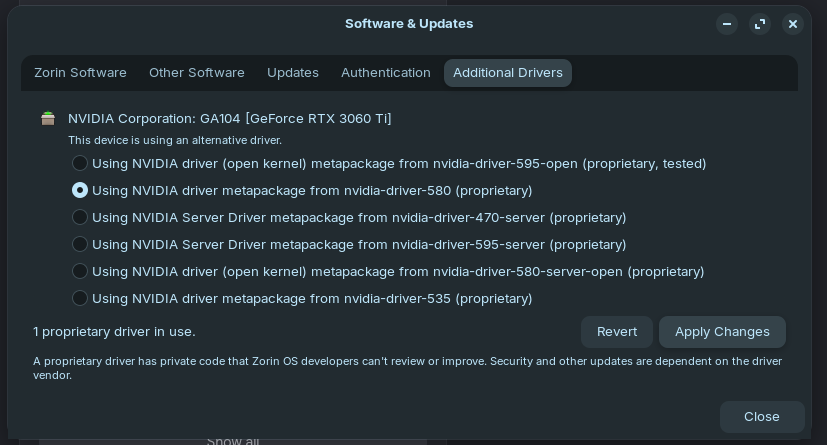
As such I'm going to use the 'additional drivers' tab in 'software and updates' like this:
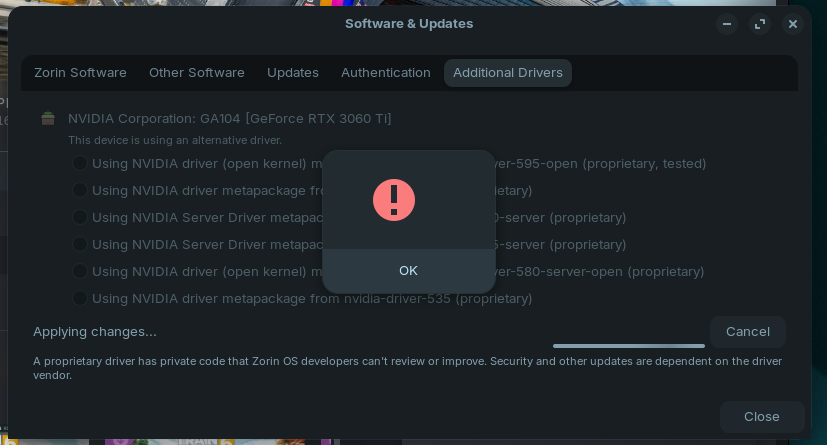
Which it didn't like - I got this error message:
After which Software and Updates told me that no proprietary drivers were being used, and the radio button for 580 wasn't selected.
Ok - not only did that not work - Zorin can't connect to the internet either. I've had to boot up into Windows now.
The internet is also choppy on Windows - I suspect this might just be the heat and everything on Zorin will be okay when things cool down perhaps?
Did You checked the Temperatures?
For Your Internet Issue in Zorin: You wrote, You updated the System. Was there a Kernel Update with it? If yes, You could try it with booting in an older Kernel. To do that choose on the GRUB Menu ''Advanced Options'' and there the older Kernel.
I checked the temperatures, and that isn't really an issue.
Zorin doesn't seem to recognise the ethernet cable at all - so I need to rever the kernel. I'll try holding down the shift key on boot and see which kernel options are available...
Success! I can use the internet again.
According to the GRUB menu - I was on:
6.17.0-29-generic
I've switched back to:
6.17.0-23-generic
However, when I did so, the login menu appeared on the right and not the left screen, so I'll test the game and see if all is well - if not, I'll need to go back to Software and Updates and choose to revert to 580 from 595.