When the older Kernel works for You, here are Instructions to set it as default:
That was going to be my next question - although when I booted up this time, everything is on the right monitor in a resolution of 1024x768 in 4:3.
I've setup the kernel to load version 23 as a default, as this fixes the internet - now it's just a question of sorting out the nvidia drivers again.
I set the graphics drivers to the open kernel option (the same one from the screenshot posted above) and when I went for a reboot, the Zorin logo stopped glowing as it usually does. I waited, rebooted, and tried again, and it didn't reboot at all, so I've booted into Windows, and Windows performed scandisk when it booted, so something went wrong.
I'm wondering if I mash the shift key and change kernels again?
I rebooted, mashed the shift key, and choose 6.17.0-23-generic recovery mode which seemed a good choice, because when Zorin went through recovery mode, there was a loading bar for something called Nvidia persistenced service however it got stuck on the loading bar, and under it read: 'Failed to start' although everything else listed under it said 'OK' in green.
Hitting the tab key, I performed a dpkg repair, and updated the GRUB before booting into Zorin, and everything works ok - although I am in recovery mode, so I doubt I'd be able to launch any heavy apps. At least the internet is working again.
You could uninstall the Nvidia Driver and then let it first run in the default Nouveau Driver. And then install a Nvidia Driver in the Terminal instead with the Additional Drivers Tab.
I attempted to reboot after sending the above message in normal mode, and it just hung up - at least we know that recovery mode works, which we could use to remove the NVidia driver, revert to Nouveau, then do a re-install - as (hopefully) this might address the previous issue of having to use the older version.
I'm going to do a little research first, then I'll give that a go...
After some research I came across this forum post: [How to] Reinstall NVIDIA Graphics Driver
Along with this video tutorial showing how to perform everything in the forum post: https://www.youtube.com/watch?v=gcsJOtCVEvw
All went well until after I entered:
ubuntu-drivers devices
After which I got:
udevadm hwdb is deprecated. Use systemd-hwdb instead.
udevadm hwdb is deprecated. Use systemd-hwdb instead.
udevadm hwdb is deprecated. Use systemd-hwdb instead.
udevadm hwdb is deprecated. Use systemd-hwdb instead.
udevadm hwdb is deprecated. Use systemd-hwdb instead.
udevadm hwdb is deprecated. Use systemd-hwdb instead.
udevadm hwdb is deprecated. Use systemd-hwdb instead.
udevadm hwdb is deprecated. Use systemd-hwdb instead.
udevadm hwdb is deprecated. Use systemd-hwdb instead.
udevadm hwdb is deprecated. Use systemd-hwdb instead.
udevadm hwdb is deprecated. Use systemd-hwdb instead.
udevadm hwdb is deprecated. Use systemd-hwdb instead.
udevadm hwdb is deprecated. Use systemd-hwdb instead.
udevadm hwdb is deprecated. Use systemd-hwdb instead.
udevadm hwdb is deprecated. Use systemd-hwdb instead.
udevadm hwdb is deprecated. Use systemd-hwdb instead.
Ah! Hold on a tick - there was more - which was:
== /sys/devices/pci0000:00/0000:00:03.1/0000:06:00.0 ==
modalias : pci:v000010DEd00002486sv00001458sd0000405Bbc03sc00i00
vendor   : NVIDIA Corporation
model    : GA104 [GeForce RTX 3060 Ti]
driver   : nvidia-driver-535-server - distro non-free
driver   : nvidia-driver-580-server - distro non-free
driver   : nvidia-driver-535 - distro non-free
driver   : nvidia-driver-595-server-open - distro non-free
driver   : nvidia-driver-535-open - distro non-free
driver   : nvidia-driver-580-open - distro non-free
driver   : nvidia-driver-595-server - distro non-free
driver   : nvidia-driver-580-server-open - distro non-free
driver   : nvidia-driver-470-server - distro non-free
driver   : nvidia-driver-565-open - third-party non-free
driver   : nvidia-driver-580 - distro non-free
driver   : nvidia-driver-565 - third-party non-free
driver   : nvidia-driver-595 - distro non-free
driver   : nvidia-driver-595-open - distro non-free recommended
driver   : nvidia-driver-470 - third-party non-free
driver   : nvidia-driver-535-server-open - distro non-free
driver   : xserver-xorg-video-nouveau - distro free builtin
I might be okay to continue...
NVidia's site suggested:
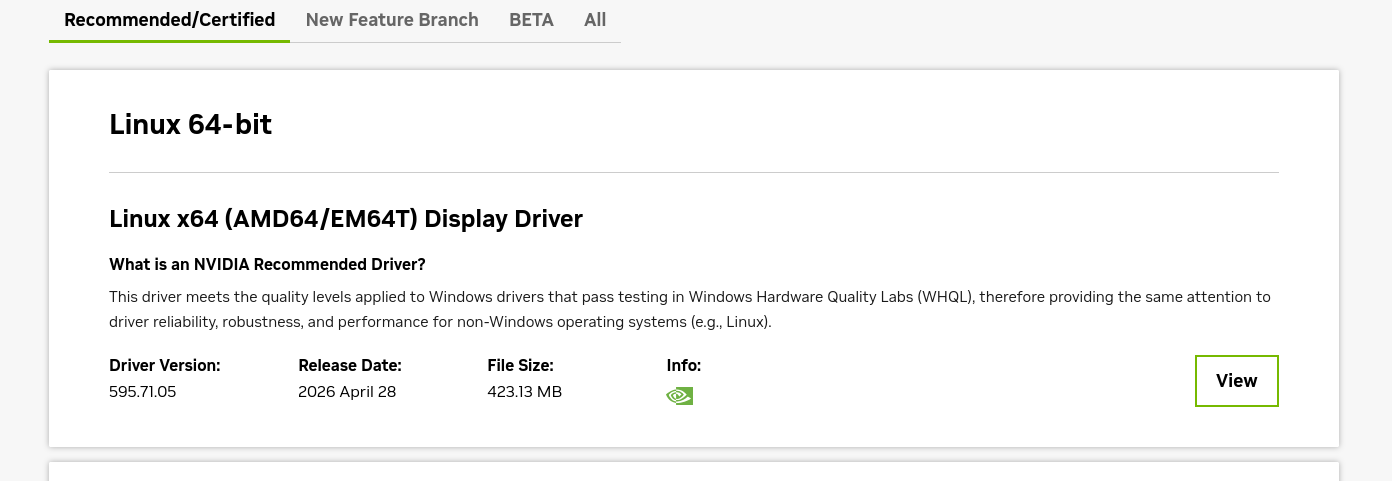
Now that I've followed all of the steps from the forum post and video, going to 595 should be possible with no issues.
Hopefully.
And my driver isn't listed in launchpad:
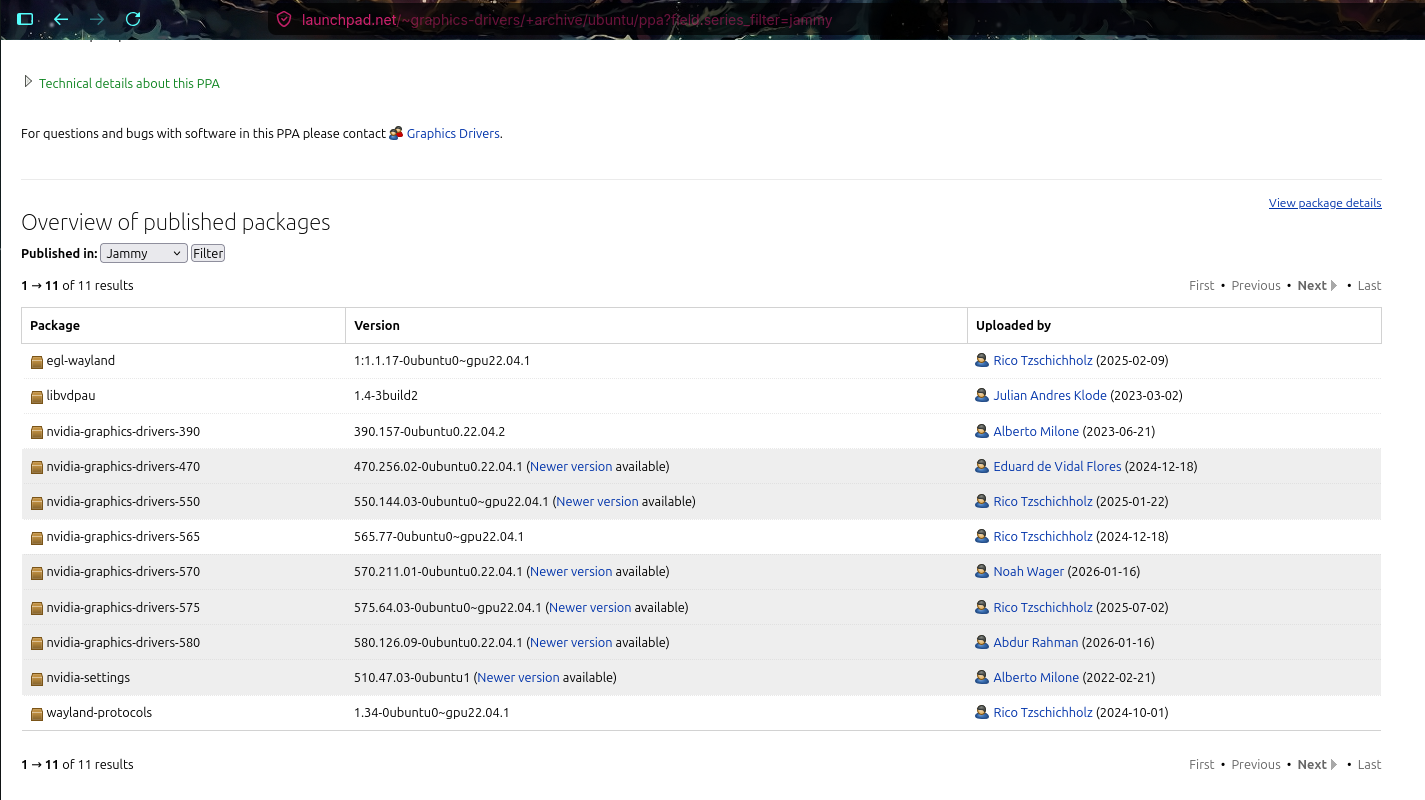
I also checked in 'All series' for published as well - 595 isn't there - although 595 was only released just over a month ago.
I might go with 580 for now, and wait until 595 is on this list before updating to 595, as 580 has worked fine the last few months.
Ah:
sudo apt install nvidia-graphics-drivers-580
Reading package lists... Done
Building dependency tree... Done
Reading state information... Done
E: Unable to locate package nvidia-graphics-drivers-580
Let's try:
sudo apt install nvidia-graphics-drivers-595
Similar issue. I'm downloading the driver from Nvidia's site and using the file which downloads.
After the reboot, Zorin booted up into the low resolution again, and I had to reboot a second time because again it failed to recognise the ethernet cable.
I went into software, selected the latest 595 driver, and rebooted when prompted.
It rebooted back into Zorin with good graphics and I thought 'Yay!' until I realised that it still wasn't connecting to the internet.
I'm a bit stumped trying to work out how the graphics card issue cancels out the not only the internet via ethernet, but also Bluetooth as well.
You are not confusing anything, you need to remove the tails of other drivers and stop playing with it, just put a working 580 and that's it.
595, while the test ones were only recently fixed.
check what drivers you are using:
nvidia-smi
find the tails of other drivers that are not related to 580..
dpkg -l | grep nvidia
remove unnecessary dependencies:
sudo apt purge ~c
let's say this as an example of manually removing other dependencies - which were not deleted by default:
sudo apt purge linux-objects-nvidia-590-6.17.0-22-generic linux-objects-nvidia-595-6.17.0-23-generic
I'm sure you have a lot of other drivers that simply conflict with each other. When you start something, the 580/595 zoo starts and they fight each other.
I had that too..
Then, in order for the driver to be registered in the system kernel as trusted at system startup, you still need to disable secure boot, as this happens on the NVIDIA driver side and the Linux kernel simply ignores it.
This needs to be done every time you update your drivers and kernel!
You can then re-enable it.
I get what you're saying - stick to the 580.
I'd like to do the above - however, when I boot in Zorin, it can't find the internet at all - including bluetooth which is via a USB.
At first I considered it was because I'd booted into recovery mode via the GRUB, although having done a normal boot, it still doesn't connect to any device.
UPDATE: Got the internet back via choosing the third option in the GRUB - without recovery mode.
I ran and got the following message:
nvidia-smi
Command 'nvidia-smi' not found, but can be installed with:
sudo apt install nvidia-utils-470         # version 470.256.02-0ubuntu0.24.04.1, or
sudo apt install nvidia-utils-470-server  # version 470.256.02-0ubuntu0.24.04.1
sudo apt install nvidia-utils-535         # version 535.288.01-0ubuntu0.24.04.2
sudo apt install nvidia-utils-535-server  # version 535.288.01-0ubuntu0.24.04.3
sudo apt install nvidia-utils-565-server  # version 565.57.01-0ubuntu0.24.04.3
sudo apt install nvidia-utils-580         # version 580.142-0ubuntu0.24.04.1
sudo apt install nvidia-utils-580-server  # version 580.126.20-0ubuntu0.24.04.2
sudo apt install nvidia-utils-525         # version 525.147.05-0ubuntu1
sudo apt install nvidia-utils-525-server  # version 525.147.05-0ubuntu1
sudo apt install nvidia-utils-570         # version 570.211.01-0ubuntu0.24.04.2
sudo apt install nvidia-utils-570-server  # version 570.211.01-0ubuntu0.24.04.2
sudo apt install nvidia-utils-590         # version 590.48.01-0ubuntu0.24.04.4
sudo apt install nvidia-utils-590-server  # version 590.48.01-0ubuntu0.24.04.4
sudo apt install nvidia-utils-550-server  # version 550.163.01-0ubuntu0.24.04.1
sudo apt install nvidia-utils-595         # version 595.58.03-0ubuntu0.24.04.1
sudo apt install nvidia-utils-595-server  # version 595.58.03-0ubuntu0.24.04.1
Obviously it made sense to choose 580 therefore I ran and received:
sudo apt install nvidia-utils-580
Reading package lists... Done
Building dependency tree... Done
Reading state information... Done
The following additional packages will be installed:
  libnvidia-compute-580 nvidia-firmware-580-580.159.03
  nvidia-kernel-common-580
Suggested packages:
  nvidia-driver-580
The following packages will be REMOVED
  libnvidia-compute-595:i386
The following NEW packages will be installed
  libnvidia-compute-580 nvidia-firmware-580-580.159.03
  nvidia-kernel-common-580 nvidia-utils-580
0 to upgrade, 4 to newly install, 1 to remove and 0 not to upgrade.
Need to get 137 MB of archives.
After this operation, 122 MB of additional disk space will be used.
Do you want to continue? [Y/n] y
Get:1 http://archive.ubuntu.com/ubuntu noble-updates/restricted amd64 nvidia-firmware-580-580.159.03 amd64 580.159.03-0ubuntu0.24.04.1 [76.0 MB]
However when this installation finished I tried the command again:
sudo nvidia-smi
NVIDIA-SMI has failed because it couldn't communicate with the NVIDIA driver. Make sure that the latest NVIDIA driver is installed and running.
Therefore I used the 'additional drivers' tab of Software and Updates to select the 580.
I ran dpkg -l | grep nvidia and got this list:
ii  libnvidia-compute-580:amd64                            580.159.03-0ubuntu0.24.04.1                      amd64        NVIDIA libcompute package
rc  libnvidia-compute-590:amd64                            590.48.01-0ubuntu0.24.04.4                       amd64        NVIDIA libcompute package
rc  libnvidia-compute-595:amd64                            595.71.05-0ubuntu0.24.04.1                       amd64        NVIDIA libcompute package
rc  linux-modules-nvidia-580-6.14.0-37-generic             6.14.0-37.37~24.04.1+2                           amd64        Linux kernel nvidia modules for version 6.14.0-37
rc  linux-modules-nvidia-580-6.17.0-14-generic             6.17.0-14.14~24.04.1+1                           amd64        Linux kernel nvidia modules for version 6.17.0-14
rc  linux-modules-nvidia-580-open-6.17.0-19-generic        6.17.0-19.19~24.04.2                             amd64        Linux kernel nvidia modules for version 6.17.0-19
rc  linux-modules-nvidia-580-open-6.17.0-20-generic        6.17.0-20.20~24.04.1                             amd64        Linux kernel nvidia modules for version 6.17.0-20
rc  linux-modules-nvidia-580-open-6.17.0-22-generic        6.17.0-22.22~24.04.1+1                           amd64        Linux kernel nvidia modules for version 6.17.0-22
rc  linux-modules-nvidia-580-server-open-6.17.0-29-generic 6.17.0-29.29~24.04.1+1                           amd64        Linux kernel nvidia modules for version 6.17.0-29
rc  linux-modules-nvidia-590-open-6.17.0-14-generic        6.17.0-14.14~24.04.1+1                           amd64        Linux kernel nvidia modules for version 6.17.0-14
rc  linux-modules-nvidia-590-open-6.17.0-19-generic        6.17.0-19.19~24.04.2                             amd64        Linux kernel nvidia modules for version 6.17.0-19
rc  linux-modules-nvidia-595-6.17.0-23-generic             6.17.0-23.23~24.04.1+1                           amd64        Linux kernel nvidia modules for version 6.17.0-23
rc  linux-modules-nvidia-595-6.17.0-29-generic             6.17.0-29.29~24.04.1+1                           amd64        Linux kernel nvidia modules for version 6.17.0-29
rc  linux-modules-nvidia-595-open-6.17.0-29-generic        6.17.0-29.29~24.04.1+1                           amd64        Linux kernel nvidia modules for version 6.17.0-29
rc  linux-objects-nvidia-580-6.14.0-37-generic             6.14.0-37.37~24.04.1+2                           amd64        Linux kernel nvidia modules for version 6.14.0-37 (objects)
rc  linux-objects-nvidia-580-6.17.0-14-generic             6.17.0-14.14~24.04.1+1                           amd64        Linux kernel nvidia modules for version 6.17.0-14 (objects)
ii  linux-objects-nvidia-580-server-6.17.0-23-generic      6.17.0-23.23~24.04.1+1                           amd64        Linux kernel nvidia modules for version 6.17.0-23 (objects)
ii  linux-objects-nvidia-580-server-6.17.0-29-generic      6.17.0-29.29~24.04.1+1                           amd64        Linux kernel nvidia modules for version 6.17.0-29 (objects)
ii  linux-objects-nvidia-595-6.17.0-23-generic             6.17.0-23.23~24.04.1+1                           amd64        Linux kernel nvidia modules for version 6.17.0-23 (objects)
ii  linux-objects-nvidia-595-6.17.0-29-generic             6.17.0-29.29~24.04.1+1                           amd64        Linux kernel nvidia modules for version 6.17.0-29 (objects)
ii  linux-signatures-nvidia-6.17.0-23-generic              6.17.0-23.23~24.04.1+1                           amd64        Linux kernel signatures for nvidia modules for version 6.17.0-23-generic
ii  linux-signatures-nvidia-6.17.0-29-generic              6.17.0-29.29~24.04.1+1                           amd64        Linux kernel signatures for nvidia modules for version 6.17.0-29-generic
rc  nvidia-compute-utils-595                               595.71.05-0ubuntu0.24.04.1                       amd64        NVIDIA compute utilities
ii  nvidia-firmware-580-580.159.03                         580.159.03-0ubuntu0.24.04.1                      amd64        Firmware files used by the kernel module
ii  nvidia-kernel-common-580                               580.159.03-0ubuntu0.24.04.1                      amd64        Shared files used with the kernel module
rc  nvidia-kernel-common-595                               595.71.05-0ubuntu0.24.04.1                       amd64        Shared files used with the kernel module
ii  nvidia-utils-580
1 Like
Okay, so I'm spending another night back on Windows again.
I've been trying different drivers, and each driver either:
- Has poor resolution
- Has poor resolution and only displays on either the left or right screen
- Has good resolution and displays on the left screen with the right screen blank
- Has poor resolution with no internet or bluetooth
- Has good resolution with no internet or bluetooth
I've been at this for two hours, (as well as the two days before today) rebooting and trying different things, and there isn't any difference.
I can't seem to be able to delete the drivers which aren't needed - which I think is the main issue here?
I'll email Zorin support in the morning and see if there is any official support - thank you for trying to help everyone - we did give it a good shot.
1 Like
umm you don't see anything??
you have a zoo of drivers there that can conflict with each other!
I said there should be one and only one version without tails!
I wrote above how to clean the tails.
nothing you have 580, 590, 595 and all of them are still with fixes.
590 = 4 fixes, 595 = 2 fixes.
Then I don't know what and how you installed - regular proprietary or kernel versions.
find the tails of other drivers that are not related to 580..
dpkg -l | grep nvidia
remove unnecessary dependencies:
sudo apt purge ~c
let's say this as an example of manually removing other dependencies - which were not deleted by default:
sudo apt purge linux-objects-nvidia-590-6.17.0-22-generic linux-objects-nvidia-595-6.17.0-23-generic
Everything works fine for me, because you need to clean up the tails of broken drivers and not just put one on top of another
Same for me, i rebooted last night (6.17.0-35) and suddenly no nvidia recognised, i am not a geek (that is why i choose zorin and make donations), very annoying.
Claude suggested me to choose the open kernel 595 driver for some signatures issues but no luck
EDIT : last reboot worked with this driver only