Ok i missed the reply @Johan on the preference to use wayland to do this since with zorin it works best with X11 then i would highly suggest installing the liquorix kernel as it does allow nvidia to work way better with wayland on that kernel
sudo apt update
sudo add-apt-repository ppa:damentz/liquorix
sudo apt install linux-image-liquorix-amd64
1 Like
Johan
September 12, 2026, 1:45pm
22
Ok, the nvidia-modprobe package was not installed so I installed it (sudo apt install nvidia-modprobe).
Then I executed the command you gave and it just hold indefinitly (no outputs).
When re-executing the command it exits with status code 1.
From the journalctl (with -g nvidia flag) :
sept. 12 15:41:04 pc-johan sudo[8819]:    johan : TTY=pts/2 ; PWD=/home/johan ; USER=root ; COMMAND=/usr/bin/nvidia-modprobe -c 0 -u
sept. 12 15:41:08 pc-johan sudo[8870]:    johan : TTY=pts/2 ; PWD=/home/johan ; USER=root ; COMMAND=/usr/bin/nvidia-modprobe -c 0 -u
sept. 12 15:41:22 pc-johan kernel:  os_acquire_rwlock_write+0x31/0x50 [nvidia]
sept. 12 15:41:22 pc-johan kernel:  portSyncRwLockAcquireWrite+0x10/0x40 [nvidia]
sept. 12 15:41:22 pc-johan kernel:  rmapiLockAcquire+0x27c/0x360 [nvidia]
sept. 12 15:41:22 pc-johan kernel:  kgspInitRm_IMPL+0x1653/0x24d0 [nvidia]
sept. 12 15:41:22 pc-johan kernel:  RmInitAdapter+0xf16/0x2100 [nvidia]
sept. 12 15:41:22 pc-johan kernel:  ? os_release_mutex+0xe/0x20 [nvidia]
sept. 12 15:41:22 pc-johan kernel:  rm_init_adapter+0x135/0x140 [nvidia]
sept. 12 15:41:22 pc-johan kernel:  nv_start_device+0x3f0/0x7c0 [nvidia]
sept. 12 15:41:22 pc-johan kernel:  nv_open_device+0xa3/0x2d0 [nvidia]
sept. 12 15:41:22 pc-johan kernel:  nvidia_dev_get+0x6d/0xe0 [nvidia]
sept. 12 15:41:22 pc-johan kernel:  nvkms_open_gpu+0x5a/0xa0 [nvidia_modeset]
sept. 12 15:41:22 pc-johan kernel:  AllocateDevice+0x45/0x410 [nvidia_modeset]
sept. 12 15:41:22 pc-johan kernel:  ? nv_drm_dev_load+0x10f/0xcd0 [nvidia_drm]
sept. 12 15:41:22 pc-johan kernel:  ? portSyncSpinlockAcquire+0x18/0x30 [nvidia]
sept. 12 15:41:22 pc-johan kernel:  ? __pfx_nv_drm_event_callback+0x10/0x10 [nvidia_drm]
sept. 12 15:41:22 pc-johan kernel:  nv_drm_register_drm_device+0xa2/0x260 [nvidia_drm]
sept. 12 15:41:22 pc-johan kernel:  ? __pfx_nv_drm_register_drm_device+0x10/0x10 [nvidia_drm]
sept. 12 15:41:22 pc-johan kernel:  EnumerateGpus+0x180/0x190 [nvidia_modeset]
sept. 12 15:41:22 pc-johan kernel:  ? nv_drm_probe_devices+0x69/0xa0 [nvidia_drm]
sept. 12 15:41:22 pc-johan kernel:  ? __pfx_nv_linux_drm_init+0x10/0x10 [nvidia_drm]
sept. 12 15:41:22 pc-johan kernel:  ? nv_drm_init+0x31/0x70 [nvidia_drm]
sept. 12 15:41:22 pc-johan kernel:  ? nv_linux_drm_init+0xe/0xff0 [nvidia_drm]
sept. 12 15:41:22 pc-johan kernel:  os_acquire_rwlock_write+0x31/0x50 [nvidia]
sept. 12 15:41:22 pc-johan kernel:  portSyncRwLockAcquireWrite+0x10/0x40 [nvidia]
sept. 12 15:41:22 pc-johan kernel:  rmapiLockAcquire+0x27c/0x360 [nvidia]
sept. 12 15:41:22 pc-johan kernel:  rm_get_power_info+0x38/0x3a0 [nvidia]
sept. 12 15:41:22 pc-johan kernel:  nv_procfs_read_power+0x56/0x1c0 [nvidia]
sept. 12 15:41:22 pc-johan kernel:  nv_procfs_read_lock_power+0x7d/0xb0 [nvidia]
1 Like
Johan
September 12, 2026, 1:54pm
23
However it created the nvidiactl device but not the nvidia0 one.
This mades a lot of my gui apps unable to display (but still launchable), so I just remove the nvidia-modprobe package and now I'm fine (but still without usable graphic card)
1 Like
Johan
September 13, 2026, 3:06pm
24
Thanks for pointing out this, but if I can make it works without having to install a different kernel I would prefer
I'm not a very technical user and I don't really want to take the risk of messing out something and having to reinstall my os.
2 Likes
Johan
September 16, 2026, 2:28pm
25
I know the following is the archlinux wiki, but can maybe it can help ?
From this page :
they say that some users has to use proprietary driver with NVreg_EnableGpuFirmware=0 parameter.Ada Lovelace (NV190/ADXXX), this should normally not affect me (as it is for Ampere architecture).
What do you think ? Is it worth a try ?
2 Likes
Johan
September 21, 2026, 9:26am
26
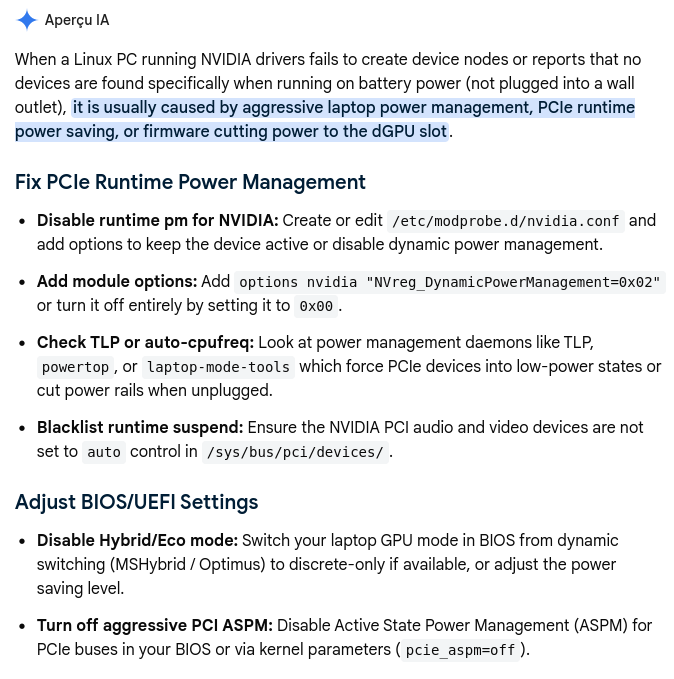
Also, it appears that the issue is related to how my laptop's power is supplied.
If my laptop is not plugged in, the issue appears.
After a google search, do you think those can help ?
2 Likes
Johan
November 4, 2026, 9:04am
27
Hi back !
Apparently I'm not the only one experiencing this issue :
opened 01:33AM - 06 Oct 26 UTC
bug
### NVIDIA Open GPU Kernel Modules Version
595.104.02 (also seen on 595.91.07)
…
### Please confirm this issue does not happen with the proprietary driver (of the same version). This issue tracker is only for bugs specific to the open kernel driver.
- [ ] I confirm that this does not happen with the proprietary driver package.
### Operating System and Version
NixOS 26.11 (unstable channel, nixpkgs 2026-09-29, `26.11.20260929.b6c8664`)
### Kernel Release
7.2.8 (NixOS build of the stable 7.2.8 release; the August occurrence was on 7.1.8)
### Please confirm you are running a stable release kernel (e.g. not a -rc). We do not accept bug reports for unreleased kernels.
- [x] I am running on a stable kernel release.
### Hardware: GPU
GPU 0: NVIDIA RTX PRO 2000 Blackwell Generation Laptop GPU (PCI 10de:2d39, VBIOS 98.06.34.00.FE)
### Describe the bug
On cold boot, loading `nvidia_drm` occasionally never finishes: systemd's "Load Kernel Modules" job hangs until it times out (90 s), the modprobe thread is unkillable (D state), the udev worker for the GPU is killed after 180 s, and the machine never reaches a usable state. A hard power-off is the only way out; the next boot is normal.
The blocked thread is inside GSP adapter init, waiting for the RM API lock in write mode:
`nv_drm_probe_devices → nvkms_open_gpu → nv_open_device → rm_init_adapter → RmInitAdapter → kgspInitRm_IMPL → rmapiLockAcquire → down_write`
The kernel reports the rwsem as "likely owned by" a kworker that is **idle** (state I, no NVIDIA frames on its stack), so it looks like the lock was taken by a work item that returned without releasing it, and nothing will ever release it.
This looks like the cold-boot variant already reported in #968 (comments by @haster, RTX 4060 Laptop, 595.84 and 595.91.07). #968 says a lock-ordering fix was slated for 595.xx; this still happens on 595.104.02.
**Possible trigger.** In both hangs, the Thunderbolt dock (CalDigit TS4) enumerated about 1 s *into* nvidia-drm's GSP init. In every good boot it enumerated either at the same moment as init started (−1.0 to +0.56 s) or much later. Timestamps below. (In this PRIME sync setup all display outputs, including the dock's DisplayPort, are on the Intel iGPU; the NVIDIA GPU has no connectors. So the interaction would come from hotplug or ACPI events rather than DP on the dGPU.)
### To Reproduce
- Lenovo ThinkPad P1 Gen 8 (21Q8, BIOS N4EET24W 1.10 2026-06-29), Intel Core Ultra 9 285H + RTX PRO 2000 Blackwell Laptop GPU, PRIME sync (Intel drives all outputs)
- CalDigit TS4 Thunderbolt 4 dock connected at power-on (two external monitors and USB devices on it)
- Kernel module options: `nvidia NVreg_PreserveVideoMemoryAllocations=1 NVreg_UseKernelSuspendNotifiers=1`, `nvidia-drm modeset=1 fbdev=1`; modules loaded by systemd-modules-load in stage 2 (not in the initrd)
- Power on and boot. About 1 boot in 35 hangs as described. There's no deterministic reproducer; the hang appears when the dock's Thunderbolt link comes up ~0.9–1.3 s after `[nvidia-drm] Loading driver`.
### Bug Incidence
Sometimes
### nvidia-bug-report.log.gz
[nvidia-bug-report-redacted.log.gz](https://github.com/user-attachments/files/33083584/nvidia-bug-report-redacted.log.gz)
Attached; generated on the boot after the hang (the hung boot is the previous boot in the journal). The bug-report script can't run during the hang itself: there's no usable system.
### More Info
**Occurrences** (from ~70 boots between July and October 2026, all on 595.x open):
| Date | Kernel | Driver | Dock attach vs. `[nvidia-drm] Loading driver` | Result |
|---|---|---|---|---|
| 2026-08-15 | 7.1.8 | 595.91.07 | +1.22 s | hang (hung-task trace below) |
| 2026-10-05 | 7.2.8 | 595.104.02 | +0.93 s | hang (forced off at ~220 s, before the hung-task detector fired) |
| ~55 boots | 7.1–7.2 | 595.x | −0.96 … +0.56 s | ok |
| ~12 boots | 7.1–7.2 | 595.x | ≥ 14 s, or no dock | ok |
On good boots `Initialized nvidia-drm 0.0.0 for 0000:01:00.0 on minor 1` follows `Loading driver` after ~3.3 s. On the hung boots it never appears. The i915 fbcon takeover happens 1.1–2.2 s into init on *every* boot, good or bad, so it doesn't distinguish them.
**Hung boot, 2026-10-05, 595.104.02** (kernel and systemd lines):
```
[ 3.762768] systemd-modules-load[433]: Inserted module 'ctr'
[ 3.765151] systemd-modules-load[433]: Inserted module 'loop'
[ 3.768075] systemd-modules-load[433]: Inserted module 'tun'
[ 3.872119] systemd-modules-load[433]: Inserted module 'kvm_intel'
[ 4.898488] systemd-modules-load[433]: Inserted module 'nvidia'
[ 4.899008] kernel: NVRM: loading NVIDIA UNIX Open Kernel Module for x86_64 595.104.02
[ 5.018189] systemd-modules-load[433]: Inserted module 'nvidia_modeset'
[ 5.064014] kernel: [drm] [nvidia-drm] [GPU ID 0x00000100] Loading driver
[ 5.172269] systemd-modules-load[433]: Inserted module 'nvidia_uvm'
[ 5.998314] kernel: thunderbolt 1-1: CalDigit, Inc. TS4
[ 64.189613] systemd-udevd[466]: 0000:01:00.0: Worker [487] processing SEQNUM=3060 is taking a long time.
[ 93.955745] systemd[1]: systemd-modules-load.service: start operation timed out. Terminating.
[ 184.205822] systemd[1]: systemd-modules-load.service: State 'stop-sigterm' timed out. Killing.
[ 184.205949] systemd[1]: systemd-modules-load.service: Killing process 433 (systemd-modules) with signal SIGKILL.
[ 194.455745] systemd-udevd[466]: 0000:01:00.0: Worker [487] processing SEQNUM=3060 killed.
[ 194.464638] systemd-udevd[466]: 0000:01:00.0: Worker [487] terminated by signal 9 (KILL).
```
**Hung boot, 2026-08-15, 595.91.07: hung-task report**
```
INFO: task systemd-modules:433 blocked for more than 122 seconds.
Tainted: G W O 7.1.8 #1-NixOS
"echo 0 > /proc/sys/kernel/hung_task_timeout_secs" disables this message.
task:systemd-modules state:D stack:0 pid:433 tgid:426 ppid:1 task_flags:0x400140 flags:0x00080003
Call Trace:
<TASK>
__schedule+0x48d/0x1960
? _regRead.isra.0+0xc9/0x170 [nvidia]
schedule+0x27/0xa0
schedule_preempt_disabled+0x15/0x30
rwsem_down_write_slowpath+0x290/0x780
? tlsEntryGet+0x30/0x60 [nvidia]
down_write+0x5a/0x60
os_acquire_rwlock_write+0x2b/0x40 [nvidia]
portSyncRwLockAcquireWrite+0x10/0x40 [nvidia]
rmapiLockAcquire+0x284/0x370 [nvidia]
kgspInitRm_IMPL+0x13ab/0x2410 [nvidia]
RmInitAdapter+0x11b2/0x21c0 [nvidia]
? up+0x63/0xb0
? down+0x1e/0x70
rm_init_adapter+0x135/0x140 [nvidia]
nv_start_device+0x249/0x830 [nvidia]
? prb_read_valid+0x1b/0x30
nv_open_device+0x98/0x260 [nvidia]
nvidia_dev_get+0x87/0xf0 [nvidia]
nvkms_open_gpu+0x57/0xa0 [nvidia_modeset]
? nvkms_alloc+0xd5/0x120 [nvidia_modeset]
AllocateDevice+0x46/0x3d0 [nvidia_modeset]
nv_drm_dev_load+0xce/0xbae [nvidia_drm]
? portSyncSpinlockAcquire+0x18/0x30 [nvidia]
? __pfx_nv_drm_event_callback+0x10/0x10 [nvidia_drm]
nv_drm_register_drm_device.cold+0x15/0x138 [nvidia_drm]
? __pfx_nv_drm_register_drm_device+0x10/0x10 [nvidia_drm]
EnumerateGpus+0x17f/0x1a0 [nvidia_modeset]
? __pfx_nv_linux_drm_init+0x10/0x10 [nvidia_drm]
nv_drm_probe_devices+0x5c/0x70 [nvidia_drm]
do_one_initcall+0x5d/0x320
do_init_module+0xb1/0x2f0
__do_sys_init_module+0x1b4/0x1f0
do_syscall_64+0x134/0x6b0
? do_anonymous_page+0x104/0x870
? __pte_offset_map+0x1b/0x100
? __handle_mm_fault+0xb6d/0xf60
? psi_task_switch+0x113/0x2a0
? count_memcg_events+0xd1/0x190
? handle_mm_fault+0x1e8/0x2f0
? do_user_addr_fault+0x21a/0x690
? irqentry_exit+0x44/0x6e0
? do_syscall_64+0xeb/0x6b0
? exc_page_fault+0x6e/0x180
entry_SYSCALL_64_after_hwframe+0x77/0x7f
</TASK>
INFO: task systemd-modules:433 <writer> blocked on an rw-semaphore likely owned by task kworker/7:1:205 <writer>
task:kworker/7:1 state:I stack:0 pid:205 tgid:205 ppid:2 task_flags:0x4208060 flags:0x00080000
Workqueue: 0x0 (events)
Call Trace:
<TASK>
__schedule+0x48d/0x1960
schedule+0x27/0xa0
worker_thread+0xa5/0x2e0
? __pfx_worker_thread+0x10/0x10
kthread+0xe2/0x110
? __pfx_kthread+0x10/0x10
ret_from_fork+0x251/0x330
? __pfx_kthread+0x10/0x10
ret_from_fork_asm+0x1a/0x30
</TASK>
```
Expected behavior: nvidia-drm initializes (or fails cleanly) regardless of a Thunderbolt device attaching during GSP init.
Same cold-boot variant as @haster's, now on Blackwell (RTX PRO 2000 Laptop, GB206) and still on
595.104.02: nvidia-drm load → RmInitAdapter → kgspInitRm_IMPL → rmapiLockAcquire (write) blocked,
rwsem "likely owned by" an idle kworker. In my two occurrences out of ~70 boots, a Thunderbolt dock
enumerated ~1 s into GSP init, which never happened on good boots.
So, for now I just don't turn off my pc (as currently my Nvidia card is usable), and I'll just wait for the fix to be published
1 Like