I am using Zorin 18 Pro on a custom desktop I7, 16mg ram 1 gig ssd and an Epson printer ET2850. Printer is installed and prints test page ok. Neither Libre writer or Only Office writer find the printer. If I go to settings, printer and print a test page and go back to the office document it now finds the printer and prints. I cannot print without going to settings and printing a test page. I don't know where to start to fix this.
1 Like
It could be that entering into the settings menu launches the background process that manages printers. Next time you boot your computer, open up a terminal and run:
sudo systemctl status cups
It the output comes as "disabled" you can run this command:
sudo systemctl start cups
And try to print again before going to the settings and doing all the shebang. If that works, we've found the culprit.
At that point you can decide: run this last command every time you want to print something, or enable the CUPS daemon so it runs automatically. I'm not sure if that is supposed to be the default anyway, so let's check the status before getting ahead of ourselves.
So,Yyou are in a Document and when You want Print it on the Print Screen Your printer is not listed, yes? When You have that, try it with closing the Printer Window and then try it it again - I mean click again the Print Icon and let the Printer Window appear.
Anoher Thing: Is the Printer in Stand-By or completely enabled?
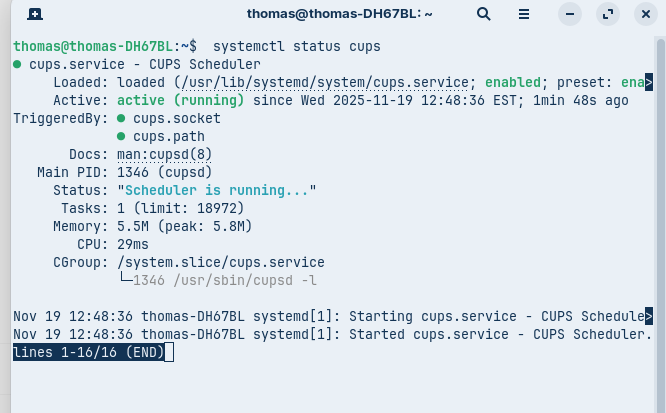
Apparently that was not the problem. I don't know how tp get ahead of ourselves. Thank you for your reply. This forum is one of many reasons I love Zorin.
To ZenZen and [Ponce-De-Leon thank you for your replies. I now feel awful stupid for posting this. Although the printer was installed on my computer and I could print a test page when I went to localhost:631 it showed no printers. I installed my printer there and the problem appears to have been fixed. Sometimes I wonder where my brain is.
1 Like
All what matters is that it now works and the Problem is solved now. I mark Your Comment as Solution.
1 Like
Printers are tricky... I've never had good experiences with them, even on Windows 
This topic was automatically closed 90 days after the last reply. New replies are no longer allowed.