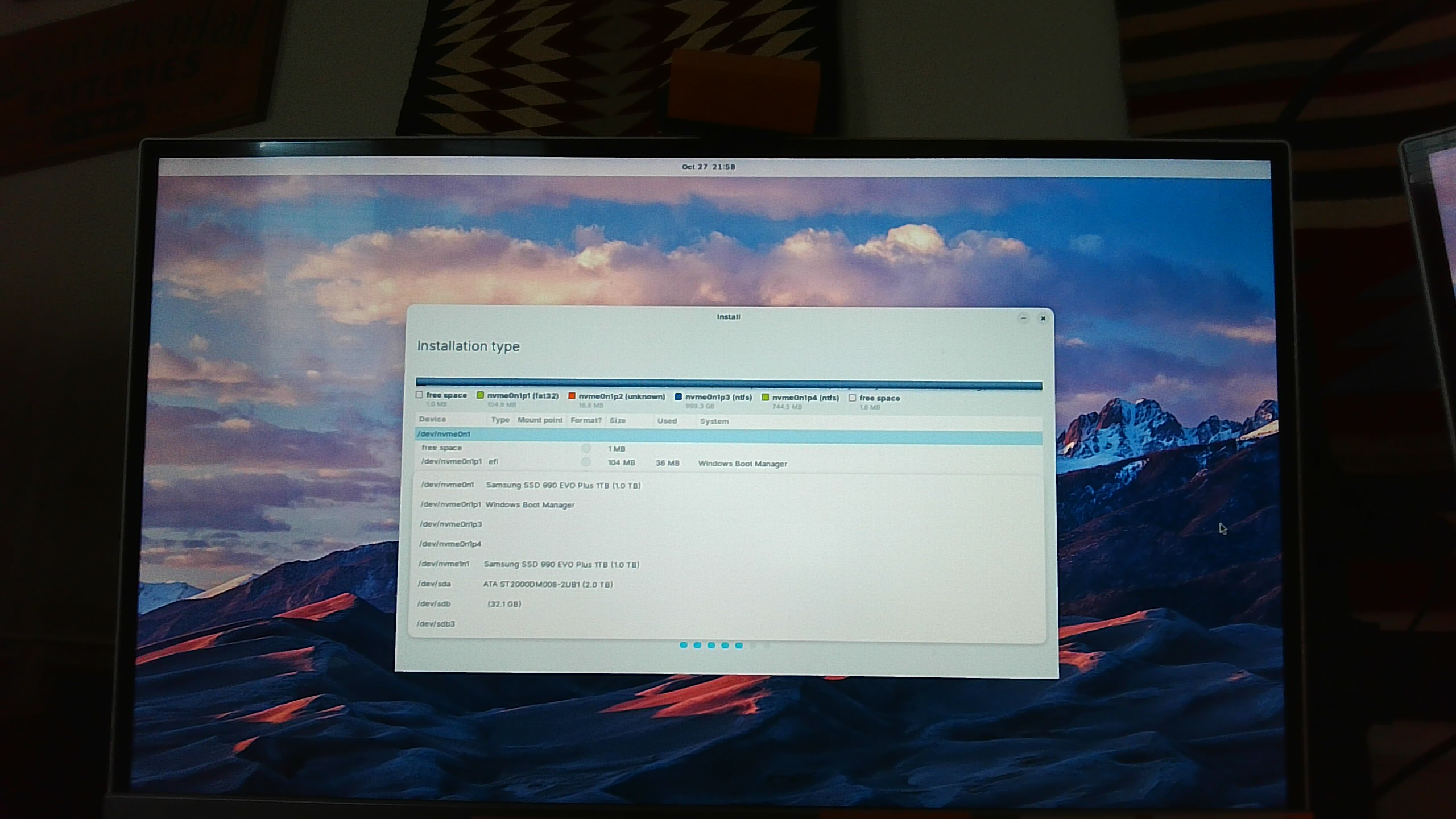
Hi. New to Linux and Zorin Pro. I'm trying to install Zorin Pro 18 on a Samsung 990 EVO Plus 1TB device (unformatted). There are 3 devices on my computer (Windows 11 is on another SSD device and the other HDD device is unformatted also). On the unformatted SSD I click on it to highlight it and then click on "New Partition Table." In the Partition Table dialog box I then click on "Continue." This is where I'm experiencing the problem. Nothing happens. The Quit and Back buttons in the lower right corner flicker for a brief second and then nothing. The + button in the upper left corner doesn't work. I appear to be stuck. Any suggestions will be helpful. Thank you in advance.
I may need to add something. After posting the first post I was looking at the Installation type page and noticed that the SSD that has Windows 11 installed on it looked empty. Yikes. I wondered if I had set that SSD up to be installed with Zorin Pro. I clicked on the Revert button and Windows 11 reappeared again. This now makes me wonder if I'm not properly selecting the unformatted device. I'm clicking on it and I don't know what else to do. I confess to beginning to be in over my head. Again, any suggestions will be most appreciated.
It sounds like you are using the Something Else option in the Zorin Installer.
From that, in the partition manager, click on the partition you are installing to and click the (+) icon.
A popup should open with a series of options.
Set it at the beginning - Primary Drive
EXT4 journaling File System
Set the mount point as simply /
Then click ok. Click the Apply button - that will Format the partition. Once that is done, it will now be formatted and you can click Continue to the installation.
Quick Question: Are you installing as EFI?
IF the drive is completely unformatted, you may need to create a 512meg EFI partition and format it to FAT32, as well.
Hi Aravisian. Thank you for a timely reply! Yes, I am using the Something Else option in the Zorin installer. I did click the partition I'm installing to but clicking on the (+) icon does nothing. It's unresponsive - no popups. And after the observation (see above) that I'm not even activating the desired device I'm tentative.
Regarding the question am I installing as EFI? Well, the truthful answer is I don't know with confidence. I had the SSD installed in the computer and told the store I didn't want them to format it. However, as already noted, I do have Windows 11 installed on another SSD in the computer. Would that suggest that I'm probably using EFI mode?
I'm 74 but I'm trying to figure this out - I so want to be rid of Windows. Again, many thanks for replying.
Regarding EFI mode. I see with the SSD that has Windows 11 installed on it (/dev/nvme0n1), the following: "/dev/nvme0n1p1 efi Windows Boot Manager." I trust that confirms EFI.
Regarding a screenshot. The screenshot is pretty crude, I apologize. I had to take it with a laptop camera pointing at the monitor. I hope it suffices. If not, I can try something else.
I see partitions 3, 4 are both available on the nvme, drive.
That installers partition manager looks a bit minimal in this screenshot.
Let's do something else;
From terminal, launch gparted
In the Gparted partition Manager, try selecting the partition, and then the (+) icon from within the full application.
Aravisian I don't want to overdo it with thanks but I really appreciate you taking the time especially because I have no idea what to do. So thanks! Okay, onward. To get to the terminal, do I click Back or Quit?
You can quit the installer for now.
I have installed Zorin OS since Zorin OS 12, probably a hundred times or more for all the releases, for testing, for alpha testing, beta testing, just... a lot.
And Every Single Time... I get nervous when inside of the installer window of making Some Mistake. Even though intellectually, I know, that it is exceptionally difficult to commit to a mistake.
Computers are fun.
Once the installer window is closed, there is an icon for the terminal in the App Menu or you can use the keyboard combo ctl+alt+t
You also can launch gparted from the App Menu - I suggested using the terminal just as a buffer since If there are any errors, the terminal will print them. Neither the installer (GUI) or launching the app from the menu (GUI) will relay those errors.
If there are errors that are showing an issue with the drive - then launching from terminal allows us to see them.
The installer uses partition manager, but Gparted as an application is the full version.
Before I follow your directions this is what I see. After quitting the Installation, screen went black and then Zorin Pro OS is showing on the monitor (taskbar, etc.). In the upper left hand corner of the screen is the icon "Install Zorin OS 18". I'm assuming Zorin isn't fully installed (maybe try it mode?). So if I need to ignore the Install icon I will. I guess I didn't expect Zorin OS to appear.
I accessed the terminal wih ctrl+alt+t. I'll type in gparted.
Okay, after clicking on the (+) for the unformatted SSD I was pointed to the menu item Device > Create Partition Table. The Create Partition Table is prompting me to select the new partition table type. It's defaulting to msdos (but there a lot of choices in the drop down menu). Is msdos what I want?
This is for the Zorin OS installation partition. I left the EFI partition alone. The device that the Zorin OS is installing on is 1TB and Zorin is the only thing that will be on that device.
Yes, you are correct.
Using Gparted was intended to ensure that you could successfully format the partitions. Once formatted, you can click the Install Zorin icon, then in the partition manager, you should see the now formatted partitions. Selecting one should allow you to have the continue button.
Thank you so much Aravisian! I have another computer configured exactly the same way so I now know how to get it set up with Zorin also. I appreciate your patience in walking me through this. Wherever you are in the world I hope the sun is shining!