Problem upgrade to ZorinOS 18 via Zorin Update App

Hello everyone,
I’m currently trying to upgrade my system from ZorinOS 17 to ZorinOS 18 using the official Zorin Upgrader tool. However, the process fails at the "Updating APT Repos" stage with the following error:

[CHECKING] Started
[CHECKING:Validating Upgrade Attempt] Started
[CHECKING:Validating Upgrade Attempt] Completed
[CHECKING:Checking Filesystem] Started
[CHECKING:Checking Filesystem] Completed
[CHECKING:Restarting Apt] Started
[CHECKING:Restarting Apt] Completed
[CHECKING:Simulating Flatpak Transaction] Started
[CHECKING:Simulating Flatpak Transaction] Completed
[CHECKING:Processing Apt Repos] Started
[CHECKING:Processing Apt Repos] Completed
[CHECKING:Updating Apt Repos] Started
[CHECKING:Updating Apt Repos] Fatal Error: { Error calling StartServiceByName for org.aptkit: Launch helper exited with unknown return code 1 }
[CHECKING:Updating Apt Repos] Failed
[CHECKING] Failed
[CHECKING:Restoring System] Started
[CHECKING:Restoring System] Error: { Error calling StartServiceByName for org.aptkit: Launch helper exited with unknown return code 1 }
[CHECKING:Restoring System] Completed

Has anyone else encountered this issue? If so, were you able to resolve it? Any suggestions or guidance would be greatly appreciated!

System Details:

  • Current OS: ZorinOS 17.3 Core
  • Upgrade Target: ZorinOS 18 Core
  • Upgrade Method: Official Zorin Upgrader Tool

Thank you in advance for your help!

What is your terminal output of

ls /etc/apt/sources.list.d

cat /etc/apt.sources.list

Welcome to the Forum!

Did You added any Third-Party Repo's?

In Terminal try sudo apt reinstall aptkit and check if You get any Errors. If not, try after the Command the Upgrade again.

Hi!

The output of "ls /etc/apt/sources.list.d" is:
deadsnakes-ubuntu-ppa-jammy.list
fingerprint-ubuntu-fingerprint-gui-jammy.list
git-core-ubuntu-ppa-jammy.list
heyarje-ubuntu-makemkv-beta-jammy.list
linrunner-ubuntu-tlp-jammy.list
mozilla.list
n-muench-ubuntu-vlc-jammy.list
steam-beta.list
steam-stable.list
teamviewer.list
vscode.sources
waydroid.list
zorin.list
zorinos-ubuntu-apps-jammy.list
zorinos-ubuntu-drivers-jammy.list
zorinos-ubuntu-patches-jammy.list
zorinos-ubuntu-stable-jammy.list

Hi!

I did that but the problem persist...

I think the output is the same:
[CHECKING] Started
[CHECKING:Validating Upgrade Attempt] Started
[CHECKING:Validating Upgrade Attempt] Completed
[CHECKING:Checking Filesystem] Started
[CHECKING:Checking Filesystem] Completed
[CHECKING:Restarting Apt] Started
[CHECKING:Restarting Apt] Completed
[CHECKING:Simulating Flatpak Transaction] Started
[CHECKING:Simulating Flatpak Transaction] Completed
[CHECKING:Processing Apt Repos] Started
[CHECKING:Processing Apt Repos] Completed
[CHECKING:Updating Apt Repos] Started
[CHECKING:Updating Apt Repos] Fatal Error: { Error calling StartServiceByName for org.aptkit: Launch helper exited with unknown return code 1 }
[CHECKING:Updating Apt Repos] Failed
[CHECKING] Failed
[CHECKING:Restoring System] Started
[CHECKING:Restoring System] Error: { Error calling StartServiceByName for org.aptkit: Launch helper exited with unknown return code 1 }
[CHECKING:Restoring System] Completed

I would suggest to disable - or delete - Your Third-Party Repo's and then test it again. Maybe one of them causes the Package Issue.

How can I do that?

Do You want delete them or disable them?

I want delete some and disable others.

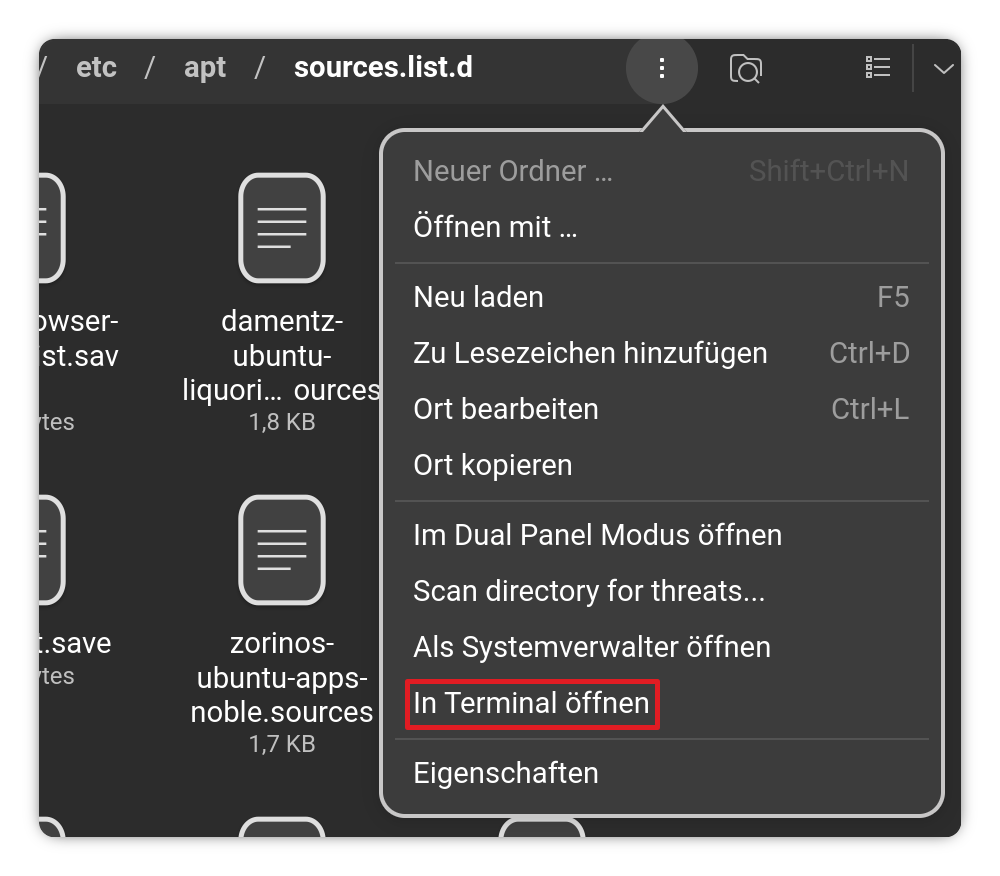
When You want deleten them, simply delete the .list File. Open Nautilus (the File Manager) and type in the Pathbar /etc/apt/sources.list.d and then You should be in the Folder with these Files. On the right End of the Pathbar are 3 Dots. Click on them and choose the Option ''Open in Terminal'':

Then the Terminal opens. To delete a File type sudo rm [File-Name].list
(replace [File-Name] with the actual file Name of the File You want delete)

When You want disable one of them type in Terminal sudo nano [File-Name].list and then set at the Beginning of each Line a # to comment it out. When changed the File press ctrl+o to save, Enter to confirm and ctrl+x to exit.

When all Changes are made type in Terminal sudo apt update && sudo apt upgrade and then try the Zorin Upgrade Tool again.

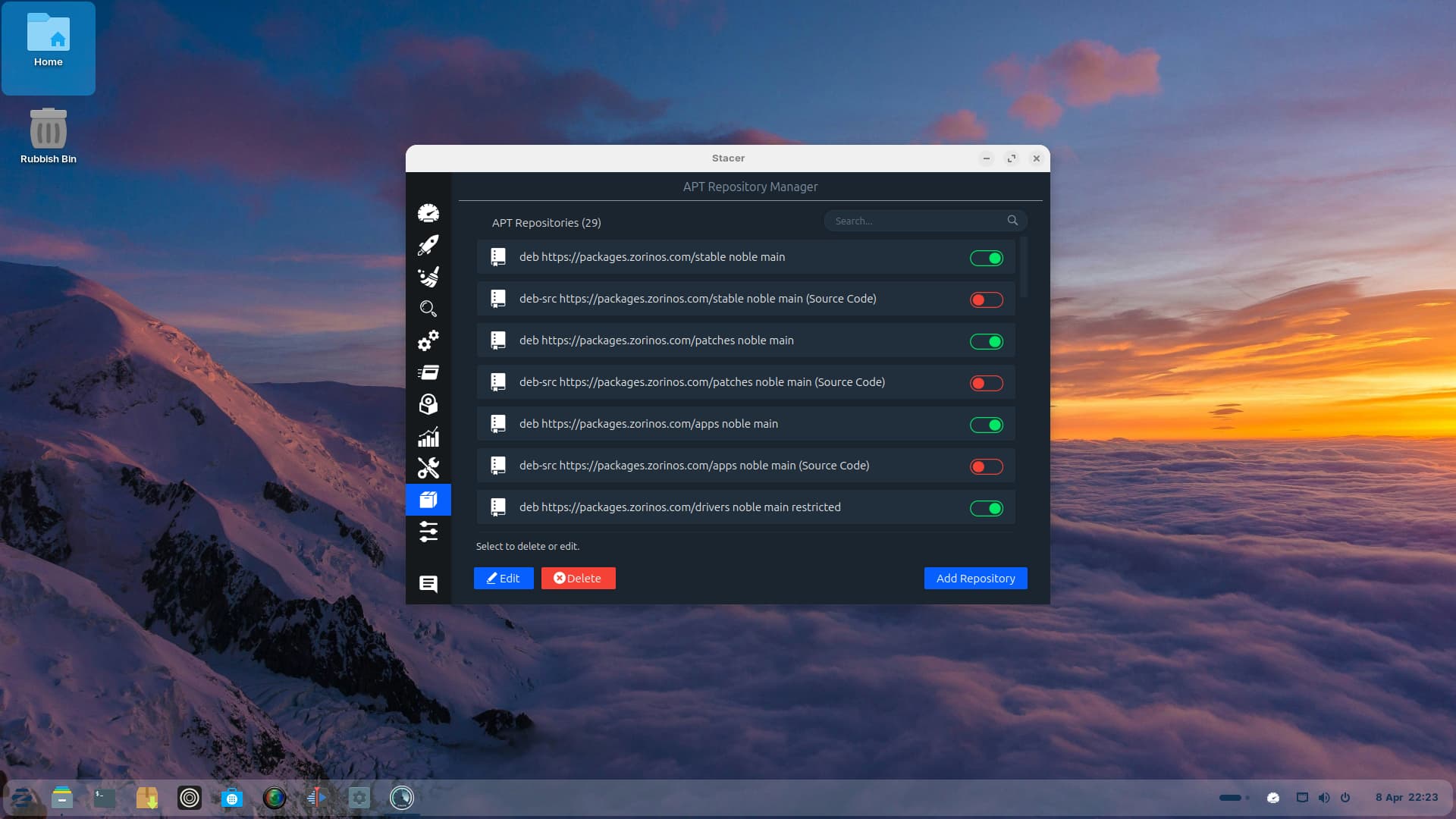
There is an easier way using Stacer:

I usually turn off first, then press Delete - you will need to enter your password to elevate you to 'root' to delete the PPA.

@Aravisian and @Ponce-De-Leon i use stacer and disable all, but the problem persist...

Can you please show the output for

cat /etc/apt/sources.list

ls /etc/apt/sources.list.d

The output of ls /etc/apt/sources.list.d:
deadsnakes-ubuntu-ppa-jammy.list
fingerprint-ubuntu-fingerprint-gui-jammy.list
git-core-ubuntu-ppa-jammy.list
heyarje-ubuntu-makemkv-beta-jammy.list
linrunner-ubuntu-tlp-jammy.list
mozilla.list
n-muench-ubuntu-vlc-jammy.list
steam-beta.list
steam-stable.list
teamviewer.list
vscode.sources
waydroid.list
zorin.list
zorinos-ubuntu-apps-jammy.list
zorinos-ubuntu-drivers-jammy.list
zorinos-ubuntu-patches-jammy.list
zorinos-ubuntu-stable-jammy.list

I cannot find this PPA anywhere for Noble... Can you check this PPA, please?

You do not need these at all - I recommend removing both... But if you are deadset on keeping one - keep only one. You cannot keep both - they conflict with each other.

Hi,

I deleted this packages but the problem persist... The message is the same

Previously, you said you disabled or deleted all third party repositories, then reported still having the same issue - followed up with showing that you had not disabled or deleted all third party repositories.
So, please confirm:
cat /etc/apt/sources.list

ls /etc/apt/sources.list.d