I don't download any apps, games, anything. I only have Zorin OS on my computer and that's it. I use the Brave browser. All I do is update when it says there are updates and I always run the sudo apt clean && sudo apt autoremove before I download the updates.
But, I'm losing functions lately. First my backspace and delete keys got wonky, and now I have to unplug and plug back in my lan connection or it doesn't recognize my wired connection for internet.
Now I'm afraid to run any more updates.
Specifically, if I try to use the backspace key while in Libreoffice it will take away some of the border at the top of the page. If I'm in other other places like an email I have to use the backspace key to delete the words I've highlighted.
Any instructions you give me, please tell me like I'm an idiot.
If you give me any instructions, please pretend I'm an idiot.
The sudo apt autoremove probably was the culprit in deleting an important dependecy in your packages that clunked your system.
Before running autoremove it's always best to make sure what you really deleting.
sudo apt autoremove --dry-run :This command simulates the removal process without deleting any packages, allowing you to review which packages are marked for removal.
As a further note it's best to do a backup once in awhile for situations like this. Many use Timeshift or Rescuezilla.
It more look like another problem than something removed , could you give me the output of
uname -a
and
echo $XDG_SESSION_TYPE
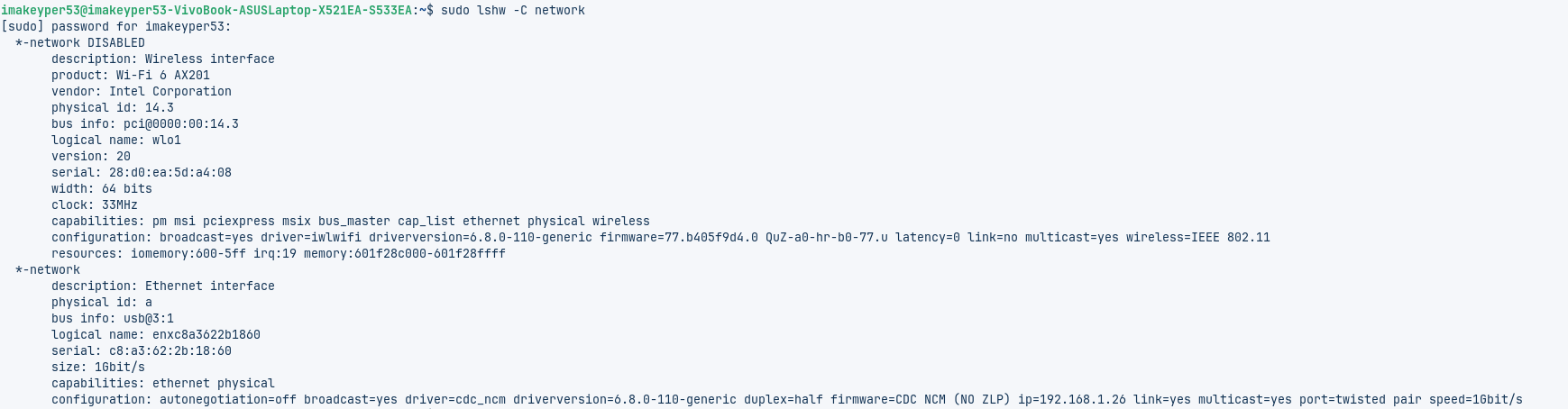
You said it began after an Update? Maybe it was a Kernel Update ... Did You had to reboot? Also: Could You post the Output of the Terminal Command sudo lshw -C network please? It shows Details about Your Network Hardware
amigo cuando instales algo no le digas al terminal tras su instalacion y termina sea bien o mal no le digas despues Autoremove eso hace que limpie todo los archivos que descargo y por eso primero hay que saber si esta estable el progrmaa y una vez estabilizado dile a otros usuarios que te ayude a bloquear y asi no se estropeara mas por muchas actualizaciones haya el programa seguira funccionando a pesar de tener nuevo kernel por updates y eso o al menos eso pienso yo por si no sabias nadie en su sano juisio escribe rapido auto remove que hacer limpieza eso se usa mucho mas alfinal despues de probar el programa y bloqueado el progrmaa para que funccione bien ahi si podras decir al terminal auto remove como decias un comando aparte si hace falta el sistema sabra que es bueno y no .. suerte..
So before I go any further and look at any more comments, I did use Timeshift but I didn't know what I was doing and it took up all the space on my computer and it ran out of bytes. I had to pay a guy to get my computer running again. I ran those commands because once upon a time I was told to do that because on my old computer it didn't run anymore after an update and I was told to run those code lines before every update to avoid any mess up but that was with Zorin OS 16.3 pro. So, I won't do that anymore.

It's wayland try it with switching to X11/Xorg. To do that, go to the Login Screen. click there on Your Profile so that the Password Field appears. When it is appeared, You should see a Gear Icon in the bottom right Corner. Click on it and choose the Option ''Zorin Desktop on Xorg'' and then log in and test it.
Okay, that looks good for me. What is Your Output for rfkill list
everything says no.
What is changing the function of my keys like the delete and backspace. I wouldn't know how to assign hot keys. This stuff is so frustrating.
I have no idea how to even begin doing what you are talking about. What is wayland. How did it come to be a factor on my laptop or my system? And on and on.
I will try a couple more times but I think I'm going to have to pay someone again to get Zorin OS 17.3 pro to work correctly. This just doesn't work well for me. I thought it was supposed to, this going to the forum to ask for help but it seems kind of clunky to this non-coder type being. No shade intended. Thanks for the attempt, I appreciate it.
To make a short Summary here: Wayland and X11/Xorg are Display Protocols. Wayland is a newer Standard but depending on the Imlementation and Hardware/Software Configuration not so reliable. X11/Xorg is an older Standard but more reliable.
To switch, go to the Login Screen. Click there on Your Profile so that the Passowrd Field appears. When it is appeared, You should see a Gear Icon in the bottom right Corner. Click on it and choose the Option ''Zorin Desktop on Xorg'' and then log in.
I understand your frustration but I just ask you to click on a gear and select something, and maybe this 2 clicks could help you