I recently got gifted a Latitude 5400 laptop from a close relative and decided to install Zorin alongside Tiny11, and i've been really enjoying it! However, I have a few questions I want to ask regarding some of the specific hardware that my machine has.
My model of the Latitude 5400 has both intel UHD graphics along with a DGPU (RX 540X Mobile), but i'm unsure of which one is in use, and how to switch between the two. I know both are detected (and have drivers), but I'm just curious as to how I can toggle between them.
My model additionally has a fingerprint biometric scanner that I use in Windows, but it doesn't seem to work in Zorin. I already tried to enable it via the troubleshooting page for it, but I got nowhere. Still not recognized.
I hope that my answers were clear enough to make sense. I've tried solving these on my own but to no avail, so I hope the forum community might be able to lend me a hand!
Sorry for taking so long to reply, I thought I would get an email if anyone followed up on my thread, guess not!
When I go to About in settings, it shows both the AMD Radeon 540x Series / Mesa Intel UHD Graphics 620, so both are at least detected. One thing I forgot to mention is that in the "Color" tab, it shows two different options, both being "Automatic - Built-in display". I don't know if this is related to the dual GPU's at all, but I just wanted to bring it up.
I did check Software & updates for a driver, but it shows nothing extra in that tab.
Thank you for taking the time to help me. It means a lot.
You should. But You can take a Look in Your Profile settings and set it up.
What is shown first? That should be the default. Normally, it should switch automatically depending of the Uasge (if You need more Graphics Power). But when you want use the AMD Graphics by default, You could take a look in the BIOS. There You should be able to select the primary Graphics.
Because of the Fingerprint: Do You know what Model it is? Did you take a Look at the Manufacturer's Website if there is a Driver or Instructions for it under Linux?
Or maybe switching to Xorg could help. go to the Login Screen, not the Lock Screen. Simply reboot for that. On the Login Screen, click on Your Profile so that the Password Field appears. When it is appeared, You should see a Gear Icon in the bottom right Corner. Click on it and choose the Option ''Zorin Desktop on Xorg'' and then log in.
I did check the actual Zorin settings menu, and it does appear that the RX 540x is shown first, so I would like to assume that it's taking priority whenever it's in performance mode or plugged in. That being said, I tried to look in the BIOS and couldn't find a toggle between GPU's, probably because this model of laptop was sold with and without the dGPU. Still, there are a few things that make me a bit skeptical about it fully being used.
Tests with certain low-end games between Zorin and Windows showed me that Windows actually had better performance somehow, despite the game in question having a native Linux port. Might have something to do with Vulkan but I doubt it. It just seemed choppier in a way that seemed more familiar with what I know of Intel UHD.
For some reason, right clicking on most apps still shows a "Launch with Discrete GPU" option, which I also find weird because if the system was in performance mode (what I usually have it on) or plugged in, I would expect it to already be using the dGPU, thus making it redundant. Then again, it's probably just there if you need to launch a program with the dGPU when on balanced/battery saver, so I'm not to worried about it.
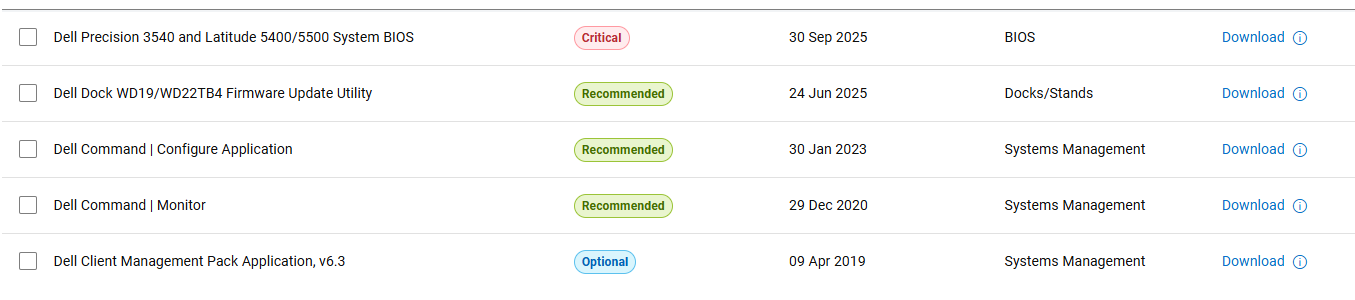
I did check what Dell had in terms of Ubuntu drivers on their site, but this was all they had:
Considering that this laptop is more business oriented, I think most of this software is primarily remote management, and is thus pretty useless for what I'm trying to accomplish.
As for signing in on Xorg, I did toggle it on when signing in, but when navigating to settings I didn't find anything new.
Okay, ran it in Terminal and this is what it spit out:
Bus 004 Device 001: ID 1d6b:0003 Linux Foundation 3.0 root hub
Bus 003 Device 001: ID 1d6b:0002 Linux Foundation 2.0 root hub
Bus 002 Device 001: ID 1d6b:0003 Linux Foundation 3.0 root hub
Bus 001 Device 005: ID 0a5c:5843 Broadcom Corp. 58200
Bus 001 Device 004: ID 0bda:565c Realtek Semiconductor Corp. Integrated_Webcam_HD
Bus 001 Device 003: ID 2b89:0043 UGREEN Mouse
Bus 001 Device 006: ID 8087:0aaa Intel Corp. Bluetooth 9460/9560 Jefferson Peak (JfP)
Bus 001 Device 002: ID 174c:55aa ASMedia Technology Inc. ASM1051E SATA 6Gb/s bridge, ASM1053E SATA 6Gb/s bridge, ASM1153 SATA 3Gb/s bridge, ASM1153E SATA 6Gb/s bridge
Bus 001 Device 001: ID 1d6b:0002 Linux Foundation 2.0 root hub
^^^^^^^^^^^^^^^^^^^^^^^^^^^^^
This is your fingerprint reader, a Broadcom device.
Because you are using Zorin 17, this could be the issue as it will depend on what kernel you have installed:
"A Linux driver for the Broadcom 58200 fingerprint sensor (USB ID 0a5c) is available through the libfprint-2-tod1-broadcom package, which provides open-source support for this device on Dell Latitude and Precision laptops. This driver is not included in the standard Linux kernel up to version 6.12, so it must be installed separately.
The recommended method for installation involves enabling the Canonical Partners repository for specific Ubuntu releases (e.g., somerville, somerville-melissa, or somerville-squirtle) and using the Additional Drivers tool to select the "Using Broadcom fingerprint TOD driver from libfprint-2-tod1-broadcom (open source)" option.
Alternatively, the driver can be installed directly via a .deb file from Dell's official repository: Index of /updates/pool/public/libf/libfprint-2-tod1-broadcom. For Ubuntu 22.04 and later, the libssl1.1 package may be required as a dependency, which can be installed manually if missing.
After installing the driver, users must run sudo pam-auth-update to enable fingerprint authentication and reboot the system.
Once configured, fingerprints can be enrolled through the system's Settings > Users interface.
While some users have reported success with compiling the driver from source via GitLab or Salsa repositories, the official .deb package from Dell's repository is the most reliable and straightforward method.
The process has been confirmed to work on systems like the Latitude 7420, 9410, and Precision 3541 with Ubuntu 20.04, 21.04, and 22.04. AI-generated answer. Please verify critical facts."
Zorin 17 is based on Ubuntu 22.04 - you might (no guarantees) get it working when Zorin 18 comes out next week.