Hi all, fairly new to Zorin here. I have been using a Razer USB Sound Card for my Blackshark V2 headset and usually it works totally fine without any issues. However, a couple of times recently, my system will only be able to detect input through the mic or sound through the headphones but not both. I have messed with the inputs and outputs but I have only ever succeeded in getting one or the other. So far, this has solved itself over the course of a couple of days (for reasons I don't know), but I would really like to find a fix.
Zorin 18 is based on Ubuntu 24.04.
Brave search result (A.I.) gives:
" Users report that Razer USB sound cards on Ubuntu 24.04 often fail to detect both input and output simultaneously, frequently resulting in a "Dummy Output" or missing input device. This issue is largely attributed to conflicts with the snd_soc_avs driver or improper profile selection by the PipeWire audio server introduced in this release.
To resolve this, you can try the following solutions based on community fixes:
Blacklist Conflicting Drivers : Edit /etc/modprobe.d/blacklist.conf and add blacklist snd_soc_avs to prevent the conflicting kernel module from loading, then reboot.
Force Audio Profile : Install pavucontrol (PulseAudio Volume Control) and navigate to the Configuration tab to manually select the correct profile for the Razer USB Audio Controller instead of leaving it on "Pro Audio" or "Off."
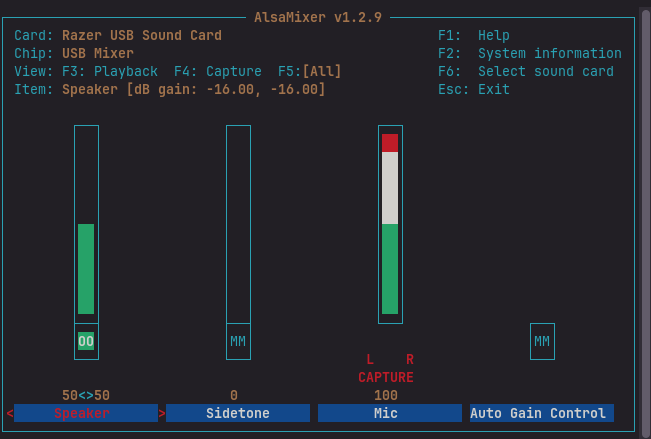
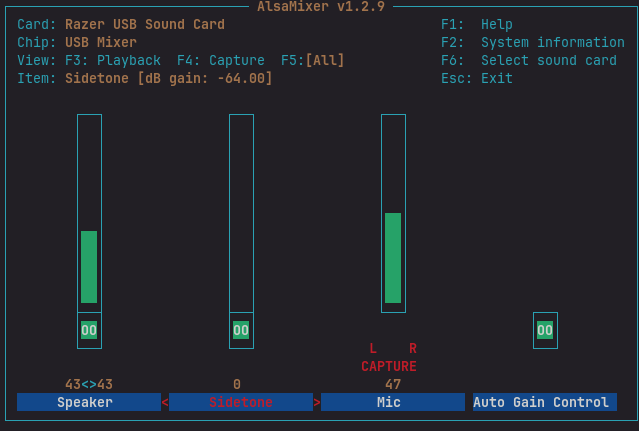
Check ALSA Mixer : Run alsamixer in the terminal, select the Razer card with F6 , and ensure Auto-Mute is disabled and all relevant input/output channels are unmuted.
And You use a Headset with a combined Audio Jack, too yes? Because I know when You plug in only Headphones in such a combined Jack that this can lead to Isses.
OK. that alsamixer is somewhat minimal and less than I expected.
You could experiment by unmuting the Sidetone and AGC channels showing [MM] = muted.
Right/Left arrow to Select, then hit M to unmute
I have no idea of the effect that may have, but just an experiment. If nothing, then change back again.
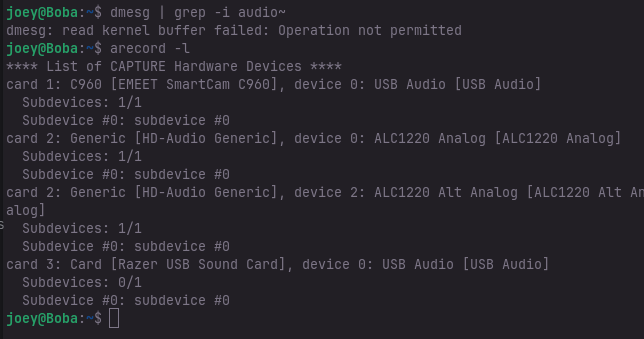
I can have either mic or headphones, never both. When I go to audio inputs in any audio settings, it lists "Razer USB Sound Card - Microphone" and "Razer USB Sound Card - Digital Input (S/PDIF)". It does the same thing in outputs; it lists "Razer USB Sound Card - Speaker" and "Razer USB Soundcard - Digital Output (S/PDIF)". By switching between these options, I can sometimes flip which one is working but it's not consistent.