Re-install of Zorin preserve efi

I'll put a longer description just in case at the end but the tl;dr version is:

Re-installing Zorin but don't want to write over the previous efi:

Dual boot (windows isn't working, boot manager problems)
Reinstall of Zorin - grub is still present
Don't want to loose the efi when Zorin was going before

So how do I not muck over the previous efi that did recognize windows (but isn't right now) and get Zorin back on?

-- Long version
Got a SSD, and have a dual boot on a 2nd set. Because of proprietary I really need to keep it with the Windows. Friend said he had clone software and I didn't need to get something..... used to be a member of the Geek Squad so he knows what he's doing.... The moment I thought that I should of known to say no.

Zorin still worked but Windows isn't now.

Zorin, on using the USB install, wanted to install next to itself but isn't asking about Windows. So one method I read was to clean it off ext4 and reinstall it. But I don't want to loose the efi, while trying to get Windows working,... correct?

So asking for help please. And wish I could say asking for a friend but that's a total fib. I did this to me :face_with_head_bandage:

Thanks and Happy New Year!

1 Like

Couple of thoughts which others will likely chime in too.

Did your Geek Squad buddy do anything irreversible with the cloning? Is the source of the stuff he tried to clone still there or did he delete it?

It sounds like your problem is with Windows not with Zorin, right?

Could it be that Windows is in legacy mode but your new Zorin install is in efi and that's why install program and grub isn't seeing Windows?

You should be able to point the boot manager for either your proposed Zorin reinstall (using something else option) or a possible Windows reinstall at the existing efi partition.

2 Likes

Are you able to boot Windows when you set Windows at first position of boot order in your BIOS?

1 Like

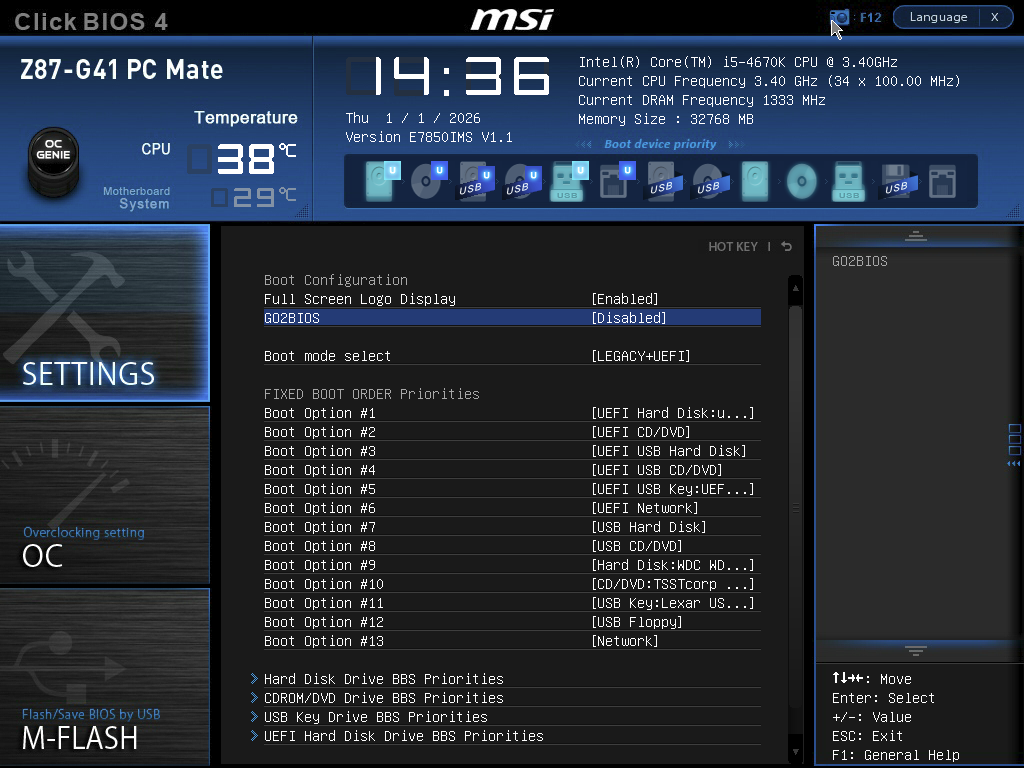
Could You start Zorin in Live Mode and open Gparted and make a Screenshot of the Partitions please? This could help to get a better Overview about Your courrent Partitions Table and how it is set up. Could you also take a Look in Your BIOS and look how Your Boot Order looks and post that here? Could be helpful, too.

With only Your Description, I would geuss that maybe the Windows Boot Manager is damaged - as I wrote: Only a Guess. Would this be the Case, You would have to repair it. But this could lead to deleting the Zorin Boot Stuff if it is placed in the same Partition. But when You want reinstall Zorin, this might not be a great Issue.

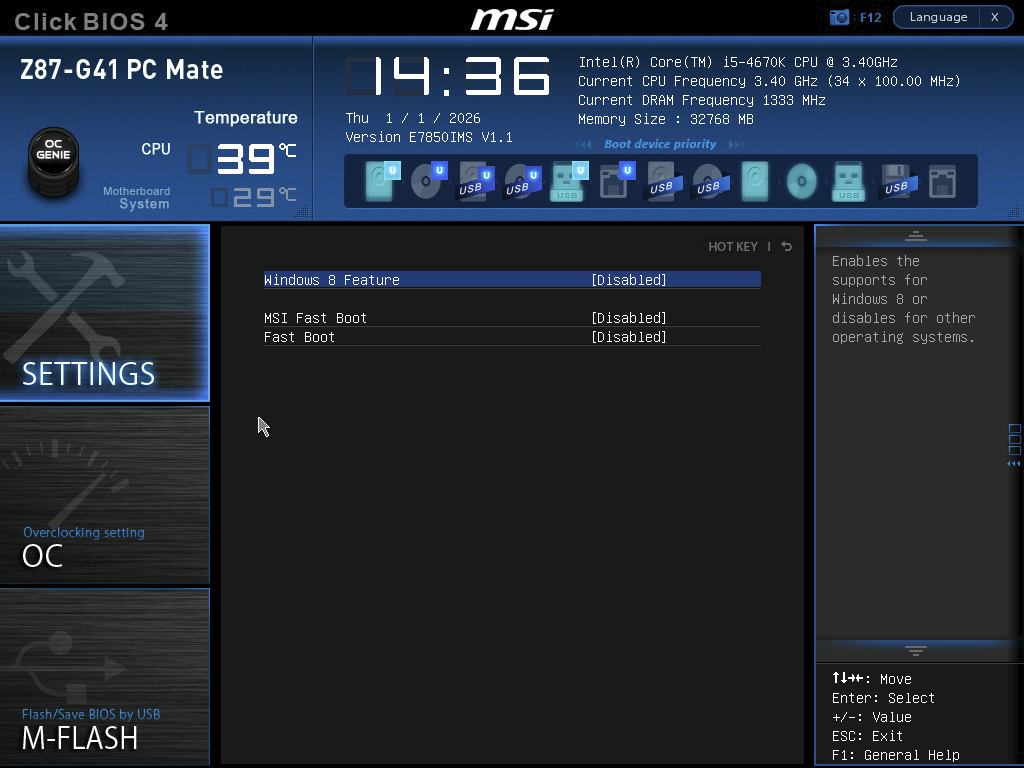
Is You BIOS in UEFI or Legacy Mode? What Tool did You choose the create the bootable USB Stick with Zorin on it? Are Secure Boot and Fast Boot in BIOS disabled? Is Fast start-Up in Windows disabled?

Until further Informations, at this Point my Suggestion would be: First make a fresh Install of Windows and then a fresh Install of Zorin.

1 Like

How about running "Boot Repair Disk" from ZorinOS Live USB?

Back up all your data - just in case.

When I handed him the two drives, one HDD and the other SSD, Windows was fine with Zorin and the two got along.

It came back, both Windows Bitlocked on both drives. I asked him about it, he says he knows nothing about Bitlock and it doesn't make any sense to him why copying sector to sector would of messed up anything to do with the drives.

Yes the problem is with Windows. Bios, both drives, no longer sees Windows at all to show up in the boot menu.

I have, (tore up the place finding it) the Windows disk and original Motherboard install disk for the computer. Which is kinda amazing Cyberpower built it back in 2014-13, the HHD and Motherboard are the only ship-with pieces left in that set.

I have run the recovery disk for it and every time from the command prompt:

bootrec /fixmbr (this works)
bootrec /fixboot (this DOESN'T work)
bootrec /rebuildBCD (this does work)

But Windows has no boot options in BIOS, Zorin doesn't know it's there, etc.

With it bitlocked like it is, I take it installing at efi partition won't wipe where Windows is installed at? Because the proprietary software I need to preserve isn't an option for reinstall. At least not without spending a lot of money.

Edit to add:

The SSD and the HDD drive has lots of space so if I needed to partition for a place to run windows in a new install and try to get Zorin to see that and then work from there that's an option?

Not so much worried about messy right now.

I have an external drive inbound that I'm going to move Windows on it and let it. and it's records, sit all by it's happy self collecting stand alone dust xD

Windows doesn't show in BIOS for boot at all when the disks were returned to me so I haven't been able to force either disk to ignore the boot sequence and just fire up Windows.

These pics are of the SSD but the HDD is the same:


Agreed that it seems to be the boot manager is having issues. Installing or reinstalling Zorin is fine. There isn't anything on it that I am worried about. I was doing this so that the set in questions maintained records AND the person using it could get used to Linux. Since only occasionally does Windows need to get accessed.

@zabadabadoo I've tried Boot Repair and it hasn't worked. However, I admit there could be settings that I'm unaware of that might resolve the issue easily.

With bitlocker locked, that's your main issue it seems to me. I'm no geeksquad expert but something encrypted your windows drive and I'm afraid unless you get it decrypted you are going to be locked out. I'm not an expert. It sounds like you should be examining ways to decrypt bitlocker on that windows install. You might be able to leverage your windows live account to get you back in.

If you didn't have it encrypted before, something triggered it while it was in your buddy's hands. Usually you need some recovery key but I think if your live account is in good order, you should be able to follow one of the methods for decrypting it. You might try booting from a live windows like a winpe, windows preinstall environment. You can make one, but something like hirens boot cd might be more helpful at this point. Then follow a tutorial for decrypting bitlocker. Lord only knows what happened to encrypt it in the first place but that's all I can think of. If you're able to, hand it to your friend to fix after making a backup of your important files first. Or take it to a local shop and bite the bullet if it's out of your skill level. Again, I'm no expert but to me it sounds like bitlocker is your issue.

1 Like

https://www.thewindowsclub.com/fix-cloned-ssd-wont-boot-windows Following this might get you going again.

https://www.elevenforum.com/t/change-how-bitlocker-unlocks-os-drive-at-startup-in-windows-11.4142/

1 Like

Hmm ... with Bitlocker this could be a Problem ...

Well, somehwo it must be encrypted with it.

Okay, at least Gparted detects sda5 as a Boot Partition. My Guess is that sda1 could be the Windows Boot Partition but without the Details it is only a Guess because of the Size.

1 Like

@Ponce-De-Leon Yes, sda1 would be Windows.

@william.a.heinz and @Ponce-De-Leon

Couple of things I discovered... okay this gives me hope, maybe.

  1. The edition of Windows we are dealing with is Windows 7 Home Premium. It doesn't have Bit Locker. So, how did this happen? (kinda rhetorical) Maybe his computer did it? In that case, he's got the bit locker keys and I can use a third party to unlock.

  2. If that isn't the case. The drives are showing as not active per diskpart so I'm guessing there's a mounting issue? How do I check or, I should say, in this situation from a live usb of Zorin how do I check what is mounting?

I can check if there is a broken UUID or something from there no? Or would that not help?

Before you tried migrating to the new SSD, were you getting a true dual boot with grub menu giving you Zorin and windows choices? Or did you have to go into your BIOS and select which you wanted?

I'm still thinking Win7 was probably in legacy mode with it's boot manager in an MBR partition (based on age of system and reference to Legacy+UEFI in your BIOS boot listing) while Zorin seems to be in UEFI based on the efi partition. I'm thinking this probably didn't give you a grub menu situation. @Aravisian gave a simple set of commands to switch Legacy to UEFI in another thread that I should be able to find for you later if you need it.

BTW could your Boot Option #9 be the windows boot manager? It was truncated in your screenshot.

Seems like the encryption is the issue you need to address first, however. Will watch progress with interest.

Well, when it was before encrypted, then only the Guy You gave it to can answer that. I don't know what system he has or how it is set up. When he has Bitlocker, the easiest Thing would be to give the Drive back, he decrypt it and disable Bitlocker for it.

The Thing is: Not the whole Drive is encrypted. Only the 3 Partations sda1 to 3 are. so, sda1 seems to be the Windows Boot Partition, sda2 the actaul System and sda3 the Recovery Partition.

In Zorin, it is detected. Otherwise, You wouldn't see it in Gparted.

When you say it's "Bitlocked," what's your evidence of that? You mentioned that it's Windows 7 home, which doesn't have Bitlocker. Have you actually gotten a prompt from Bitlocker to enter either a password or recovery key? Unless I missed something, I haven't seen mention of that. I'm asking because if the partition is truly bitlocker encrypted and you don't have the recovery key, it's almost certainly unrecoverable (that's the whole point of encryption after all). If it's not actually Bitlocker, there's more hope.

As for cloning causing problems with Bitlocker, I've cloned drives with Bitlocker many times without problems; it's doable. If anything changes in terms of secure boot, however--for example, adding an MOK key to boot cloning software--Bitlocker will treat the system as untrusted and demand the recovery key. Do you know anything about the method your friend used for cloning? Have you made any changes on your machine regarding secure boot (including turning it off/on) since things were working?

When You look at the Picture here:

You can see on the GParted Window that the first 3 Partitons are lead as ''bitlocker''.

Interestingly, I've had Gparted misidentify an unencrypted Windows 11 partition as bitlocker in the past, so I don't entirely trust that, given without other evidence. Still, I can't believe I missed that, so thank you for pointing it out.

@Xell, have you tried bypassing the bootloader to boot into Windows? I should be clear that it MAY not work, but using your BIOS boot menu (F8 during boot on most ASUS boards I've seen; I'm not sure about MSI) can at least sometimes get in, if the problem is with the bootloader's state and not the EFI data itself. This is not quite the same as boot order as in your screenshot; this is forcing a menu to appear based on your BIOS's OS detection instead of GRUB.

2 Likes

Sorry for the late reply, hope everyone had a good weekend.

@NickS Yes on true dual boot. I could select Windows or go with Zorin (as it runs the line across the top)

Boot #9 is the HHD

@william.a.heinz btw, I ran through some of those links and that didn't help but thank-you for trying. On TPM, this system isn't 2.0 so it shouldn't of messed itself up with that but tried some of the advice anyways. It took me awhile looking at things since I either need to run off Winrec disk to try or a live USB for Zorin. Lots of wait-for-it-time.

@Ponce-De-Leon The following seems to be the culprit? Aluratek AHDDUB100

I think it was said later in the thread, I must agree that it isn't bitlocked. GParted just doesn't know what else to call it? Because the more I look into it, it didn't have the access or capability to encrypt itself.

If I go to the drive where I was going to reinstall Zorin, it has a folder 'Deleted OS' inside that folder under mount is only 3 folders, 'sda1, sad2, sad3'

Also, if I go to Disks and look at sda1,2,3 it's really nice and asks if it can unlock it for me (operation not supported) but it also says the lock is unknown. Like it's a guess. Windows 7 did have a pass code for login/screen saver interrupt. But it wasn't encrypted.

So I guess I'm back to the reinstall of Zorin?
Can I keep the old grub boot so I can comb through it to find out if the mount addresses got messed up or something?

@Locklear93 I've tried to get Windows to boot but it doesn't seem to want to so I thought boot was corrupted... if, asking because I don't know, Grub doesn't load/mount it could that be why the drive isn't active?

Every time time I run WinRe or Live Zorin.. c: d: e: aren't active. I've run a scan disk and there aren't bad sectors. I've tried to activate c: through command prompt and it doesn't make a difference at reboot. All 3 go inactive again.

Edit to add: thanks everyone for all the ideas and trying! It really is appreciated.

1 Like

By "active" do you mean mounted? Whether or not a drive is mounted at start depends on the defaults the OS is using, and whether or not it's configured to be mounted in /etc/fstab. When you're running a live environment like Zorin from USB, you're not going to be able to make a permanent change to your fstab, so it's expected that you'll have to remount them each time. I can't speak for WinRE refusing; to the best of my knowledge Windows just mounts everything it sees.

@Locklear93 Yes sorry mounted. I don't think they are mounting. Gparted says they aren't. Also, another program seems to think the drives's Id start with a '?'

Something broke or corrupted when cloning from HHD to SSD and I would like to get the addresses to see if Grub is actually mounting the correct drive ID's.... or ... would that not help?