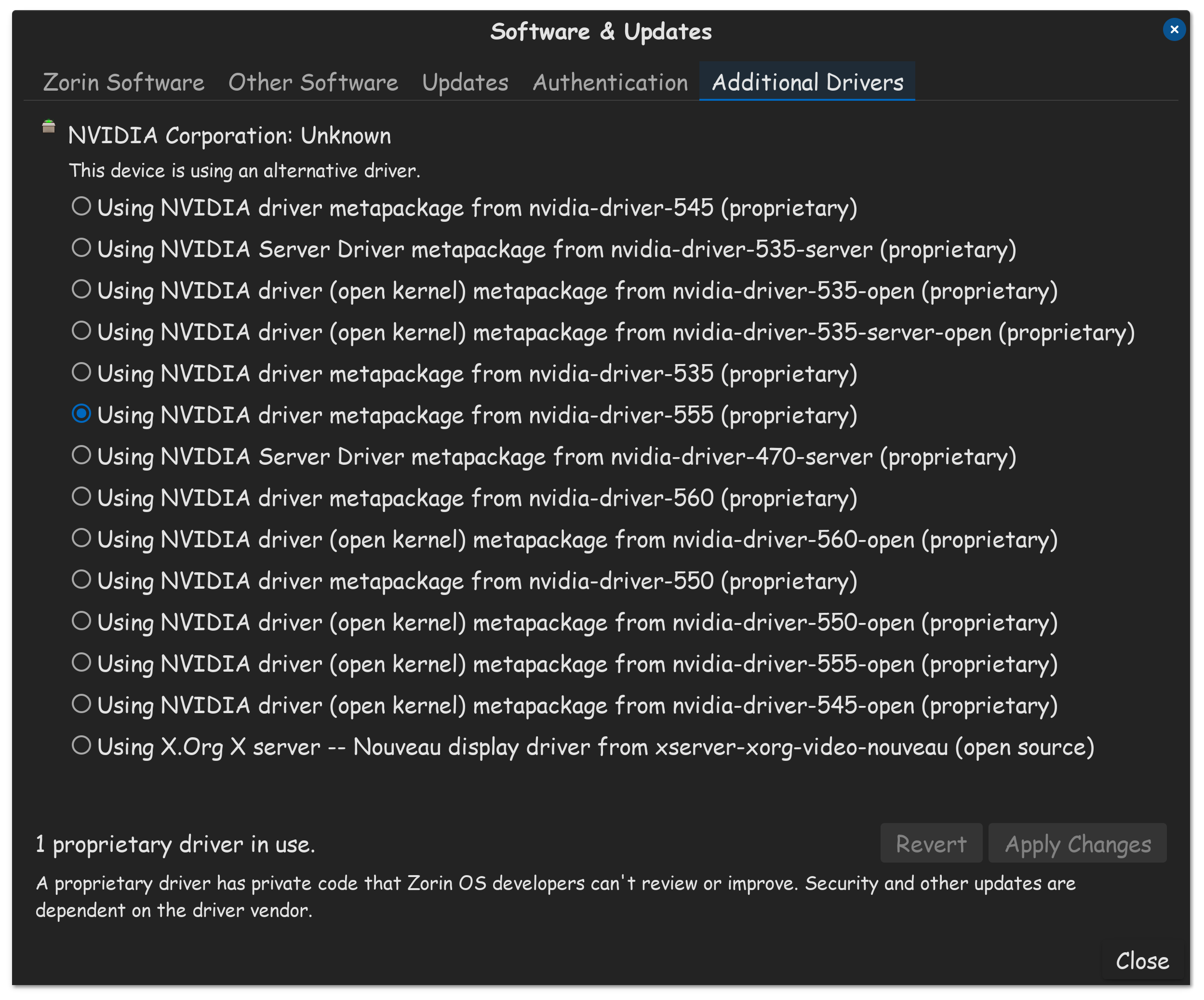
Is there a recommended update procedure? I've been running Zorin 17.3 Pro for 7 months now and am extremely happy. Today I had my first real issue with the OS minus personal "learning curve" issues. Doing an update from the terminal, my nVidia driver got hosed and made my monitor unrecognizable and reverting to VGA. I was able to fix it by getting into the "Software Updater" application, and it recommended doing a partial upgrade due to a failed update. It applied the update but I didn't see any improvement. I rebooted, selected xorg on login and it was still 640x480. I checked the nVidia driver status and saw I had to select it again. I did this and it was fixed. My question is though, since the terminal command line method of updating hosed my system, should we not need to use that and only software updater, or as a third method use the Software application update? Is there a recommended update method?
I've been computing since '86. I think one thing that always held people back from embracing Linux is the multiple ways of accomplishing tasks. I feel Zorin does a good job of insulating the "unskilled" user from having to dive too deep, but the update procedure could use some clarification.
Unless I have a specific issue with my Nvidia drivers, where I need to reinstall Gnome software in Terminal, or manually install a driver, I don't use Terminal, I just do it in Additional Drivers...
I hate to say it, but I've had the fewest issues since abandoning the easy, packaged video drivers for Nvidia's own driver installer. The thing is, while that's not HARD, it does involve multiple steps, the command line, and MAY be more complicated if you're running certain replacement kernels. (If you don't know if you replaced your kernel, you did not.) I recommend it for reduced hassles in use, but setting it up/upgrading it is a process, so I don't recommend it for anyone whose system is working and would be bothered by doing things manually.
To answer your more specific question, I personally prefer using the command line to update--the GUI updater is convenient, but I like to be able to see what's happening in case something goes wrong. There was a recent problem on Ubuntu's servers in which HTTP/500 was being returned. This means there's a server-side problem. The updater was telling me to check my Internet connection. The 500 error could only be seen via command line. Thus, I use sudo apt update && sudo apt upgrade and flatpak update. If all of your packages are .deb, then you don't need the second command; it's only for flatpaks.
APT is "Advanced Package Tool." Debian and derivatives (Zorin is an Ubuntu derivative, and Ubuntu is a Debian derivative) use it to manage .deb packages in a way that handles dependencies and other things that just extracting the package wouldn't, but it's only for .deb files. Flatpaks and snaps need their own updater, which the GUI software updater also handles. AppImages may update themselves or may require the user to manually download and replace them, depending on how they're created.
Because APT doesn't have any source for the updates. The .deb contains information about the files in the package, install scripts, and so on, so the software can be installed as needed but without a repository it has no place to download a new version from. That said, it isn't impossible for a .deb to add a repo by itself with the install scripts. I haven't seen many do this and assume it to be considered bad practice (Proton VPN and Firefox both walk you through manually adding a repo via command line), but Steam's own .deb file DOES add its repository automatically.
Depending on the circumstances of the update however, even some without repositories may perform some updates automatically, but they don't do it through APT; they self update. When Discord does updates that are only data, it'll download them itself when it starts. When there's a new version of the executable, it stops at launch and has you download the .deb manually and install it. Since Discord doesn't maintain a repository, its executable can't update itself.
Are you always informed that there is a new version of a .deb or do you have to go to the homepage regularly to see which version is currently available?
This depends entirely on the program. If the author included a simple version check, the program can notify you on launch. Many appimage programs do this. If the author didn't manually write something to check the version, then no, you'd have to periodically check for yourself or hear about a new version from someone.
Since I feel like this is a likely next question, most apps don't have their own repositories partly because it costs money to run the server and pay for bandwidth, and partly because adding repos all over the place is risky. If developer A needs a certain package as a dependency for their application and your version of Linux depends on a different version, breakage can occur. This is why Aravisian so frequently advises people not to use a different distribution's repositories, or if one must, to immediately remove the repo afterward so an update down the line won't break your stuff.
I think this is personal Preference. I like to use the graphical Software Updater because I see there not only the Packages. I can click on them and get - if supported - a Changlog. And I prefer to take a Look at it.
On the other Side, I have made the Experience that an Update is faster available in the Terminal than in the Software Updater. But this is for me (mostly) not a Problem.
At the end, I use both. And for updating Flatpaks, I use Gnome Software, not the Terminal. And Snap is uninstalled.