I have a problem with recording internal audio on the Inspiron one 2020. on my Windows 10 Aspire ZC-700G I have produced well over 1000 mp3s using asagio virtual audio cable and Audacity. The problem with this Inspiron one is The internal Microphone is recording the sound coming from the speakers so I go to settings, then sound, then go down to output, theres a button entitled speaker-built in audio, and under input theres a button entitled internal microphone-built in audio. to the right of both of these designations is an arrow on the buttons clearly leaving you with the idea that there are more options available but when you click on them nothing changes they remain the same. I'm clearly out of my league but I even went to BIOS thinking maybe something there might be the problem. I even installed Pulse Audio Volume Control it leaves us with the same scenario. I need to bypass the internal microphone and I need to record from sound card any help would be appreciated.
Maybe worth a play around with sound channels using alsamixer.
Open a terminal session (CTRL+Alt+T), then type:
alsamixer
In alsamixer, hit F6 to list/select soundcard.
Then hit F5 to show All sound channels.
Look for channel [Loopback-mode] try changing that and test.
Also same with [Auto-mute].
You may also find output and input channels that are giving you that feedback and can mute by typing "M".
Some linux sound issues are not simple and straightforward to solve, but Alsamixer is a tool you can have a good play around with.
You could post a screenshot of your alsamixer and that may help us with diagnosis.
If you find an alsamixer setting that is good, save it using:
sudo alsactl store


thank you zabadabadoo you guys are the best.
zabadabadoo I spoke too soon I ran a small recording using Tenacity. I had looked at ocenaudio the waveform looks like it's not legit I splice and dice when it comes to editing, I use that. any way I made a very small recording while recording I clapped my hands and VU meters spike in correlation to the claps and playback confirms that and AI tells me To find the microphone section, look for the device with an asterisk (*) next to it, which indicates that it is a hardware device. so in terminal I ran
pacmd list-sources in the terminal
2 source(s) available.
index: 0
name: <alsa_output.pci-0000_00_1b.0.analog-stereo.monitor>
driver: <module-alsa-card.c>
flags: DECIBEL_VOLUME LATENCY DYNAMIC_LATENCY
state: SUSPENDED
suspend cause: IDLE
priority: 1030
volume: front-left: 65536 / 100% / 0.00 dB, front-right: 65536 / 100% / 0.00 dB
balance 0.00
base volume: 65536 / 100% / 0.00 dB
volume steps: 65537
muted: no
current latency: 0.00 ms
max rewind: 0 KiB
sample spec: s16le 2ch 44100Hz
channel map: front-left,front-right
Stereo
used by: 0
linked by: 0
configured latency: 0.00 ms; range is 0.50 .. 2000.00 ms
monitor_of: 0
card: 0 <alsa_card.pci-0000_00_1b.0>
module: 7
properties:
device.description = "Monitor of Built-in Audio Analog Stereo"
device.class = "monitor"
alsa.card = "0"
alsa.card_name = "HDA Intel PCH"
alsa.long_card_name = "HDA Intel PCH at 0xf7d00000 irq 27"
alsa.driver_name = "snd_hda_intel"
device.bus_path = "pci-0000:00:1b.0"
sysfs.path = "/devices/pci0000:00/0000:00:1b.0/sound/card0"
device.bus = "pci"
device.vendor.id = "8086"
device.vendor.name = "Intel Corporation"
device.product.id = "1c20"
device.product.name = "6 Series/C200 Series Chipset Family High Definition Audio Controller"
device.form_factor = "internal"
device.string = "0"
module-udev-detect.discovered = "1"
device.icon_name = "audio-card-pci"
- index: 1
name: <alsa_input.pci-0000_00_1b.0.analog-stereo>
driver: <module-alsa-card.c>
flags: HARDWARE HW_MUTE_CTRL HW_VOLUME_CTRL DECIBEL_VOLUME LATENCY DYNAMIC_LATENCY
state: SUSPENDED
suspend cause: IDLE
priority: 9039
volume: front-left: 65535 / 100% / -0.00 dB, front-right: 65535 / 100% / -0.00 dB
balance 0.00
base volume: 20724 / 32% / -30.00 dB
volume steps: 65537
muted: no
current latency: 0.00 ms
max rewind: 0 KiB
sample spec: s16le 2ch 44100Hz
channel map: front-left,front-right
Stereo
used by: 0
linked by: 0
configured latency: 0.00 ms; range is 0.50 .. 2000.00 ms
card: 0 <alsa_card.pci-0000_00_1b.0>
module: 7
properties:
alsa.resolution_bits = "16"
device.api = "alsa"
device.class = "sound"
alsa.class = "generic"
alsa.subclass = "generic-mix"
alsa.name = "ALC662 rev3 Analog"
alsa.id = "ALC662 rev3 Analog"
alsa.subdevice = "0"
alsa.subdevice_name = "subdevice #0"
alsa.device = "0"
alsa.card = "0"
alsa.card_name = "HDA Intel PCH"
alsa.long_card_name = "HDA Intel PCH at 0xf7d00000 irq 27"
alsa.driver_name = "snd_hda_intel"
device.bus_path = "pci-0000:00:1b.0"
sysfs.path = "/devices/pci0000:00/0000:00:1b.0/sound/card0"
device.bus = "pci"
device.vendor.id = "8086"
device.vendor.name = "Intel Corporation"
device.product.id = "1c20"
device.product.name = "6 Series/C200 Series Chipset Family High Definition Audio Controller"
device.form_factor = "internal"
device.string = "front:0"
device.buffering.buffer_size = "352800"
device.buffering.fragment_size = "176400"
device.access_mode = "mmap+timer"
device.profile.name = "analog-stereo"
device.profile.description = "Analog Stereo"
device.description = "Built-in Audio Analog Stereo"
module-udev-detect.discovered = "1"
device.icon_name = "audio-card-pci"
ports:
analog-input-internal-mic: Internal Microphone (priority 8900, latency offset 0 usec, available: unknown)
properties:
device.icon_name = "audio-input-microphone"
analog-input-mic: Microphone (priority 8700, latency offset 0 usec, available: no)
properties:
device.icon_name = "audio-input-microphone"
the end I did not find the asterisk (*) anywhere and would not have known what to do with it even if I had found it.
Can you hit F5 in alsamixer and post a screenshot.
(Your previous screenshots were with F3 showing only some channels, not ALL of them)

pacmd list-sources in the terminal
2 source(s) available.
index: 1
name: <alsa_output.pci-0000_00_1b.0.analog-stereo.monitor>
driver: <module-alsa-card.c>
flags: DECIBEL_VOLUME LATENCY DYNAMIC_LATENCY
state: SUSPENDED
suspend cause: IDLE
priority: 1030
volume: front-left: 65536 / 100% / 0.00 dB, front-right: 65536 / 100% / 0.00 dB
balance 0.00
base volume: 65536 / 100% / 0.00 dB
volume steps: 65537
muted: no
current latency: 0.00 ms
max rewind: 0 KiB
sample spec: s16le 2ch 44100Hz
channel map: front-left,front-right
Stereo
used by: 0
linked by: 0
configured latency: 0.00 ms; range is 0.50 .. 2000.00 ms
monitor_of: 1
card: 0 <alsa_card.pci-0000_00_1b.0>
module: 22
properties:
device.description = "Monitor of Built-in Audio Analog Stereo"
device.class = "monitor"
alsa.card = "0"
alsa.card_name = "HDA Intel PCH"
alsa.long_card_name = "HDA Intel PCH at 0xf7d00000 irq 27"
alsa.driver_name = "snd_hda_intel"
device.bus_path = "pci-0000:00:1b.0"
sysfs.path = "/devices/pci0000:00/0000:00:1b.0/sound/card0"
device.bus = "pci"
device.vendor.id = "8086"
device.vendor.name = "Intel Corporation"
device.product.id = "1c20"
device.product.name = "6 Series/C200 Series Chipset Family High Definition Audio Controller"
device.form_factor = "internal"
device.string = "0"
module-udev-detect.discovered = "1"
device.icon_name = "audio-card-pci"
- index: 2
name: <alsa_input.pci-0000_00_1b.0.analog-stereo>
driver: <module-alsa-card.c>
flags: HARDWARE HW_MUTE_CTRL HW_VOLUME_CTRL DECIBEL_VOLUME LATENCY DYNAMIC_LATENCY
state: SUSPENDED
suspend cause: IDLE
priority: 9039
volume: front-left: 65535 / 100% / -0.00 dB, front-right: 65535 / 100% / -0.00 dB
balance 0.00
base volume: 20724 / 32% / -30.00 dB
volume steps: 65537
muted: no
current latency: 0.00 ms
max rewind: 0 KiB
sample spec: s16le 2ch 44100Hz
channel map: front-left,front-right
Stereo
used by: 0
linked by: 0
configured latency: 0.00 ms; range is 0.50 .. 2000.00 ms
card: 0 <alsa_card.pci-0000_00_1b.0>
module: 22
properties:
alsa.resolution_bits = "16"
device.api = "alsa"
device.class = "sound"
alsa.class = "generic"
alsa.subclass = "generic-mix"
alsa.name = "ALC662 rev3 Analog"
alsa.id = "ALC662 rev3 Analog"
alsa.subdevice = "0"
alsa.subdevice_name = "subdevice #0"
alsa.device = "0"
alsa.card = "0"
alsa.card_name = "HDA Intel PCH"
alsa.long_card_name = "HDA Intel PCH at 0xf7d00000 irq 27"
alsa.driver_name = "snd_hda_intel"
device.bus_path = "pci-0000:00:1b.0"
sysfs.path = "/devices/pci0000:00/0000:00:1b.0/sound/card0"
device.bus = "pci"
device.vendor.id = "8086"
device.vendor.name = "Intel Corporation"
device.product.id = "1c20"
device.product.name = "6 Series/C200 Series Chipset Family High Definition Audio Controller"
device.form_factor = "internal"
device.string = "front:0"
device.buffering.buffer_size = "352800"
device.buffering.fragment_size = "176400"
device.access_mode = "mmap+timer"
device.profile.name = "analog-stereo"
device.profile.description = "Analog Stereo"
device.description = "Built-in Audio Analog Stereo"
module-udev-detect.discovered = "1"
device.icon_name = "audio-card-pci"
ports:
analog-input-internal-mic: Internal Microphone (priority 8900, latency offset 0 usec, available: unknown)
properties:
device.icon_name = "audio-input-microphone"
analog-input-mic: Microphone (priority 8700, latency offset 0 usec, available: no)
properties:
device.icon_name = "audio-input-microphone"
active port:
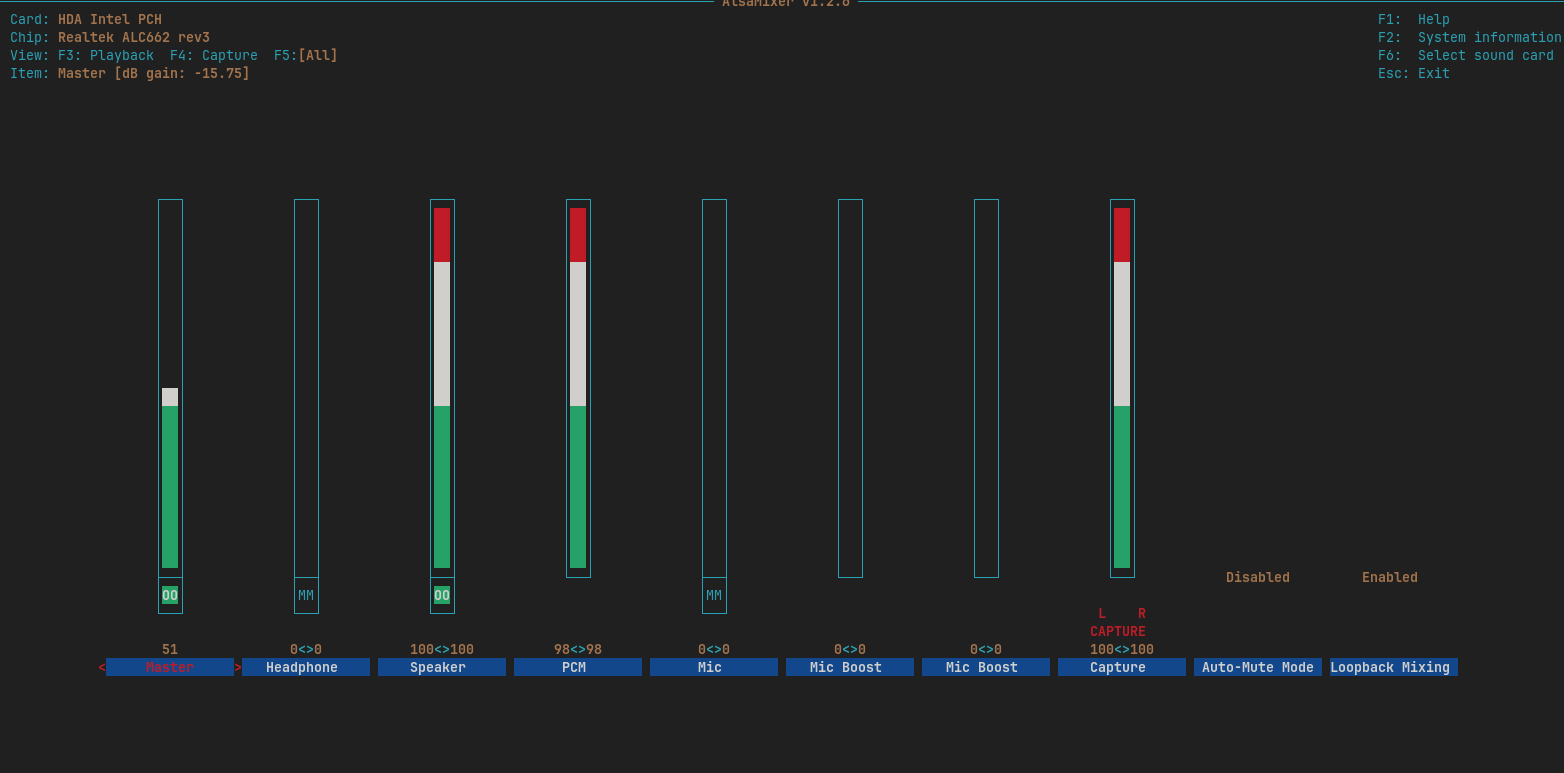
Did you try changing [Loopback Mixing] channel setting to "Disabled"?
I went to alsamixer and both automute and loopback were already disabled? I do not recall disabling loopback but I went ahead and tried to record a youtube video using tenacity and while recording I clap real loud and I peak out so enabled both of them recorded again and the disabled them again In all cases I have internal microphone
To be clear, in all cases when you clap it is picked up by your internal mic and is added to the inline recording. Is that correct?
In alsamixer, have you tried muting the [Capture] channel. pan across to it and hit M.
But that may be your line in channel. Anyhow worth a test.
I presume you have looked at Zorin>Settings>Sound and tried changing mic settings there.
Another option may be to instal pulse audio volume control, to see if that tool can help.
To be clear, in all cases when you clap it is picked up by your internal mic and is added to the inline recording. Is that correct?
yes The first time as I clapped the VU meters peaked in unison with the clap just for confirmation I converted it to mp3 and sure enough thats what it was. Every time after that If it spikes with my clap I kill the session without saving it.
In alsamixer, have you tried muting the [Capture] channel? pan across to it and hit M. But that may be your line in channel. Anyhow worth a test.
F4 capture showed no change to M but in F5 M basically turned the microphone off for the most part you could still hear the YT video in the back ground I cranked it wide open both the volume on the system and the YT video. this changed the flat line of the wave form it made an impression.
I presume you have looked at Zorin>Settings>Sound and tried changing mic settings there.
Yes that was my first move the input panel button is entitled "internal microphone-built-in" on the right side of the panel button is a dropdown menu when you click it the only thing that happens is the downward pointing arrowhead disappears. the title of the panel button remains intact. you either have the illusion of an option or you can click on it and get the low down on the dropdown.
I forgot to mention on capture once I muted the audio it was barely above noise floor I clapped multipletimes and you could hear it.
dealing with this issue early on I had installed pulse audio volume control. It has the same problem that the Zorin settings have. The only difference is it has a lock beside it. The drop down menu exhibits the same behavior.
Sorry. I have run out of ideas on this one for now.
If I do think of something useful to help, I will post another reply.
I appreciate your time an effort. Thank you
I took a hiatus from this nerve-racking trouble shooting process. during that time I did install PulseAudio and tenacity on my formerly Windows 10 Aspire ZC-700G where I have produced well over 1000 mp3s using Asagio virtual audio cable and Audacity. everything I experienced on the Inspiron one 2020 I am experiencing the same on the Aspire ZC-700G. Which leaves me to believe it is the OS 17.3 In settings sound did your tray dropdown menu offer you more options than your tray?
Sorry, I do not understand the question.
Can you maybe do a screenshot to illustrate what you mean.