I trying everything but HDMI cable when connected it showing on TV HDMI cable is connected on TV, but on display setting it is not detecting any display what to do now, I trying lots of command based on internet but not get any result out of it, is there any command or app via which we can I can fix it or any github repo which can help me to fix this ?
Are you logged into the desktop on Wayland?
Many of the commands you will find on the internet (like xrandr) will not work on Wayland.
yes I am in wayland
Is there any solution in it when I using it
There is some tooling available, like wl-roots, but these are not fleshed out.
Wayland is not, truthfully, ready for prime time. Developer push in its direction is precocious at best, despite it being over 16 years old.
I would recommend switching to Xorg.
I have change to x11, now what I need to do?
What is your terminal output for
xrandr
with the TV screen connected via HDMI?
Is the HDMI cable directional? Some only work one way, so must be plugged in in that direction only.
Nothing is changing when xrandr command with and without cable, but when I use windows in my system this cable works fine with the same system
Then it is safe to conclude the cable and its direction are fine.
What graphics are you using? Is it the built into motherbaord Intel graphics?
A dedicated AMD or Nvidia card?
(Example; if using Nvidia card and the cable is plugged into the Nvidia card, but the Nvidia driver is not loaded, it may not pass through to the Intel GPU).
It has AMD processor with nvidia graphics card
What is your terminal output of
nvidia-smi
NVIDIA-SMI has failed because it couldn't communicate with the NVIDIA driver. Make sure that the latest NVIDIA driver is installed and running.
In my laptop I have nvidia 1650, which processor i need to install
In terminal, please run:
sudo apt remove --purge '^nvidia-.*' '^libnvidia-.*'
Then run:
sudo apt update && sudo apt install nvidia-driver-575 nvidia-dkms-575
Watch the terminal for errors. If you see any, please relay them here.
If you see none, check
nvidia-smi
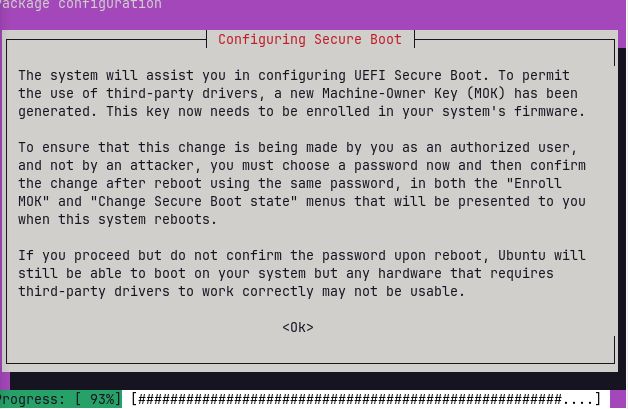
That means that you have Secure Boot enabled in your BIOS settings.
Secure Boot is a utility that works with Microsoft to only only Microsoft signed products to initialize at boot.
This can block some Nvidia Drivers or some GnuLinux processes.
And... it being enabled may explain the problems you have been having.
Are you dual booting with Windows?
I have windows on this laptop before but I deleted it using pendrive boot mode and install the zorin OS?
Then you can disable Secure Boot in your BIOS settings, without worrying about Windows OS balking.
thanks man, I want to learn how to fix such problem in future, is there any community where such discuss or where I can learn and help others to solve this problem accross multiple distribtion, by the way a huge thank for helping when I trying it using internet for lots of weeks
Well, there is this one... 
2 Likes