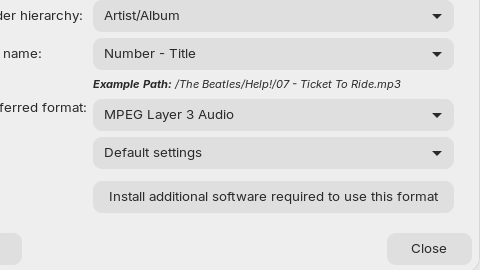
In Rythmbox, if you go into Preferences/Music and then the Library structure heading you can set your preferred format to Mpeg Layer 3 audio (mp3). This or the Mpeg Layer 3 setting cause an information popup.
"Install additional software required to use this format"
When You open the Software Store, scroll down to the End, You will see there a Button called ''Codecs''. When You click on it, You get an Overview with installable Codec Packages.
Then You can install more Codec Support over the Terminal with:
vlc is a Media Player which brings Codec Support with it. ffmpeg is no Player but brings Codec Support, too. ubuntu-restricted-extras is a Packages Bundel which brings Codec Support and Microsoft Fonts. That is the Reason why You will get a Licence Agreement Prompt where You have to navigatewith the Tab Key to ''Ok'' and press Enter to accept.