I'm having an issue with Zorin 17.3 where upon boot / waking from suspend and then about every 60 minutes thereafter, my computer is pulling about 140GB of data from my file server. When I shut down / suspend the computer that network traffic will go away.
You can see from the network traffic image below from my server about a 10 minute period (just after 2PM) where about 140GB of data is flowing from my server to my Zorin OS install. (I don't see these data spikes when I turn off / suspend Zorin and vice versa.)
Looking at HTOP on either the server or Zorin doesn't help identify the issue but you do see the mirrored network traffic.
At the time that screenshot was taken, everything other than the SMB and NFS connections were stopped on the server. What I'm trying to do is find where I can see all the background tasks scheduled to run in Zorin OS. As far as I'm aware I'm not syncing any data (I.e. no NextCloud, OneDrive, SyncThing or Similar) between the two machines. Being able to see everything that is scheduled in the background would at least help me find the culprit.
Any ideas where I can start? This just started to happen in the past 3-4 weeks.
Off the top of my head, since the flow of data is from the server to your desktop/laptop computer (I assume), I would think this is the Gnome's file indexer trying to make an index of the remote files.
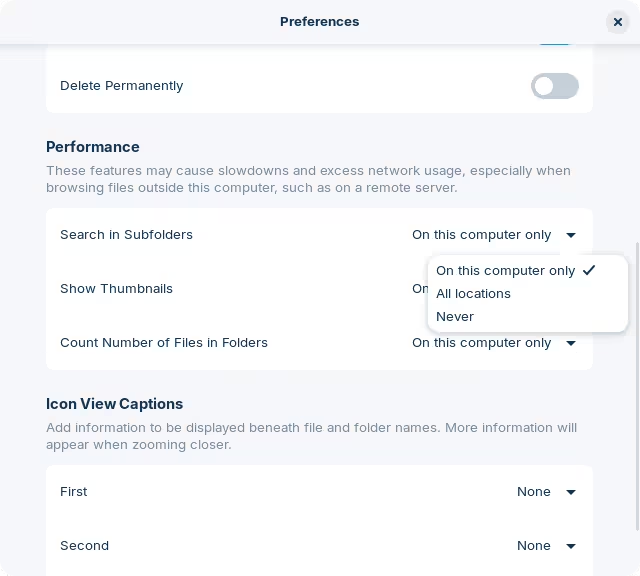
If you launch Nautilus (the file manager) and open the preferences, check the Performance options are set to "On this computer only".
However, you can also run this command in the terminal to see what processes are running and have an active network connections and to where:
ss -ntlp
This will list all open files corresponding to TCP connections (incoming and outgoing) which might also help reveal the culprit:
lsof -Pwni tcp
Another command that you can install that'll give you a better real time view on what's going on with your system is btop. Launch it and use the ← and → keys to sort the list of processes by different criteria: memory usage, threads, cpu, etc:
I think that was it. As after posting this I remembered that the search function for files on remote servers broke with the 17.3 update. However, I didn't immediately think of that because I just noticed the excess traffic over the past couple of weeks and hadn't seen the issue since I originally installed 17.1 -- when the remote search did work.
I have updated the search to this computer only -- which means that I won't be using search for files since all my files are on the server. Anything on the actual computer is just temporary.
I haven't seen the high amount of traffic since disabling it about 3 hours ago. So, I'll monitor for a day or so and then update / close this thread. Thanks!