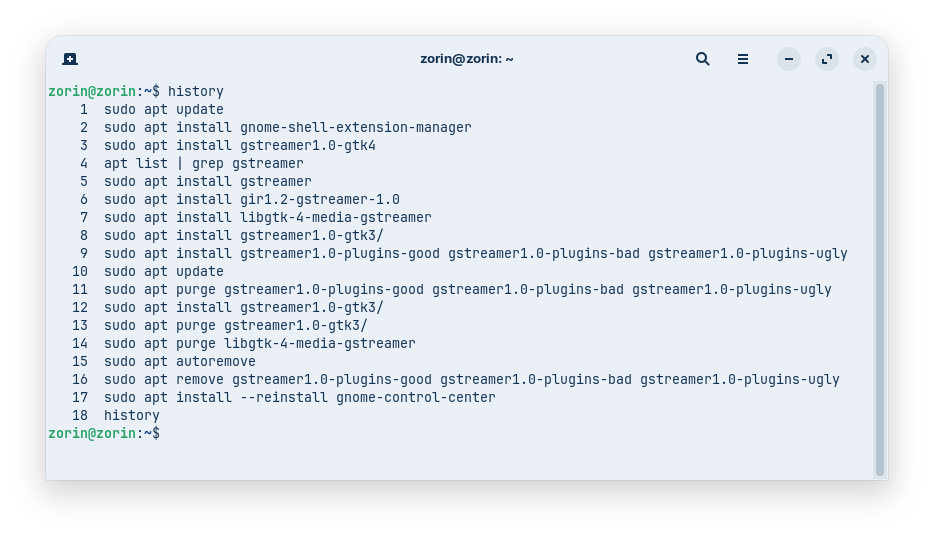
Today I wanted to test the Live Lockscreen gnome extension, and it didn´t work. I tried to install the missing packages, but I wasn't successful to find the gstreamer1.0-gtk4 package, so I tried to remove the packages which I had added.
Because
showed an error message that it couldn't be installed because of unfulfilled dependencies, I used the autoremove command. There were listed many packages, and I didn't check every single one.
After a whille, I noticed, that I had no longer a settings app on the system and I had to reinstall it.
Does someone know, for which of those packages the gnome-control-center is set as dependency so that the removal caused the problem?
I repeated all commands to find the culprit, and it was the command
sudo apt purge libgtk-4-media-gstreamer
which has removed the gnome-control-center.
And I wasn't paying attention and just clicked on "y" because I thought they were just some multimedia codecs that can safely be removed.
So next time I'll know: Be careful with the removal of gstreamer libraries!
I wanted to test the extension for you to see if I could add a video to the lockscreen which may play the audio message "welcome, please identify yourself" because you have experience with creating videos.
But perhaps I would need to build the required package from souce to not damage the system.
But I think the extension is not for the login screen, just lock screen.
The last time it worked (Welcome please identify yourself) I think based on that video was Zorin 16.3.
It originated from the Ultimate Edition Oz release of Diamond II-B which was based on Ubuntu 13.10. Basically, bring back the package that includes the drumroll and then it can be swapped out. This is where tightly created OS prevent users from making changes they want to make to their system.
I think we are seeing this take place with Gnome. I get the impression they only want extensions that they approve of. Not long ago I was looking for some items that worked in earlier versions of Gnome and everyone I looked at came back with red sentences of not being compatible.
But to make this argument more balanced, creators write an extension (or a Widget when it comes to Plasma) and the DE devs make some major changes and the extension devs now have to navigate changes in order to update their extension and if it becomes too much they don't update their project.
The other element I suspect is the forced inclusion of everything 'libAdwaita' and the kitchen sink to boot.
I tried lightdm on PCLOS Debian - it failed miserably leaving me with a flashing cursor and a black screen, probably because of no systemd, I don't know. So had to switch back to gdm3.
I also got a black screen with a cursor when I tried to install lightdm on Zorin Core and to login there. Maybe I made something wrong. I didn't know which greeter to install and what option to choose for login. The one which I selected, ended bad. Then I had to make a hard shutdown and the live session was gone.
But in the gui of the lightdm settings was no option to add an audio file.
I'm very surprised because this is completely new to me, that you have to be careful when removing packages that you added yourself and that weren't preinstalled.
Until now, I assumed that anything that wasn't installed beforehand is not important for the system and could simply be removed again. That's why I didn't pay any further attention to what was being removed.
Did that happen because it was a library, or is it the same with regular apps?
Hold on...
Does Gnome Control Center depend on libgtk-4-media-gstreamer?
Taking a quick look, it does. So when you installed it, you may have only reinstalled it.
When you removed it, you left Gnome Control Center in a broken state. In order to resolve it, the APT resolver removed the broken package: Gnome Control Center.
You're right. I slap my hand against my forehead, I'm such a dummy.
libgtk-4-media-gstreamer is preinstalled.
I mixed up the commands. I wanted to list all gstreamer packages which exist in ubuntu noble, especially the not yet installed ones, but used the command to show the installed ones, and I didn't notice my error.
Later I didn't keep track of which packages I had just installed and which were already there, so I just uninstalled them all. My mistake.
That'll teach me a lesson...Always read which packages will be removed...Now it is clear to me why that has happened.