Should i try XFCE?

You can also add the brightness. Here is an example:

sct 3500 0.8

The first parameter 3500represents the color temperature. The values are in the range [1000, 10000]

The second parameter 0.8 represents the brightness. The values are in the range [0.0, 1.0].

If sct is called with parameter 0 (sct 0) the color temperature is set to 6500, and the brightness to 1.0.

If sct is called with the color temperature parameter only, the brightness is set to 1.0. That is the full brightness.

If sct is called without parameters, the current display temperature and brightness are estimated.

1 Like

Tysm for that answers my eyes hurt a bit after a few minutes without Night Light, Now how a can i autostart it?

Try it this way. Go to settings >session and startup >application autostart and add a new entry. I had to play around until it worked. There was an initializing problem. On my Zorin virtual machine sct doesn´t work, so I can´t test it for you. Maybe it also works on your machine with just

sct 3500

in the command field.

I don't know how to enter the sign ' on my laptop keyboard, this one I used, not ". I'm not sure if it makes a difference.
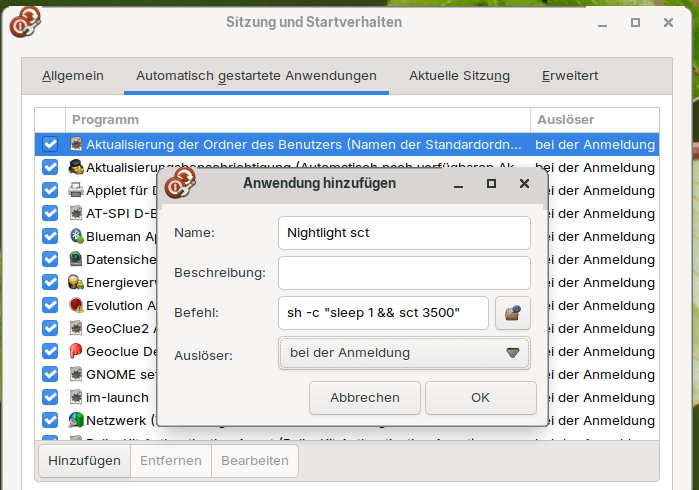
sh -c 'sleep 1 && sct 3500'

I tried with only sct 3600 earlier and didn't work, now withsh -c 'sleep 1 && sct 3500'it worked, Thanks!

1 Like