To make sure you're running the most recent version of applications that are in the standard repositories, I would usually just run through the terminal:
sudo apt update && sudo apt upgrade
You could do the same with flatpaks as well, although I don't use snaps:
flatpak update
That being said, that's only going to get you the most recent version of the programs that are installed in the repositories (mainly the apt versions, not flatpak). So if the repositories don't have the most up to date version of a program, you're going to need to either add a seperate PPA for that software that allows the most recent version onto your system, or go through a different standalone method such as Flatpak or Appimage.
The standard Ubuntu repositories will prioritize stability over new, so typically they will be behind in versions. Generally not an issue for me, but I understand other users have issues with this.
Mixed results. Before terminating, the first command said:
Err:35 https://ppa.launchpadcontent.net/appimagelauncher-team/stable/ubuntu noble Release
  404  Not Found [IP: 185.125.190.80 443]
Reading package lists... Done
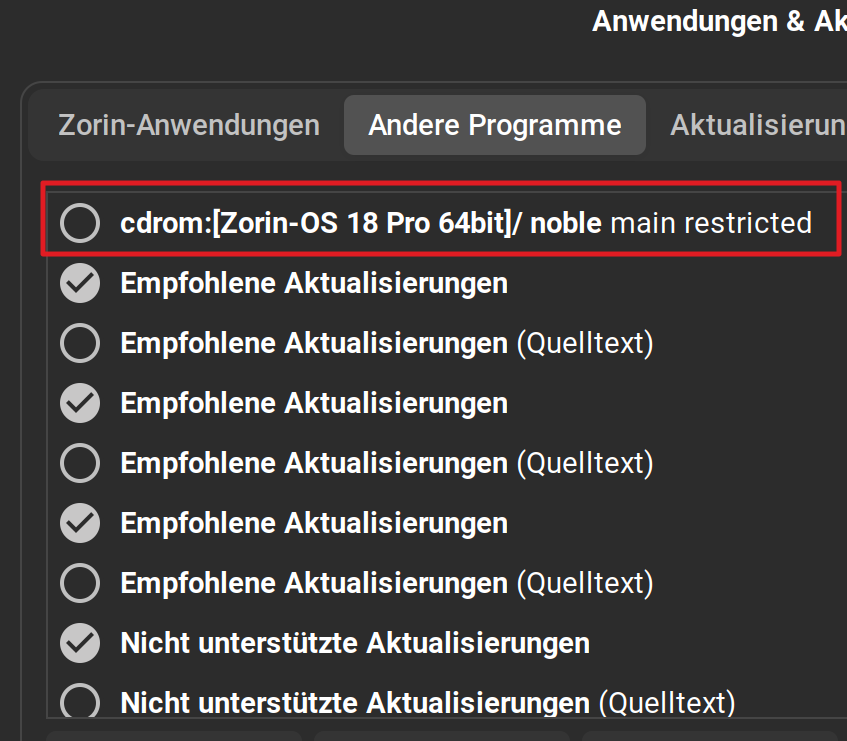
E: The repository 'cdrom://Zorin-OS 18 Core 64bit noble Release' does not have a Release file.
N: Updating from such a repository can't be done securely, and is therefore disabled by default.
N: See apt-secure(8) manpage for repository creation and user configuration details.
E: The repository 'https://ppa.launchpadcontent.net/appimagelauncher-team/stable/ubuntu noble Release' does not have a Release file.
N: Updating from such a repository can't be done securely, and is therefore disabled by default.
N: See apt-secure(8) manpage for repository creation and user configuration details.
N: Updating from such a repository can't be done securely, and is therefore disabled by default.
N: See apt-secure(8) manpage for repository creation and user configuration details.~~~
Output is:
steve@stevec:~$ sudo apt update && sudo apt upgrade
Hit:1 Index of /ubuntu noble InRelease
Hit:2 Index of /ubuntu noble-updates InRelease
Hit:3 https://brave-browser-apt-release.s3.brave.com stable InRelease
Hit:4 Index of /ubuntu noble-backports InRelease
Hit:5 Index of /ubuntu noble-security InRelease
Hit:6 Index of /agornostal/ulauncher/ubuntu noble InRelease
Hit:7 Index of /stable/ noble InRelease
Hit:8 Index of /patches/ noble InRelease
Hit:9 Index of /xtradeb/apps/ubuntu noble InRelease
Hit:10 Index of /apps/ noble InRelease
Hit:11 Index of /zorinos/apps/ubuntu noble InRelease
Hit:12 Index of /drivers/ noble InRelease
Hit:13 Index of /zorinos/drivers/ubuntu noble InRelease
Hit:14 Index of /zorinos/patches/ubuntu noble InRelease
Hit:15 Index of /zorinos/stable/ubuntu noble InRelease
Reading package lists... Done
Building dependency tree... Done
Reading state information... Done
All packages are up to date.
Reading package lists... Done
Building dependency tree... Done
Reading state information... Done
Calculating upgrade... Done
The following packages were automatically installed and are no longer required:
apparmor-profiles linux-headers-6.14.0-34-generic linux-hwe-6.14-headers-6.14.0-34 linux-hwe-6.14-tools-6.14.0-34
linux-image-6.14.0-34-generic linux-modules-6.14.0-34-generic linux-modules-extra-6.14.0-34-generic linux-tools-6.14.0-34-generic
Use 'sudo apt autoremove' to remove them.
0 upgraded, 0 newly installed, 0 to remove and 0 not upgraded.
steve@stevec:~$