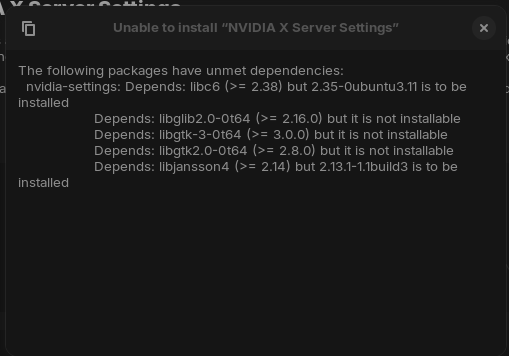
I've tried purging everything Nvidia and using an older driver but that didn't help. This was also occurring before Zorin 18 was announced, it just wasn't anything worth pursuing at the time.
I've combed through search results for a few days now and haven't found anything useful. Everything is up to date. The only thing I haven't tried is a fresh install but other than that, I'm out of ideas.
You've mentioned trying to purge everything and use an older driver. The problem you're running into isn't with the Nvidia package (probably); it's that your c library is older than the package needs. The thing that's of note to me is that the output you're getting says glibc6 2.35 is "to be installed," not "is installed."
So, couple of things. First, your phrasing implies you're on Zorin 18. ("This was also occurring before Zorin 18 was announced...") Is that correct?
Secondly, if you would, please open a terminal window (Ctrl-Alt-T) and type /lib/x86_64-linux-gnu/libc.so.6 and paste the output, so we can see for sure what the version of the library is.
Finally, after you tried purging Nvidia stuff, what method did you use to put a driver back? There's the Software and Updates tool's "Additional Drivers" tab, and there are a couple of different means for doing it from the terminal.
This tells me that you have added a source repository that is higher than Zorin OS 18 or 17 offers.
It is trying to install from that source instead of 17: Jammy or 18: Noble.
Can you please fully list your terminal output for:
I apologize, I edited my original post to show my system specs. I am currently on 17.3 Core 64-bit.
The output is:
GNU C Library (Ubuntu GLIBC 2.35-0ubuntu3.11) stable release version 2.35.
Copyright (C) 2022 Free Software Foundation, Inc.
This is free software; see the source for copying conditions.
There is NO warranty; not even for MERCHANTABILITY or FITNESS FOR A
PARTICULAR PURPOSE.
Compiled by GNU CC version 11.4.0.
libc ABIs: UNIQUE IFUNC ABSOLUTE
For bug reporting instructions, please see:
<https://bugs.launchpad.net/ubuntu/+source/glibc/+bugs>.
I used the Additional Driver tab anytime I changed the drivers.
$ cat /etc/apt/sources.list
# deb cdrom:[Zorin-OS 17.1 Core 64bit]/ jammy main restricted

# See http://help.ubuntu.com/community/UpgradeNotes for how to upgrade to
# newer versions of the distribution.
deb http://archive.ubuntu.com/ubuntu jammy main restricted
# deb-src http://us.archive.ubuntu.com/ubuntu/ jammy main restricted

## Major bug fix updates produced after the final release of the
## distribution.
deb http://us.archive.ubuntu.com/ubuntu/ jammy-updates main restricted
# deb-src http://us.archive.ubuntu.com/ubuntu/ jammy-updates main restricted

## N.B. software from this repository is ENTIRELY UNSUPPORTED by the Ubuntu
## team. Also, please note that software in universe WILL NOT receive any
## review or updates from the Ubuntu security team.
deb http://archive.ubuntu.com/ubuntu jammy universe
# deb-src http://us.archive.ubuntu.com/ubuntu/ jammy universe
deb http://us.archive.ubuntu.com/ubuntu/ jammy-updates universe
# deb-src http://us.archive.ubuntu.com/ubuntu/ jammy-updates universe

## N.B. software from this repository is ENTIRELY UNSUPPORTED by the Ubuntu
## team, and may not be under a free licence. Please satisfy yourself as to
## your rights to use the software. Also, please note that software in
## multiverse WILL NOT receive any review or updates from the Ubuntu
## security team.
deb http://archive.ubuntu.com/ubuntu jammy multiverse
# deb-src http://us.archive.ubuntu.com/ubuntu/ jammy multiverse
deb http://us.archive.ubuntu.com/ubuntu/ jammy-updates multiverse
# deb-src http://us.archive.ubuntu.com/ubuntu/ jammy-updates multiverse

## N.B. software from this repository may not have been tested as
## extensively as that contained in the main release, although it includes
## newer versions of some applications which may provide useful features.
## Also, please note that software in backports WILL NOT receive any review
## or updates from the Ubuntu security team.
deb http://us.archive.ubuntu.com/ubuntu/ jammy-backports main restricted universe multiverse
# deb-src http://us.archive.ubuntu.com/ubuntu/ jammy-backports main restricted universe multiverse

deb http://security.ubuntu.com/ubuntu jammy-security main restricted
# deb-src http://security.ubuntu.com/ubuntu jammy-security main restricted
deb http://security.ubuntu.com/ubuntu jammy-security universe
# deb-src http://security.ubuntu.com/ubuntu jammy-security universe
deb http://security.ubuntu.com/ubuntu jammy-security multiverse
# deb-src http://security.ubuntu.com/ubuntu jammy-security multiverse

# This system was installed using small removable media
# (e.g. netinst, live or single CD). The matching "deb cdrom"
# entries were disabled at the end of the installation process.
# For information about how to configure apt package sources,
# see the sources.list(5) manual.