I had Zorin OS 18 Core installed and was working fine. Had sound and everything else worked. But after upgrading in place to 18 Pro, my sound no longer works. I looked in the settings and I have the same settings as before just no sound. It is turned up and the correct device is listed.
I have tried a few things from the internet, like installing Pulseaudio controller and that did not work, I have even reinstalled the sound stack and no joy there either.
Any help greatly appreciated....
Welcome to the Forum!
What Sound Setup do You have?
I have a SoundBlaster Z-Series X AE5 Plus. It worked fine after installing Zorin 18 Core but quit when I upgraded today to Pro. Did upgrading to Pro somehow change the drivers?
When I run systemctl --user restart pulseaudio it says Failed to connect to bus: No medium found.
This is on a desktop PC not a laptop.

I believe Sound Input/Output Chooser comes pre-installed by default since OS 17 and beyond. Click the system section of your panel bar, and as you can see, the sound modes show up at the top. Make sure you have the proper sound output mode selected.
For example, if you use built in speakers, choose speakers, if you use HDMI audio, choose HDMI output. I personally am using an external S.M.S.L USB DAC, so I'm using the S/PDIF.
Also, make sure your sound output is not muted either, you can easily check this with Pulse Audio Volume Control, and make sure mute button is not highlighted/on your sound output channel.
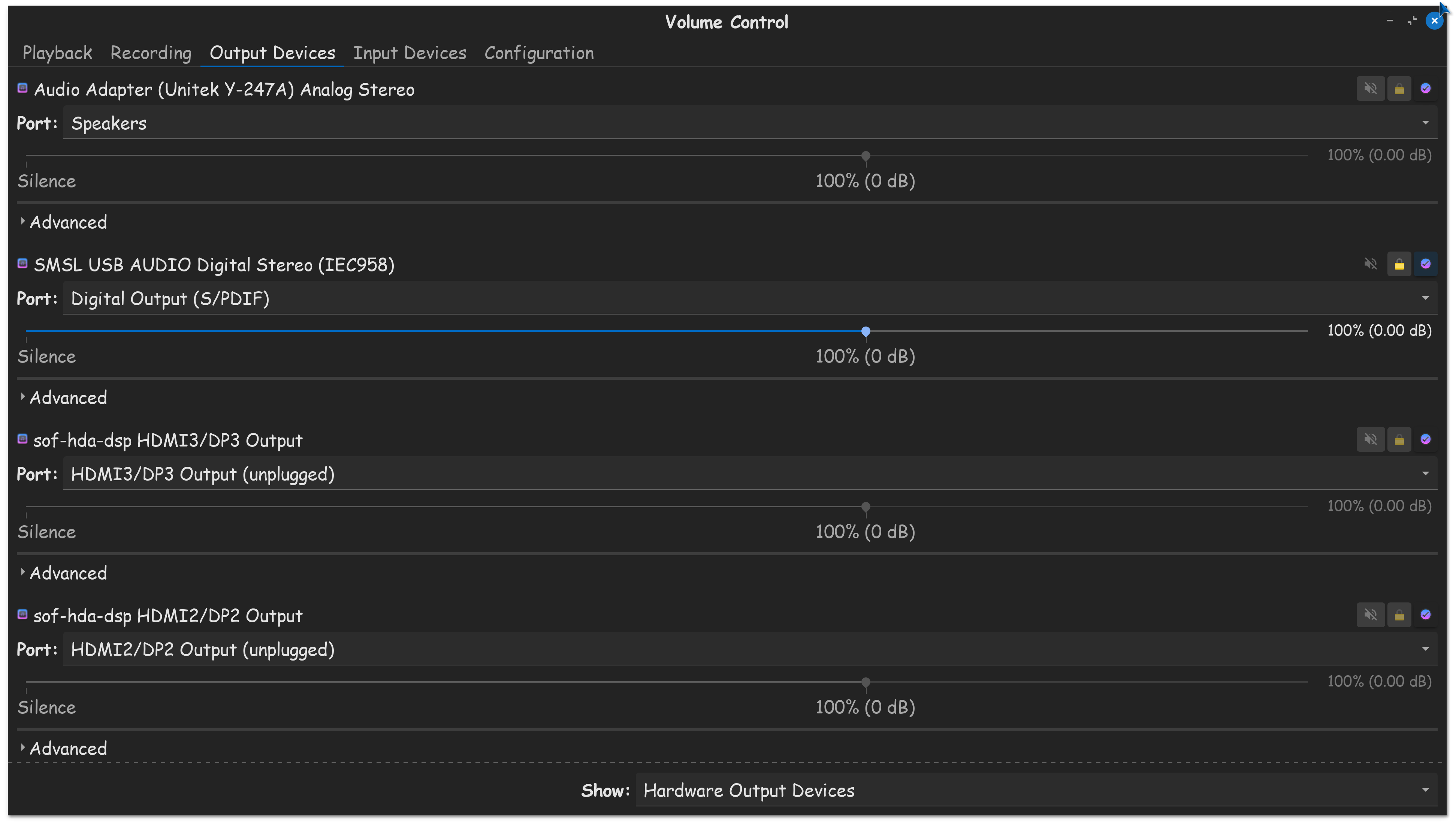
Also, you might want to make sure you have Secure Boot disabled in the BIOS of your computer.
And, at the login screen, you may want to think about clicking on your username, and then clicking on the gear icon, and selecting Zorin OS Desktop, not Wayland.

@Startreker Thanks for the input but I have tried all of that and I don't have secure boot on and my default desktop is Zorin Desktop not Wayland. I have even reinstalled the audio stack and nothing is working. I can see the output device and I can see the bar move when using the test in settings but no sound. I don't have speakers hooked up to this PC I use earbuds plugged into the front of the computer which was working perfectly when I first installed Core a couple of months ago. Then right after upgrading to Pro, no sound. I know its not my earbuds either since I also tested with a known working pair.
I just discovered that the headphone jack in the front of the computer is not working but the one on the sound card in the back is working. Any ideas how to get the front one working again?
That just told me that your using a desktop computer. I always recommend using rear panel audio at all times. The front panel jack either has physically failed, or something in software is not enabling it, driver issue, or its disabled in the BIOS.
Considering you told me you could use it on core, BIOS setting is unlikely the issue. As I said, you should always be using rear panel audio, its always the best, so if thats working, that is excellent!
Yeah the rear plug is working right on the sound card. I have to go to BestBuy and get a male-to-female audio extension cord since my earbuds cable is very short.
1 Like
I totally get that, most desktop computers are at least 2 feet long. I think a 3' extension will sort you out right. PRO TIP, gorilla tape the connection between ear buds and extension, you'll never worry about pulling the cable out by mistake.
I have a 6' extension cable. Don't think I'll be pulling it out.
In terminal type:
alsamixer
In alsamixer, hit F6 to list/select soundcards.
then
Hit F5 to show All sound channels.
See if any headphone or other output channels are set [MM] i.e. muted.
Use cursor arrow keys to move to channel, Hit "M" to unmute and up-arrow to increase volume level.
Also have a play with Auto-Mute and Loopback-mode channel settings.
See if any of that helps.
@zabadabadoo, I never did get the front headphone jack to work again. I am using the rear headphone jack with a 6' audio extension cord. Thanks for the input though.
This topic was automatically closed 90 days after the last reply. New replies are no longer allowed.