I'm very new in the world of Linux. I have had 17.3 for a week and was feeling my way around. Now that I have a little better grasp of things — or so I thought — I have installed Zorin 18. I tried to download Spotify both from the software installer and directly from the terminal. On both occasions it downloads I can even see it in my apps. Unfortunately, as soon as I open it, the window appears, then instantly disappears. Am I doing something wrong? Could anyone help please?
Welcome to the Forum!
Does Your System run in wayland or X11? In Zorin 18, you can check that in Settings>System>Info>Systemdetails.
Did You used the Instructions directly from Spotify?
Look on ''Debian/Ubuntu'' for it.
I have Spotify installed as Flatpak on Zorin 18 and it works without problems 
It's wayland. I'm on an old late 2009 iMac that I'm trying to unbrick. I tried from the software installer first, and then by using some code from Spotify. They both downloaded, I could see the icon; but when I opened it the window opened for a fleeting second then just vanished!
Thanks for replying, it's much appreciated.
It's probaly either my old late 2009 iMac or me.
Thanks for replying, it's much appreciated.
1 Like
Try to switch to Xorg. Logout and at login click on your username then a cog wheal appears at the bottom right corner. There select "Zorin Desktop on Xorg". Then login with your password.
Do you have problems with launching other apps, too? How much RAM do you have? On your old computer Zorin lite may run better because it needs less ressources. Zorin lite 18 has not been released yet, but you could try Zorin 17.3 lite. All newer versions (of all distributions) run worse on older systems, so I'd recommend to use an older version that is still supported.
If the .deb version of spotify doesn't open you could try to launch it via terminal with this flag:
spotify --no-zygote
If it helps you can set that permanently as described in the link at method 2.
1 Like
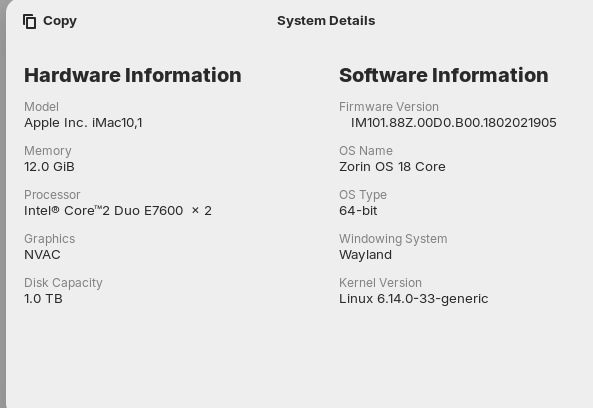
I have attached a screenshot of my setup. It could be that I don't have a fast or powerful enough system. I will try what you've recommended. Thanks for your reply.
2 Likes
If you have no other issues with other apps and the system is not laggy, you can stay at Zorin 18 core. 12 GiB RAM are enough.
1 Like
I have tried again, with the same results. I used the terminal and followed the instructions, and it downloaded. I could see it in the show apps. As soon as it opened, it disappeared. I really don't know what to do. Should I reinstall Zorin and start again?
Try open it via terminal.
spotify
or
spotify-client
It still opens a blank window for a millisecond the disappears. I have installed gimp, Inkscape, and others with no problems. I’m wondering if it’s my old cpu !
This topic was automatically closed 90 days after the last reply. New replies are no longer allowed.