I've never used Linux before. It's been pretty bumpy so far.
I have Steam installed and have downloaded and installed a game.
I use a Steam Controller to play (one of the old ones, not the newly released one).
Steam saves my individual game key-mappings with which I play.
The controller is plugged in and is acting like a mouse, so the PC recognises it.
In Steam, though, it's acting as is no controller is attached. I can navigate menus with the controller, but no Steam Overlay and no means of selecting the game's keybinds.
I'm confused. I thought Steam played well with Linux.
I followed a series of steps making terminal commands that a search on Brave recommended, something to do with input rules, but what it was doing was completely obscure to me.
(I found it strange, too, that I couldn't simply copy/paste the commands from the search into the terminal window.)
Could someone please suggest the steps I need to take to be able to get Steam to see my controller, to activate the overlay, and to select my game's keybinds?
If your controller is being detected by the OS but not the program, I'm guessing you may have installed the Flatpak version of steam. If you go to the Software store and search steam, there should be both a Flatpak version and a system (apt) version. If you search it and you find your version there and under the uninstall button it says "Flatpak" I'm wagering that's the main culprit.
If that's the case, I would uninstall that version, then install the apt version (which is easy to do through terminal with a simple
sudo apt install steam
just to make absolutely sure you're getting the system version and not the flatpak version.
Would you happen to have the instructions you followed? That would help us to know exactly what has happened.
As for flatpak and apt, don't worry. It's confusing for everyone, and not made abundantly clear. When you search for an application in the Software centre (where you install programs) you have the option of either Zorin os (apt), Flatpak, or Snap packages. Flatpak and Snap packages are newer, but often have limitations on system access (leading to situations like you're describing now). We often recommend sticking to system packages (that say Zorin os in the Software centre) to avoid these permission issues (and more).
And other times, instead of being one application (ex Steam) in the Software store, there's sometimes more than one "Steam" listed to be installed, where one may be flatpak and one may be Zorin. I know that's confusing... not a lot of us like how these multiple packages are being handled right now.
If you include screenshots of stuff, we can definitely try to help more than I'm probably doing right now lol.
I tried rebooting, but it says Unable to uninstall Steam. Details gives: "snap "steam" has "remove-snap" change in progress". It doesn't seem to be progressing.
I've waited a long time for the Steam snap uninstall to complete, but it still says "change in progress." Is there some way to force it to complete or to begin again?
I've not heard of this happening before, but I don't really deal with snaps that much. What I did find is this little help post right here Trying to reinstall steam but snap wont let me - Ask Ubuntu
Which seems to be the exact problem you're running into. You can try their steps and see if that helps that get unstuck, but instead of disabling snapshots entirely like they say, I might say skip Step 5, and in Step 6 try
snap remove --purge steam
instead. I'd rather just purge steam rather than make a larger change to Snap and create potentially more issues down the road.
snap remove stuck at 85% with "remove-snap change in progress" is pretty common.
check whats holding it with snap changes and snap change <id>. if its been hung a while, sudo snap abort <id> then sudo snap remove steam again.
after its gone, install the .deb/apt steam from the software store (zorin os channel, not snap/flatpak) so the controller/uinput bits you already set up can actually reach it.
Thanks for the replies. I would have tried that — had it not been the case that after a reboot, the entire OS was out of action. Black screen and no way to get in.
The instructions I'd mentioned were: Play Games - Zorin Help
That's how I ended up with the Snap version.
From having looked at the article on uninstalling Steam that was recommended, I guess that the problem was my drive size.
I've installed Zorin on an 256GB SSD, separate from the other drives in my machine which are still running Windows — I didn't want to get into dual booting (I control which boots via the F8 interrupt), since I know how touchy Windows can get about its Boot Manager.
I'd installed ESO via Steam, which is about 150GB. If, as the article implies, the uninstall was trying to create another backup image of all that, this may explain why everything got stuck.
If that is what happened, it's a strong argument for disabling the backup images altogether, rather than merely purging one.
I've tried to press through the very disheartening experience of having to reinstall the OS less than 24hrs after first installing it. I've been struggling for the last few hours to get some basic things set-up before re-attempting Steam. I intend to make a backup of the partition (using Macrium Reflect) before attempting it again.
When You install Zorin again, You can use the ''Erase disk'' Option which wipdes the Disk and creates the Partitions automatically.
A quick Word to the Package Formats:
.deb Packages are the native System Packages. they are like .exe or .msi Files that You might know from Windows.
Flatpak and Snap are containerized Formats. That means they don't have complete System Access. That is intended. and because of that, that can lead to Issues when specific Permissions are needed. When You use a .deb File, You don't have that Issue.
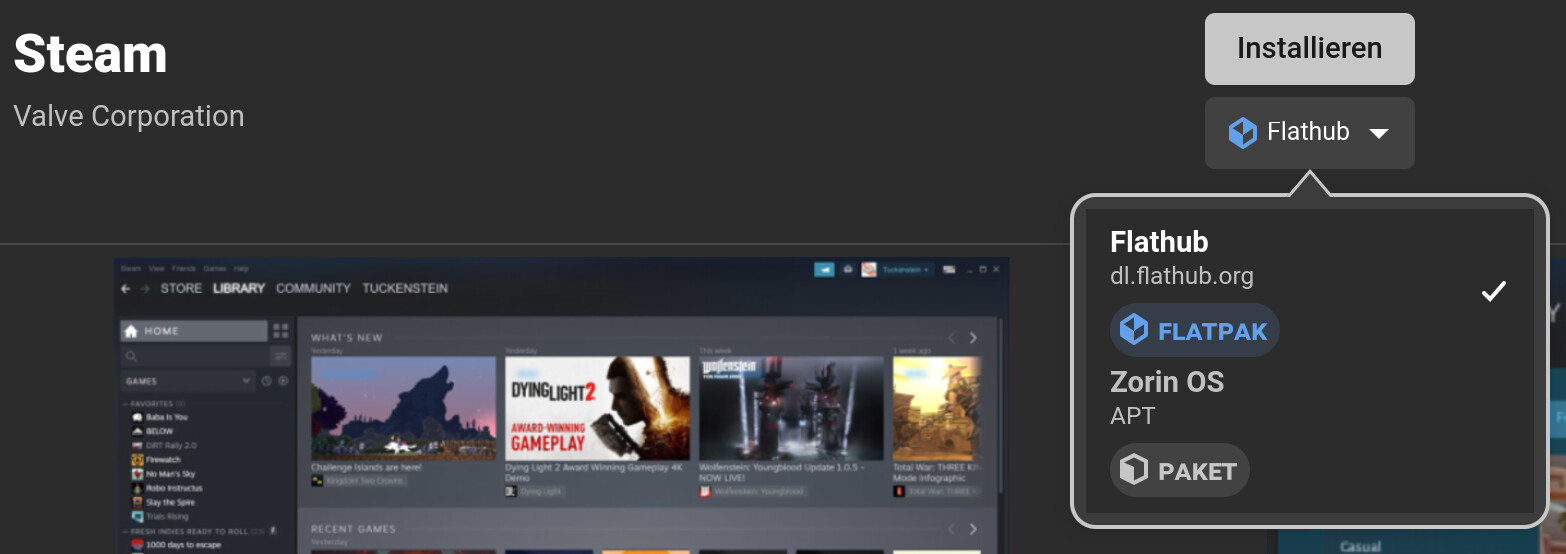
For Steam, You can see here the Package Format Choice under the Install Button:
You see there Flatpak and APT. APT is the .deb Package. In Your Case, there should be Snap Packages listed, too. Because I have Snap uninstalled, I don't have that.
I see, thank you. I was still a little confused about the deb / apt terminology, so that clears that up.
So, the rule of thumb, in terms of 'good practice', is that when there's a choice, go for the apt version.
I don't want to pester with a long series of questions, so, in lieu of that, could someone point me towards online resources that will talk me through the basics of file management, system management, and application installation? I discovered Extensions Manager and installed a few things from that, but how they're different from applications remains a little obscure to me, for example.
I have a long list of software to try to install and get functioning together, so a good grasp of the basics before doing that might be useful.
The Extension Manager exists because of the gnome Desktop. It is a Program for install and managing Gnome Extensions. Now, these are technically Programs, too. But in Practise, You could see Gnome Extensions more like Plugins for the Gnome Desktop. So, this is for the Gnome Desktop only.
Gnome Extensions exist because the pure Vanilla Gnome Desktop (=The Desktop like it comes by default from the Gnome Dev's) is very minimalistic - so minimalistic that it lacks some Functions. And Third-Party Developer Gnome Extensions are there to compesate that in a Way. The Zorin Desktop for Example is a modified and customized Gnome Desktop.
Yes, that is quite adequate in my Opinion. There are surely Exceptions. Not every Flatpak or Snap Package has Issues. But when there should be Issues, it can help to switch to the .deb Version if it should be available.
When You have Questions feel free to ask. We are here to help.
For clarity, I don't cover Gaming or Steam or Gaming Apps in the Unofficial Manaula for ZorinOS 18 Core, just a guide around the Desktop, installation instructions, and some troubleshooting tips you may encounter (but not gaming ones!).
Hope you get sorted.
Thank you for the recommendations. I had found the unofficial Manual already (and, yes, just what I was looking for, since it's all new to me) — will check out the tutorials too.