Steam/proton centric malware

Hey,

Last year, before I switched to Linux, I ran into malware that seemed to run some parts when a specific steam game (Distance) was running.

I naively played with an image manipulation AI tool, which infected my anaconda python environment (renaming/deleting the folder stopped some the steam game-related symptoms--spoofing an executable to run what I suspect was a cryptominer).

It obviously had other capabilities, because after removing anaconda, it destroyed my ability to manage security preferences by adding a group policy to the registry.

So, maybe a RAT on top of that.

I tried reinstalling windows at the time, and it seemed to work.

Yet, here I am. Even after installing Zorin, paranoid, only installing what I needed for steam.

It's a different game this go around, and it took me a while to learn how to check, but running a steam game runs a ton of "wineservers" that make remote http and https connections, which were observed with:
ss -ptu

I know this isn't normal behavior because my roommate has the same game (Tabletop Simulator) and almost the same setup.

A lot of them go to IPs under the akamai CDN.

So, if it survived windows OS reinstall and it's utter destruction with Zorin's install, could be a rootkit, I guess.

I'm not sure what details matter, but:

  • Single boot Zorin computer now, but was single windows 11.
  • Nvidia on X11
  • Lenovo Legion Pro laptop.
  • Steam games run on non admin.
  • Blocking one or more Akamai IPs on the firewall just leads to different Akamai IPs later (though it might stop it for one run).
  • Blocking all http/https traffic does stop connections and the wineservers (basically learned the firewall isn't ignored), but that's undesirable for obvious reasons.
  • If the network is off when the game runs, sometimes (saw/checked just once) it will make a bunch of 127.0.0.1:port connections for a few wineservers instead.
  • The system is pretty bare for non-apt or software app. The exception is the Deb steam file from their website. I don't have anaconda.

Sorry if anything wasn't very coherent. I was up most of last night trying to learn to debug stuff with strace, but its output is either not helpful or too complicated for me to understand.

I don't expect this is necessarily anyone's forte, but I'm just lost on what to do on this one.

Thank you.

2 Likes

If you haven't already, I'd try installing clamAV and rkhunter. As you said, this is not my forte, but it's going to be difficult for ANYONE to provide good directions without knowing what the malware is.

It might also be useful to know some of the Steam games you've experienced this on, so we can take a look on our own machines (assuming anyone trying to help has the games) at what normal looks like, versus what you're experiencing.

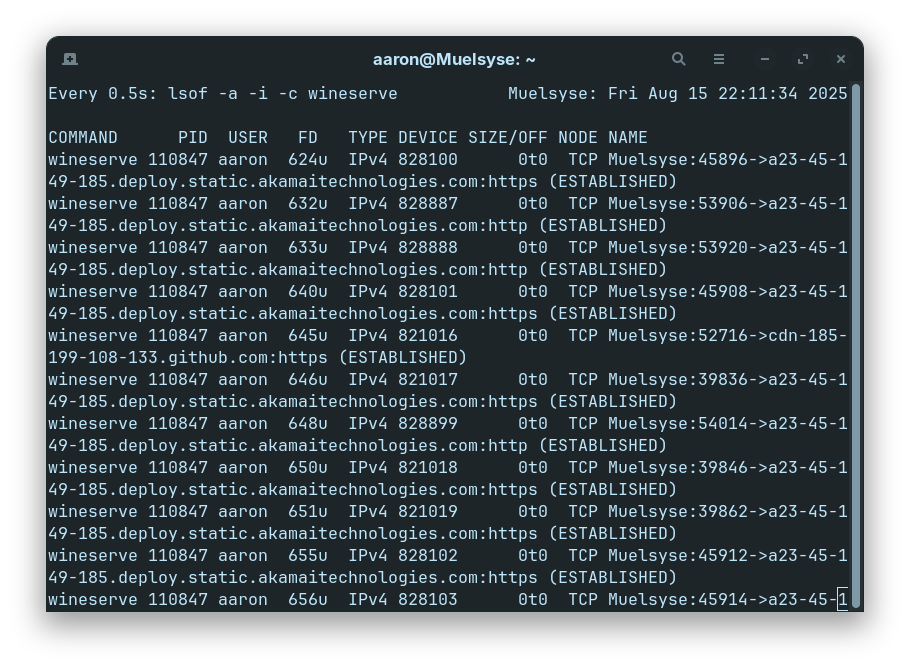
As a side point, you might find lsof -i more readable than ss -ptu. I do. If you want to keep an eye on the wineservers while you have something open, you could use watch -n 0.5 lsof -a -i -c wineserve, which will repeat the command every half second. (lsof has its own argument for repeating, but for whatever reason I always get syntax errors with it while watch is cooperative.)

2 Likes

If you want to check for rootkits there are two apps available, both are terminal based there is no GUI. It is not like Anti-Virus where you can only run one AV. The two packages are chkrootkit and rkhunter.

You can install via terminal (just enter 'terminal' without the quotes in the menu search box and press the Enter key).

First,

sudo apt-get update

then

sudo apt install chkrootkit rkhunter

The guides on how to use them:

Just to also inform you rootkits utilise system calls, and the apps can only check for rootkits that use this method of infection. However, there is a potential new threat nicknamed 'Curing' which avoids using system calls;

https://www.securitronlinux.com/bejiitaswrath/how-to-check-if-you-are-vulnerable-to-the-new-curing-rootkit-on-your-linux-machine/

I should just like to point out that both these apps take a snapshot of your system. If you add new applications after installing these, a future scan may result in some false positives, because you have added applications which were not present when the first system 'snapshot' was captured, which is used as a base reference point.

1 Like

Assalamu Alaikum, hello there!

Considering the issue was resolved in Windows, as a beginner, I bet it has something to do with the complexity of the Terminal. I wish I could be of more help, but all I can say is that either you try reinstalling Wine and Steam clearing all settings or try a fix with the terminal. You could also try seeking help of an advanced AI model if available.

I would recommend you go through @swarfendor437's links in the above post.

In terms of ClamAV, here is a useful guide:

Just out of curiosity, does your laptop allow you the ability to change out the ssd? That might be something worth trying as well. I know there's a lot of ways they can stay on the system regardless, but it's just something else to try if possible.

Hey again,

I'm going to start off mentioning new info: even if it's really weird to open ~20+ wineservers when no obvious game consequences occur from blocking them, it is possible that it is normal behavior, or it's possible that we both (my roommate and I) have a problem.

Monitoring them a while with 'watch,' my roommate found that the wineservers do start on their computer too, but they stay only open for a few minutes after getting to the main menu game (maybe to check for updates to the workshop content?).

I'm hoping it's normal, weird, but normal.. I'm going to learn how to use these rootkit checking tools in case it isn't. Though, I do go through the trouble of having Secure boot Enabled, but I suppose it is only the 2024 dbx, and this is the first I've heard of "curing," @swarfendor437. Sounds terrible..

"Distance" was the original definite problem from Windows.
LivePortrait was the AI github repo, though it's unclear if it or the modified, Webcam enabled version (or both) were to blame (it was a version around July 12th last year). However, I think it was also during the period of python github repos getting hacked with cryptominers being inserted by a third party. So, it could have been any number of the dependencies as well.

Back then, I checked a bunch of different games (BG3, Skyrim, L4D2, Autocraft (because it was also Unity 5, not because it was fun), and some others), and only Distance ever did anything strange.

I had a steam discussion post about it back then. I think it was special because I had let the python/AI grind in the background while I was playing that game in particular once (and I had been playing it a lot at the time). Another noteworthy event from back then was that I had just installed CUDA to try to speed up the AI--only then did symptoms emerge (major lag spikes on a very odd time schedule with a spoofed game executable) after having had it for a little more than a week.

Oddly enough, the slowness wasn't due to the malware itself doing it's memory and CPU hogging, which it did as well: it was actually because of the antivirus software knowing only just enough to know 'something' was wrong, but not being able to pinpoint anything. It (Webroot) would try to scan the spoofed "Distance.exe" a literal hundred times in a short span of a couple seconds (observable using the windows sysinternal tools). The spoofed executable still used a ton of memory.

Trying to verify the integrity of Distance through Steam did nothing. There is a single listed entry on Distance on VirusTotal, but the people at Webroot figured it was a false positive.

That said, I submitted a 'report' to Webroot, but without the scan logs, which were lost in the panicked windows reinstall, it didn't do them much good, and they couldn't recreate anything on their lower-end test computers (I think the CUDA enabled nvidia drivers were an important factor).

So, I never did find out the specific cause or the extent of the hack, just that it was python adjacent, so there wasn't much closure. It's hard to know when I'm just reading too much into things, and I guess maybe I'm easily rattled now.

Current:

This go around, when my internet was acting really slow:

I checked the router next to find out what was using it up. That computer's data use was middle of the road (not crazy high, but not as low as my roommate's), but some apple devices were going nuts: looking at them, they wanted a system update.

I still found it was odd that mine was higher, so I checked ss and saw all of the wineservers from the Tabletop Simulator pid, and I kinda freaked out.

I tried to figure out strace, it definitely did.. something. Even with trace=%network it didn't seem to provide much insight.

Again, while I was taking a break from panicking and actually sleeping, my roommate was doing some checks on their laptop, and they found that the link doesn't stay open perpetually: the wineservers will stop 5-10 minutes after opening the game (so theirs is doing the same thing, so it could be normal, or both computers could have a problem).

I've checked Skyrim SE, and didn't see a bunch of wineservers, just a connection I'd expect given Bethesda's creation club check.

Back from sleeping, with a cooler head, I checked the memory usage + CPU usage on Tabletop Sim. It's actually pretty nonexistent compared to the Distance situation. Stays around 6.5 GB for the whole system, and no CPU numbers above 30%.

There's also no interval timed usage spike like before (for Distance back then, the CPU usage would spike on a schedule: on-launch, 10 seconds delay, 20 seconds, 30 seconds, a minute, 3, 5, and finally 10 minutes).

So, it could be normal.. a weird normal that hit a trauma nerve, but normal.. I don't suppose anyone has Tabletop Simulator to check on their end?
I don't seem to get anything in reference to wineservers when I run my game, just going to the main menu. There are lots of references to it going out to the internet to most likely check for updates, however, for all the workshop content that it has.

1 Like

So. There's your wineserve to akamai business. I'm fairly confident I'm not rootkitted or otherwise infected.

@applecheeks37 You probably don't see any wineservers because you probably have the Linux native version installed. I'm not sure why chronosJ is using the Windows version. I had to force the Windows version by manually setting a Proton runner. Without that, it installed the Linux version, and naturally no wineservers started since it wasn't using WINE.

3 Likes

When using lsof, check the PID column by each wineserver. If they're the same, it's not opening multiple servers, it's opening one that's making multiple connections. Sorry for forgetting to mention that last night.

2 Likes

It's the same! Just different file descriptors. Good to know, thank you!

I use the windows version of Tabletop Simulator for a couple of reasons:

  • On the native version, the camera doesn't keep rotating when the mouse hits the edge of screen.
    • That would be fine for chess, cards, etc, but it's a deal breaker for D&D.
  • I was on windows when I first played it, so a lot of local maps and assets are saved with the windows style C:/ format.
    • I actually wrote a script to covert the json files' internal paths to Linux's path format, but after hitting the camera issue in native, I didn't use it.

Thank you so much for taking the time to look.

1 Like

Happy to. I wasn't aware of the issue with the camera; I picked up Tabletop Simulator when it was on sale after it had made a big splash, then found that anything I'd want it for, I preferred other tools. (Foundry for TTRPGs, primarily.) Still, just as well I had it handy since it let me resolve your concerns.

1 Like

Good thinking there, @Locklear93

I've just found that someone wrote a little script that shows connections made, grouped by programs and users, that could help troubleshoot this type of issues.

1 Like