https://github.com/AlexanderVanhee/gradia-capture
I was testing Bluefin distro and found this extension, I really liked it. I miss having a good screenshot annotation tool like KDE Spectacle.
https://github.com/AlexanderVanhee/gradia-capture
I was testing Bluefin distro and found this extension, I really liked it. I miss having a good screenshot annotation tool like KDE Spectacle.
I tried to install this extension on Zorin 18.1, but it showed the error
"This extension is incompatible with your current version of GNOME".
There is nothing to stop you from installing spectacle in Zorin. It just does not work as well as it does in KDE Plasma:
If you are on Zorin 18 you could go the whole hog:
Or just install kde-standard as an option to boot into at login.
Hello and welcome to the forum,
Perhaps this GNOME alternative is an option for you:
ApexShot (Most complete with OCR)
This is currently the most powerful alternative for Zorin OS (GNOME/Wayland). Unlike Gradia, which requires a separate extension for OCR, ApexShot natively integrates screen capture, annotation, screen recording, and OCR (text recognition) into a single application.
curl -fsSL https://raw.githubusercontent.com/apex-shot/apexshot/main/scripts/install.sh | bash
Did it work for you? I got errors during the installation on Zorin 18.1 (tested in a live session):
"dpkg: Dependency problems prevent apexshot configuration: apexshot depends on libxtst6 (>= 2:1.2.5); but: The version of libxtst6:amd64 on the system is 2:1.2.3-1.1build1."
I also got error messages in Gnome Machines. But I was able to launch ApexShot without any error messages.
libxtst6 is apparently an X11 Testing library; I didn't look into it further since Apex seems to be working.
Ah, you're right! Actually, I didn't think it would work because of the error messages, but I found the program in the list of the apps and was able to launch the program as well and make annotations (in a Wayland session - X11 is experimental).
But because the package manager is broken after the installation and needs the command sudo apt --fix-broken install to work again, then apexshot gets removed.
Welcome to the Forum!
You can install Gradia as Flatpak from the Software Store:
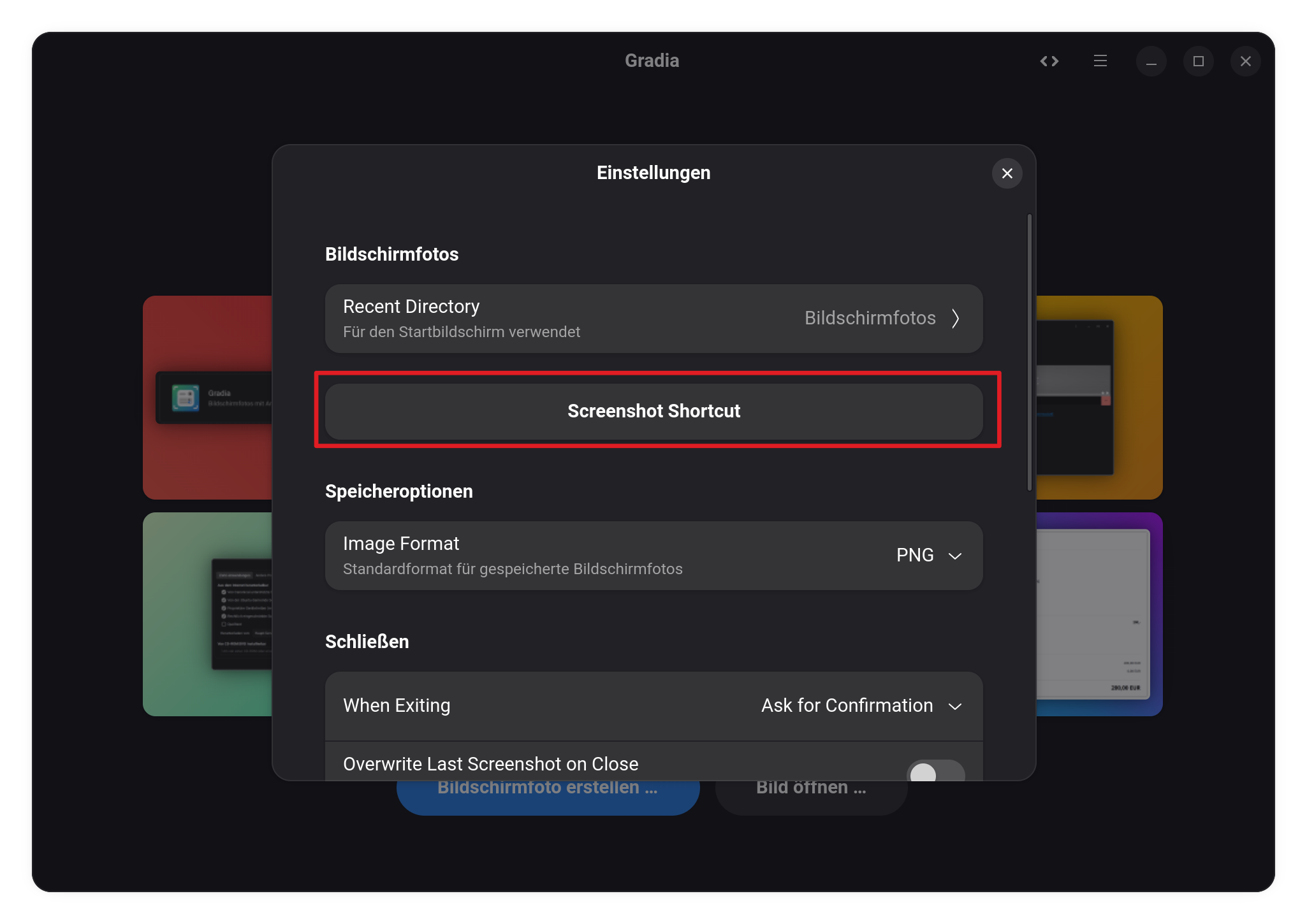
and then use this as Screenshot Tool. When installed, open in Gradia the Preferences and there You have a Button to click on to get an Explanation to set it up as Screenshot Tool:
Did You used the .deb File or the Install Script?
I tried both with the same result, and tested the installation of the .deb package with gdebi and the terminal sudo dpkg -i command.
I'm not sure if it is because of the live session and I haven't updated the system, but usually, when I get such errors, they are shown when a library or a dependency isn't installable/upgradeable.
In the morning, I tested this tool in a X11 session, but I was not able to save the edited screenshots - I don't know, why (or I didn't find them). As path I had set the right German folder in the extension's settings.
I also tested this gnome-extension, it was very special to use
Then I took a look at "Annotator" (you can install it as flatpak or with a ppa from ubuntuhandbook), but I didn't like it so much, usually I use ksnip for editing screenshots.
The Version is on Zorin not available. It is only on Ubuntu 26.04 or Debian 13 available. So, on Zorin You can't use it.
Or: You download the Version from the Ubuntu 26.04 Repos and install it manually, but I would be careful with this kind of Action. When You want test it in Live Mode, it would be fine. But I wouldn't recommend it on an Installation.
And on X11 it might not work because of the ''experimental'' Status at the Moment.
Where can you see which ubuntu/gnome versions it's compatible with (before you try the installation)? The informations on the extension's site are sparse.
I looked for the Package libxtst6 on pkgs.org to check which Version is where available.
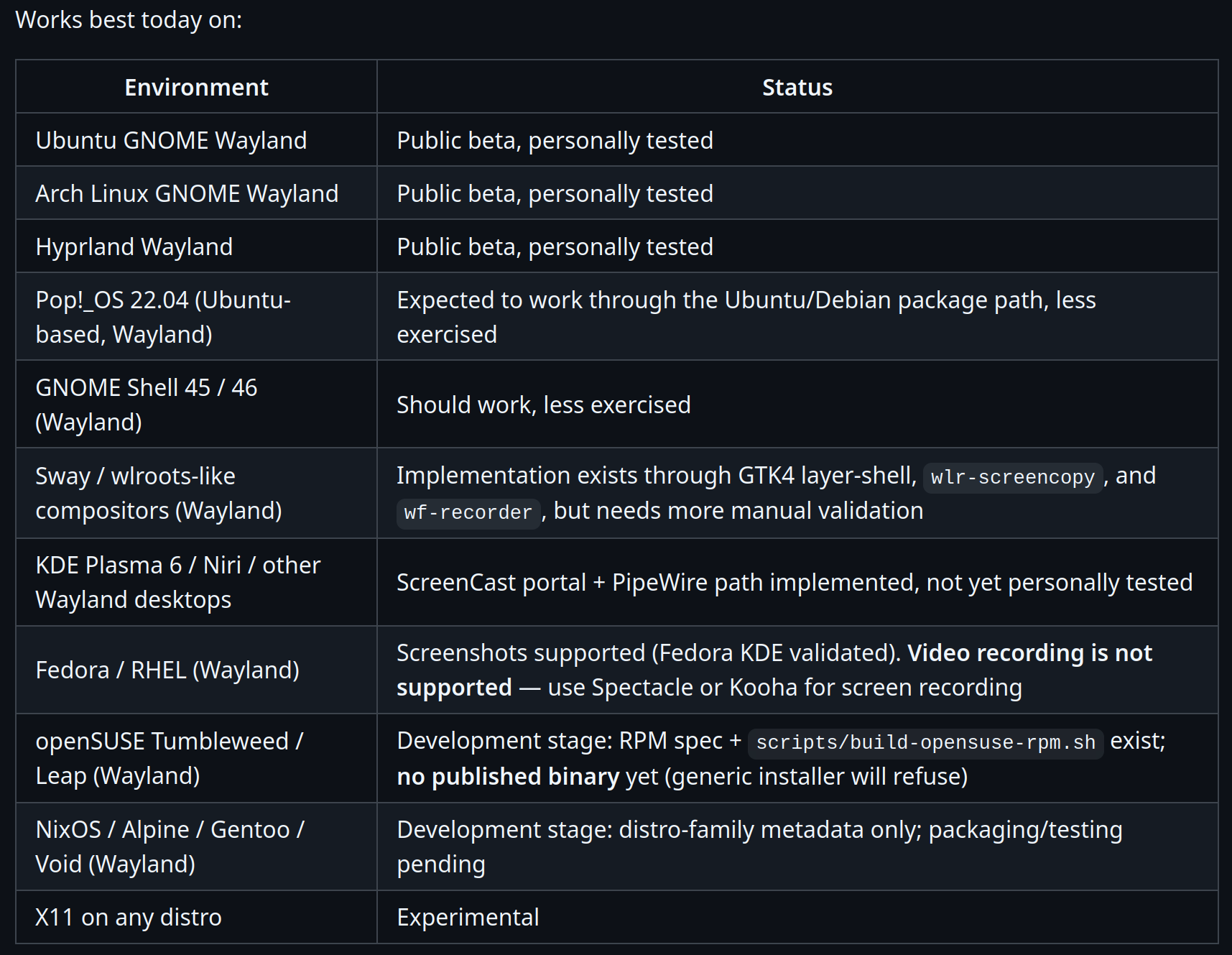
You mean now ApexShot, right? There is a List on the Github Page:
Also You see there the hint ''Public Beta''. So, it might not work under all Circumstances.
Ups, I mixed something.
So that means you didn't know about it beforehand either? It's strange, because even Pop OS 22.04 is shown there as expected to work with ApexShot.
And I always thought, scripts with build.sh build it from source as the gnome extension gradia-capture.
Might be something to report to the Project. Or it is Intention that it only works on the current Ubuntu and Debian. But Gnome 45 and 46 is listed. So ... Maybe the Dpendency is wrong.
A Built Script built that what You have downloaded. But when Dependencies are needed they can get taken from the Repos of the Distro. That is the Reason why it is important to make clear what Versions are supported and which not. Because without, You can have something like with the libxtst6 Package.
So, even when Zorin 18 uses Gnome 46, the right Version of this Dependency Package is missing. But ApexShot seems to be a relatively new Project. It is on Version 0.2.34. So, there can come Improvements.
I mean the build script of the gradia capture extension. The extension is not available at extensions.gnome.org, and nowhere is shown which gnome version is supported.
But it sounds as if you build it from source, so I don't understand, why it doesn't work. But another user had the same problem on Ubuntu 24/gnome 46.
Hi, I'm already familiar with Gradia and other alternatives; I simply suggested including this extension in future versions of Zorin OS, as it would make life much easier for Linux beginners.
I've digged a bit on the Github Page and found this in the metadata.json File:
  "settings-schema": "org.gnome.shell.extensions.gradia-companion",
  "shell-version": [
    "49","50"
So, this seems only to work for Gnome 49 and 50. You could try it with adding 46 to it and see if it works.
Thanks a lot - I've learned something new again where to find informations about the supported gnome versions! I'm impressed by how much you know!
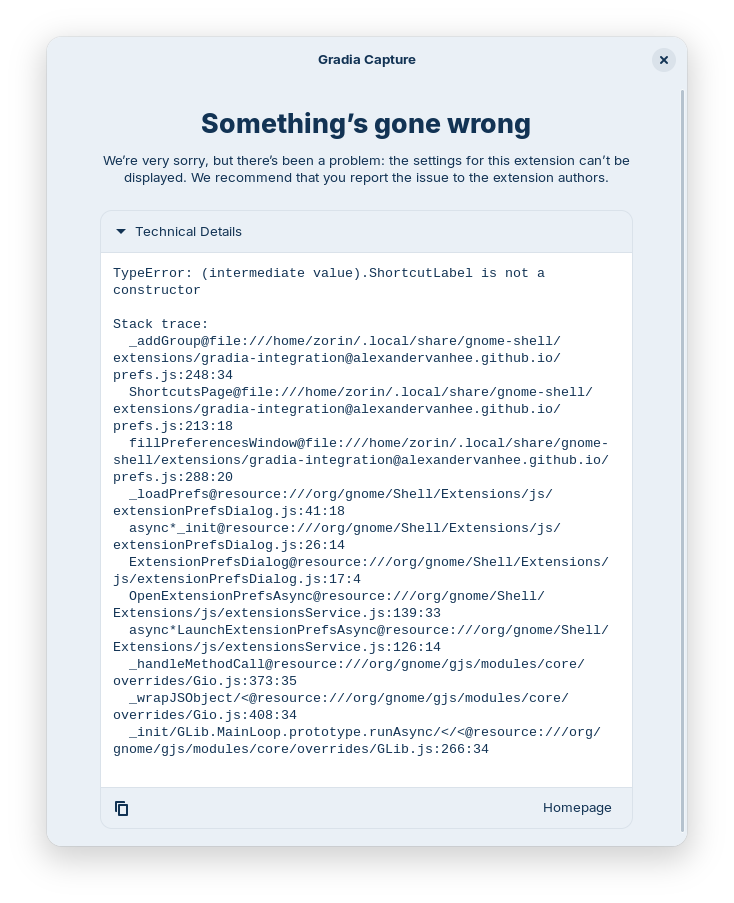
The message about incompatibility was gone now and the slider no longer greyed out, but the extension settings still not shown.
I'm not sure if I also need to install gradia, probably yes, but when I tried to install it, I ran out of space in my live session.
P.S.: To everyone reading this: I don't recommend trying this method if you want to keep your system stable.
I tried the installation of gradia and the gradia extension again today in a fresh live session, and this time it didn't ran out of space. The extension still didn't work.
Gradia is a really nice tool. It's too bad it's not yet available as a native package in ubuntu 24.04.
Unfortunately, it doesn't open automatically after taking a screenshot of the entire screen if as custom shortcut is set the command
flatpak run be.alexandervanhee.gradia --screenshot=INTERACTIVE
. It works with the other options (capture of an area or a window), but not with the entire screen, and the default image viewer (eye of gnome, eog) always opens, too.
You can set gradia as default application for png (or other file formats of gradia), then gradia opens automatically after a screenshot of the entire screen, but that's not very practical for regular images.
It would be interesting to know if the extension handles this more effectively, so that the image viewer doesn't open, just always gradia.