Suspect malware

Well update for now is
I believe I have a virus /malware that started from the modem/router.
reasons being
1- all computers now have the same issues. (as above details)
2- one of the laptops which does now have same issue has had zero connection to any other device (no USB stick / no physical connection / and the router / modem is nt set up a a home network or lan)

From the router I now suspect that it has infected the UEFI / Bios on all computers and or other firmware. It may have even infected my mobile phone! an andriod with e/os on it.

I'm rapidly coming to the concludion that I'll have to keep the infected computers off Internet forever and I'm going to have to replace thee router the computers and even the mobile phone!
I've used another tablet connected via mobile data to reset many passwords, also someone tried to use a credit card that I have, so I've cancelled all cards and getting replacements.

The joys of going online!

1 Like

Woah..

1: What router are you using, make / model - you may be able to flash to something like OpenWRT and have much better protection..

2: Did you do any scanning?? I didn't see any mention - that would absolutely point to the problems, if they are virus related..

2 Likes

@Chris2var , How do I check and see if i have a virus on my device(s) like you?

This technically hasn't been confirmed as virus activity - yet.. in all honesty it could just be from a backup utility, that has access to all the files - or some kind of monitoring not found yet.

But, you would most likely just scan your computer with ClamTK or any other virus scanner out there. There's two offered in Software - I've got Clam, been using that one since it released lol but the other is Raspirus, haven't used it though. But, Clam is pretty straight forward; update, scan, remove if need. Also has some options for detecting PUA / PUP, or potentially unwanted applications / programs.

2 Likes

PUA and PUP has never worked coreectly, not even in the Windows version so I keep that turned off.

2 Likes

@PlumpKibbles , "Raspirus" is designed only for raspi's?

1 Like

Not too sure, it looks to be some kind of removable device scanning app - pretty neat. I've never used it though.

1 Like

Very, VeRy true - can also confirm this lol may be easier to just scroll through the apps list and see what you have or haven't installed, heh.

@PlumpKibbles It clearly is a virus / malware as my card details were compromised. Unfortunately I done a factory reset on the router before thinking about trying to check it first. It is a "sky sr203 router"
I was fool enough to have all my personal details on the main PC, in an encrypted word document, with an 18 digit password that is on the "onlykey". Obviously not good enough though!
Like I said in last post this will now be split between the PC and a physical book, meaning both are useless without the other, I would encourage all to do this. You never know when you might get hacked!
@Jessie I suspected virus / malware when I started to see the accessed files, which I clearly had not accessed, and I concluded that this was not a backup or indexing issue as this from multiple websites confirm

Therefore unless the file is opened to read or display the contents then the accessed (and atime) stamps will not be changed.
I have decided on the extreme of junking the PC's laptops, tablet and mobile because I feel my security is much more important than a chance that I've managed cleared the virus/ malware.

Remember the one important fact ......
Anti virus /malware companies are playing a catch up game, so the virus /malware is out in the wild causing issues and problems UNNOTICED until the companies find it and then they have to create something to remove / stop the infection or protect you againest it.

But.. no mention of which virus - or a scan that detected anything.. :person_shrugging:

Sorry, if you don't like the response - but, sounds more like someone got click-baited or hijacked; not a virus. Which I'd have to say you just need to watch what you're clicking or opening. You could have quite possibly been connected to an Evil Twin AP, or someone accessing your information through a MITM attack - both are becoming more common than you'd think. Without much more than "It's a virus, I know it is" doesn't really prove that it is anything.

Without scan information, or detected viruses - to me, you got hijacked or was caught in a click-jacking. Passwords don't really matter when someone directly connects to your machine through a backdoor or reverse shell.. Just saying. Most SQL servers can be taken over by root privileges through ' or 1=1; -- - and now you've got root, no passwords matter at that point. View away, any document or file - no password..

Gotta see a scan, or detected virus, to believe it were virus activity.

(edit) Was searching around for that router - have not heard of it; mostly seems exclusive to the UK. There is a firmware version for a SR102 on OpenWRT's hardware list. Doesn't help much now but, there may be support in the future. Might be worth checking out when / if available.

2 Likes


The final update....

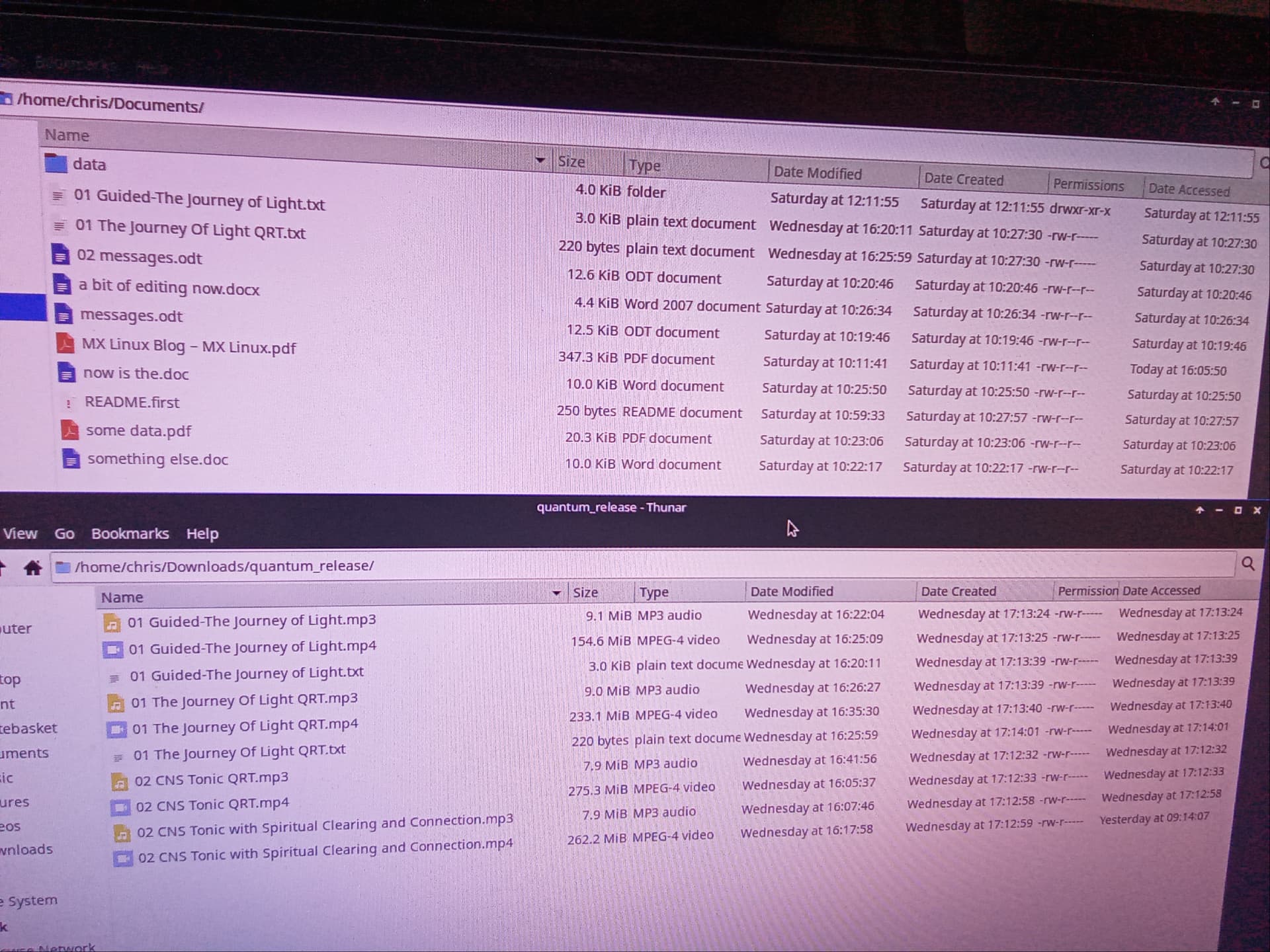
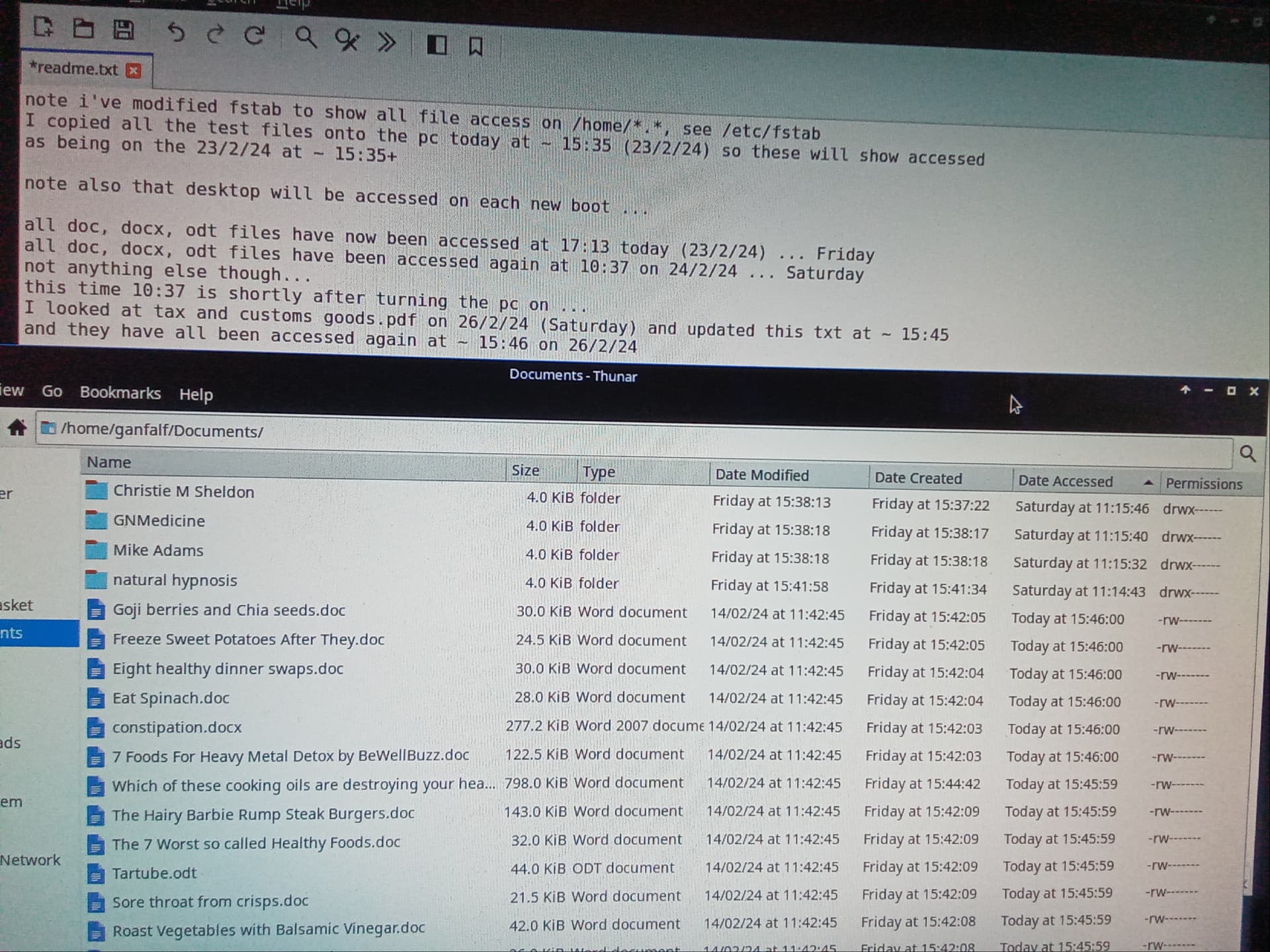
There is attached two photos. infected pc and clean pc.
These are both new builds with only one change on both of them, see below. Therefore they are identical, all setting the same, default settings with the exception of thunar as I want to see quickly if files are accessed.
The infected PC is not connected to the new router. It has no internet access now.

Notice that on the infected PC, the doc, docx, odt have all been accessed, with different times to the created time note also that the accessed times are the same within a minute or so and also read the text in the photo of the infected pc, as this gives more details.
Now bearing this in mind, notice that on the clean pc, there is only two files that have been accessed and it was me that accessed them both.

So this clearly proves that access time has nothing to do with caches or indexing, as I previously said it didn't, as if it did both PCs would behave identically, considering they are set up identically.

Further this also clearly proves that there is something going on differently between the two PCs and this is highly likely be an infection, as the two PCs are set up identically from an official download of an install DVD.

I had reset all the SSDs with hdparm prior to the new install, so it's most likely that something has infected the bios or some other firmware of the infected PC, which was the same as the old scrapped one, again see below.

For the reason I am making this post it is totally irrelevant how the infection occured, this is only about how I noticed it.

There are various types of file on both the PCs, so that a fair comparison can be made between the two.
.

Prior to this, on another infected PC (the now scrapped one) I removed the two HDDs leaving two SSDs (note the HDDs were for data only) one SSD had the boot, OS and / on it and the other had /home on it.
Once I repowered the pc, it wouldnt boot at all and then using a boot DVD, the boot SSD was not visible the home SSD was still visible, boot SSD was not visible even with gparted, or hdparm.
Interestingly though the boot SSD was visible when the SSD was put into a usb cradle, I tried hdparm on the SSD but it didn't work, hdparm only works when connected via SATA cable and then this SSD did not show up.

So now I have scrapped this PC and I have physically destroyed the aforementioned SSD.

The photo of infected pc attached is from the second infected pc.

I have replaced the router as well to be on safe side.

The only reason for this update is so others can be aware of how important accessed time is, as it was through this that I knew something was wrong in the first place.

Unfortunately now most Linux's deprecate atime (which is where file managers get the accessed time from), so it doesn't update immediately, read it up yourself to understand how and when default atime is updated.
The reason given is due to the overhead it uses, but I'd rather be more secure and lose a little speed.
So unless you edit fstab, as below, then atime is not much use

Also you may be able to tell from the photos that I'm not using Zorin, I have now switched to MX Linux, and having done that, I had to make the one change that I made to both the infected and clean PCs which is to edit /etc/fstab and change "noatime" to "strictatime" but only for the /home, (as I have /home on a different SSD on both PCs) this way the accessed time is immediately updated on a refresh of the folder on /home.

I've decided that I am going to close this post now as I feel nothing useful can be achieved by arguing the toss over the definition of what a virus is and if it will show on a scan, even if its unknown.
If click baited on one PC how did the same happen on three other PCs with no connection to each other, apart from using the same router? This is why I say it's a virus, and likely a new one so unknown to clam TK

Drastic measures in trashing and destroying PCs and SSDs but better to spend a couple of hundred quid on new to ensure I'm doing all I can to safeguard my data rather than take a chance with attempting to remove something that doesn't want to be removed.

I would like to say that I did get much useful information and help on this request for assistance and my other posts and requests so I say thank you all for that.

1 Like

Proofs only exist in Mathematics.
What is does demonstrate, is that the files are being indexed in a way that is unexpected by you. It does not, in any way, "prove infection."

This is simply not how Malware is detected: using inference and suspicion does not work. Detection is made by identifying the processes and files involved.

File Indexing absolutely 100% can access your files at different times on two identical machines. It depends on when the indexer runs, not on what your settings are.

Lack of evidence does not equal lack of knowledge about the mystery virus.
Virus scans do not necessarily scan for only a Known Virus Name. Rather, they scan for hooks and processes - the tell-tale signs of virus behavior. It is not a checklist of names.
Per O.P. request: Thread closed.

1 Like