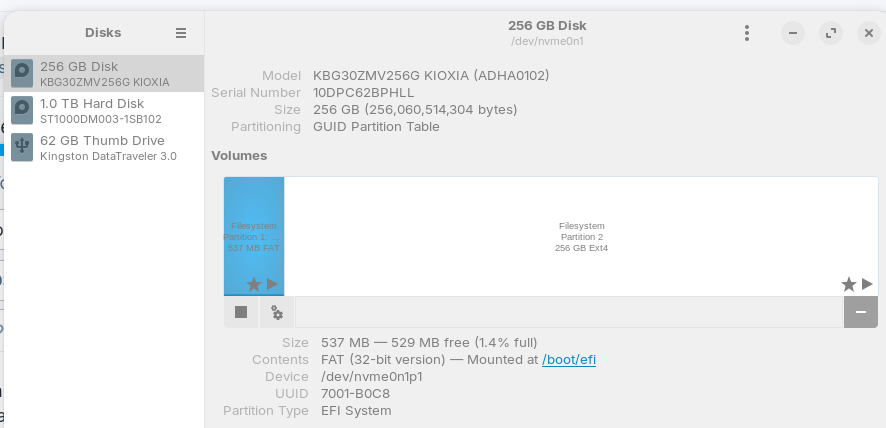
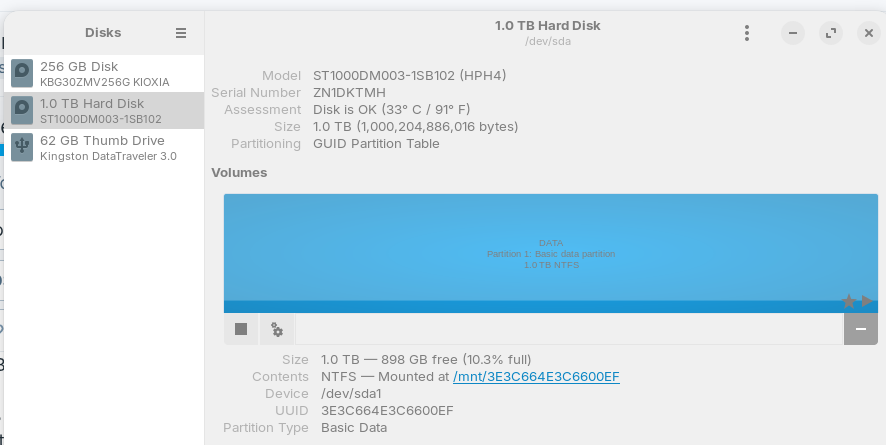
About 6 months ago I installed Zorin on my desktop PC. I don't think I did it the right way. I have two physical hard drives. Now one contains the Zorin partition but the other still contains Windows files (but not the operating system). The way the drives are partitioned, there's a lot of unused space on both drives.
I want to switch to a dual boot with Windows 10 (trying to avoid 11) and use Zorin as my primary operating system. I also want to make better use of the space on my hard drives.
I've read that it's better to install Windows first, then add Zorin. I have Secure Boot and Fast Boot turned off in the BIOS, and the system is set to boot to the Zorin grub menu.
Is it better to install each operating system on a separate drive, or both on the same drive in separate partitions? I have a 256 gb drive which is the current boot drive, and a 1 TB drive which contains the Windows files (which I don't need as they're already backed up to pCloud).
Also, my USB key is formatted with NTFS, should I change it to Fat32? I haven't downloaded any iso files to it yet.
I'd like to clear the data from both hard drives and start with a clean install, if possible. What's the best way to do this?
This choice is completely up to you. Personally I have done both, but to keep things cleaner it's nice (in my eyes) to keep each OS to their own drive, if possible (and the space available is enough for your needs). If you want them both on the same drive, however, it's also done easily, just needs a little bit more care put into it.
It's generally better to start with installing windows first, yes. Then install Zorin (or whatever other distros you may want).
Generally you'll want to set it to Fat32, but most applications will wipe and reformat when you're making a bootable drive anyway. Except for maybe the Windows USB installer program? I haven't used that in ages, and I can't recall what it actually sets / wants the drive to be set at at install.
When the Place of each Driver is enough for Your Usage of each System, I would suggest to install one System per Drive.
When the Stick has 32Gig's or less, I would recommedn to use FAT32.
For this, I would suggest the Following: Create one USB Stick with Windows and one with Zorin on it. Then start the Zorin Stick, choose ''try Zorin'' to get in Live Mode and search there for GParted. Open it and then delete all Partitions on every Drive. Then both Drives should be blank.
The other Option would be to simply install each System on a Drive. Windows should delete all Data from the chose Drive and on Zorin, You can choose during the Installation the Install-Option ''Erase disk'' which wipes the Drive and then installs Zorin on it.