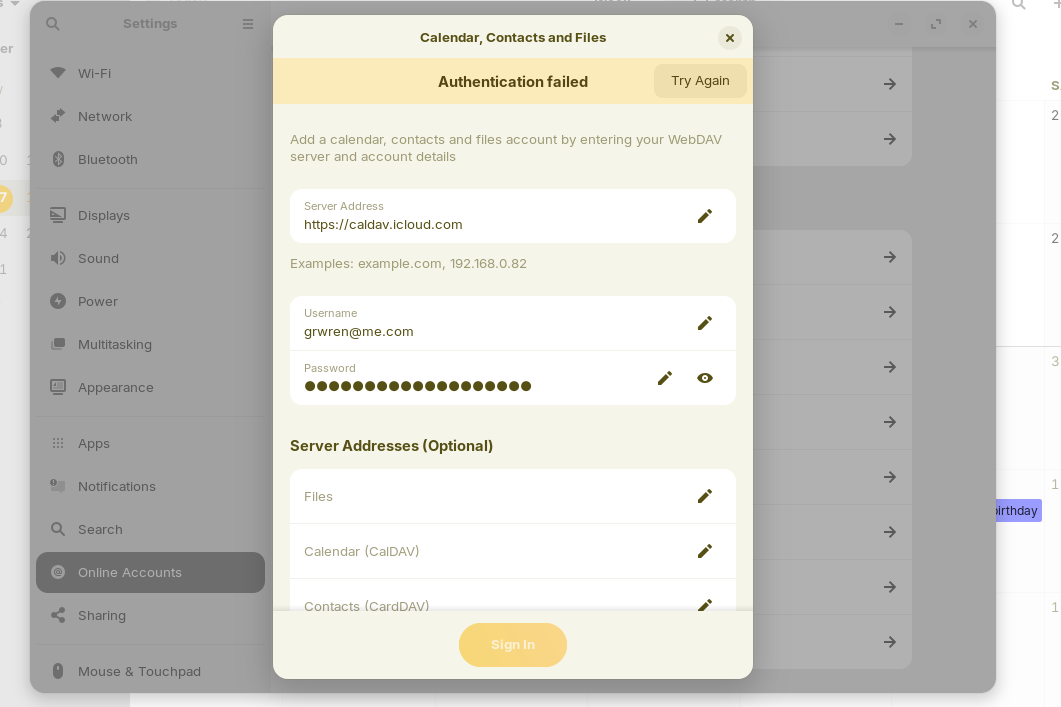
Hi. Has anyone had any luck, or tried, syncing an icloud calendar to the Zorin OS calendar? If so I'd appreciate your input. I've tried this but no luck:
To sync your iCloud calendar with the Zorin OS calendar, you can use the built-in Calendars application, which supports CalDAV, the open standard used by iCloud. Here’s how to set it up:
"1. Open the Calendars app on Zorin OS.
2. Go to the Settings menu (usually accessible via the gear icon) and select Online Accounts .
3. Click on Add Account and choose CalDAV .
4. Enter your iCloud Apple ID as the username and the app-specific password as the password. To generate an app-specific password:
- Visit https://appleid.apple.com and sign in.
- Navigate to the Security section.
- Under App-Specific Passwords , click Generate Password .
- Enter a descriptive name (e.g., "Zorin OS Calendar") and copy the generated password.
- For the server address, enter
https://caldav.icloud.com. - Click Add . The calendar should now sync with your iCloud account."
I should not that in my "Online Accounts" there is no "Add Account" or "CalDav" so I tried adding it under WebDav which doesn't seem to work. Any thoughts, comments or questions would be appreciated.
Thank you.