Hey guys, how are you doing? Since I installed Zorin OS 18, I’ve been experiencing a lack of smoothness — in fact, there are occasional freezes whenever I try to open applications like Brave or others.
My hardware is i7 10750H
GTX 1650
16gb ram
Secure boot is deactivated!
Welcome to the Forum!
For Browsers: Try it with disabled Hardware Acceleration. You can find it in the Browser Settings of each Browser.
So, You have an Nvidia Card. Please check if Your System runs in Wayland or X11. You can do that with the Terminal Command:
echo $XDG_SESSION_TYPE
When it shows You Wayland, I would recommend to switch to X11/Xorg instead. To do that, go to the Login Screen. Click there on Your Profile so that the Password Field appears. When it is appeared, You should see a Gear Icon in the bottom right Corner. Click on it and choose the Option ''Zorin Desktop on Xorg'' and then log in.
Some other Questions:
- Are Secure Boot and Fast Boot in BIOS disabled?
- If Windows is still installed: Is Fast Start-Up in Windows diabled?
- What Nvidia Driver do You use? Did You tried a different one? Did You tried it with a Reinstall of it?
i'm already at x11. Fast Boot not disabled, but fast Start-up is disabled in windows. My driver is NVIDIA Corporation TU117M [GeForce GTX 1650 Mobile / Max-Q] (rev a1)
i just updated all drivers and it is still the same 
I'm sorry to hear this. Just switch to MX Linux or Linux Mint. Good luck.
Thta is Your Graphics Card. I meant what Driver Version You use for it. Take a Look in the ''Additional Drivers'' Tab in Software & Updates. There You should find it. Alternatively try the Terminal Command nvidia-smi and post the Output here.
Then disable Fast Boot. What is with Secure Boot? It is disabled? If not: disable it.
already tried everything, even increasing swap memory. Thas sad, i love this system. My video driver is NVIDIA-SMI 580.95.05 Driver Version: 580.95.05 CUDA Version: 13.0
After i send the message that i saw the driver version wasn't there
The xx50 nvidia card is notorious driver wise. Let's us have a look;
sudo apt update && sudo apt upgrade
sudo apt install inxi
inxi -GA
Please post the outcome of the last command.
580, okay. Did You installed Zorin with Nvidia Drivers or without and installed them after the Installation?
with Nvidia Drivers
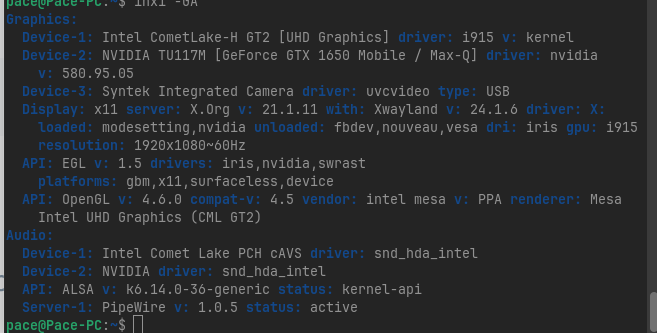
From what I understand, the 580 driver for NVIDIA cards has been very problematic for many people. Suggest you use a different version of the drivers. Like maybe 535 or whatever. I'm sorry you're going through this. Good luck.
Okay, then I would suggest to try it with deleting and installing it over the Terminal.
First type sudo apt purge nvidia* libnvidia* to remove all Nvidia Stuff. Then make a sudo apt autoremove to remove File Rests, but please take a Look at the List of the to be removed Files before You delete them.
Then type sudo apt install nvidia-driver-580 nvidia-dkms-580 to install the Driver. Like @Omnimaxus already wrote, you could try a different Driver Version, too if You want. Then simply change the 580 to the Driver Number of the Driver You want test.
2 Likes
Thanks @Ponce-De-Leon and @Omnimaxus for the help! I switched to 535 as Omnimaxus suggested, and although it improved things a bit, I’m still experiencing some freezing when running multiple tasks.
1 Like
Is your HDD an actual HDD, or a SSD? Also, can you check the health of your hard drive? I recommend downloading Rescuezilla, making a live ISO of it on an USB stick, and booting into the live USB. Use Gnome Disks to check the health of your hard drive. Feel free to report back here. Thanks. Of course, this could purely be a Zorin OS problem (software-wise) that the developers need to fix after having released such a buggy OS in the first place, but let's see what Gnome Disks says first. You might also have to update your kernel, too, using the Mainline tool.
One thing at a time.
EDIT: I suppose you could still use the Disks app while running Zorin OS without having to create a separate ISO of Rescuezilla, so give that a try first and let us know what you see. Thanks again.
This topic was automatically closed 90 days after the last reply. New replies are no longer allowed.