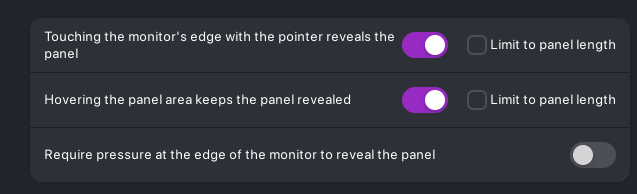
I have this issue where the taskbar appears for a brief moment in first-person games. It's like the game is reacting to the input, but the OS is still tracking an invisible mouse and wants to show the taskbar when I touch the bottom only to hide it right after because it's overlapping with a window. The mouse isn't confined in game though. It first happened in Minecraft, which I fixed by switching to raw input mode, but now it is bothering me in games like Golf with your Friends and mostly CS2. Switching to full screen doesn't change anything.
I am on ZorinOS 18.1 Core with X11, I have Panel Intellihide enabled and the setting "Allow the Panel to be revelaed while in fullscreen mode" is off.
If anyone knows how to fix this please let me know. Thank you in advance!
I have them like you do, I know that turning off the first one would solve my problem, but it would also mean I always have to press the Super Key to show it and that would also be annoying. I used to be on WIndows and there it worked correctly. The Game took full control of the mouse in first-person, but when in Menus I could still get the taskbar. Is something like this not possible with Zorin? It honestly seems very weird that both the game and OS track it and it gives this conflicting outcome.
I just shown you what option you need to enable or disable, it's a just a suggestion, if you don't try you will never know, I just try to help you, I'm not a gamer... And Linux is different from Windows, your problem have a solution....
I didn't mean to make it sound like I don't appreciate your help, I do. I tried disabling the setting but that makes the taskbar never appear. I am just checking if there is a way to have both: The taskbar appearing when not in an first person game, but otherwise working.
Do you run your games in Fullscreen or Borderless Window mode? I don't run an auto-hide taskbar (I like seeing it 24/7) so I haven't had this occur to me, but I would think this might be possible if you were running a borderless windowed game instead of fullscreen? Just something that might be worth looking into.
CS2 only has Fullscreen Windowed or Windowed for me and neither works, Golf with your Friends only has Windowed where the Taskbar stays over the game, or Fullscreen where it flickers. Raft does have Borderless Fullscreen but it flickers.
That's very strange that the flickering would occur with a game that's using fullscreen, it should be taking precedence in the vast majority of cases. Supposedly, if you download dconf-editor, and go to:
/org/gnome/shell/extensions/
There should be an option on the extension to possibly change autohide-in-full-screen to False. Which would hopefully alleviate these issues you're running into. I can't verify that that option is still there presently, and won't be able to until later, but it seems like it USED to be an option (thank Gnome for the constant removal of features).
If you wanted to take a look there and report back, maybe that might still be an option.
I don't know how actually, but also the issue isn't really resolved, I've just played a game of CS2 and while it is less it still happens. For some reason it seems to work really well at the start and slowly stops working. If I am not mistaken Super + I is the shortcut to disabling Intellihide, is there one for the taskbar appearing on hover or for the taskbar as a whole?
I don't think so, after digging I only find this one, not others
You can try to install Dash to Dock extension (disable Zorin taskbar first) an see it fou can have a better management for your problem, or if the bug you have is in it...